APT AI Prompt — A Dog and a Cat Do the APT. Dance
Free APT AI prompt for Seedance 2.5. A dog sings and a cat plays drums in the APT. dance. Download the clip, make two sheets, swap in your own pets.
Have it running in three steps
- 1
- 2Open ImagineArt
- 3Paste it and generate
What you'll need
30 min- ImagineArt
- Claude


This is a free APT AI prompt for Seedance 2.5. A German Shepherd sings into the microphone and a black cat plays the drums. They dance, play the cup game and put on star sunglasses, all in a lime green studio.
The moves come from a 26 second APT. clip. Seedance 2.5 edits that clip and swaps the two people for two animals. The camera, the cuts and the timing stay the same.
We used our own dog and cat. You can put in your pets, your friends or yourself. The last step shows how to change the prompt for them.
The whole process
- Download the APT. clip from this page. It has no sound.
- Make a character sheet for each of your two characters.
- Paste the prompts into Claude or ChatGPT and ask it to rewrite them for your characters.
- Open ImagineArt, pick Seedance 2.5 video editing, add the clip and both sheets, and paste the prompt.
What the APT. trend is
APT. is a song by ROSÉ and Bruno Mars. It came out on 18 October 2024, with a music video on the same day. In the video they sing, play drums, dance and play a drinking game in a bright pink room.
It works well as an AI reference. There are only two people in a plain room, so each one is easy to swap for someone else.
Download the APT. clip
This is the clip we used as the reference. It is 26 seconds long and has no sound, so it is ready to upload.
Make a character sheet for each character
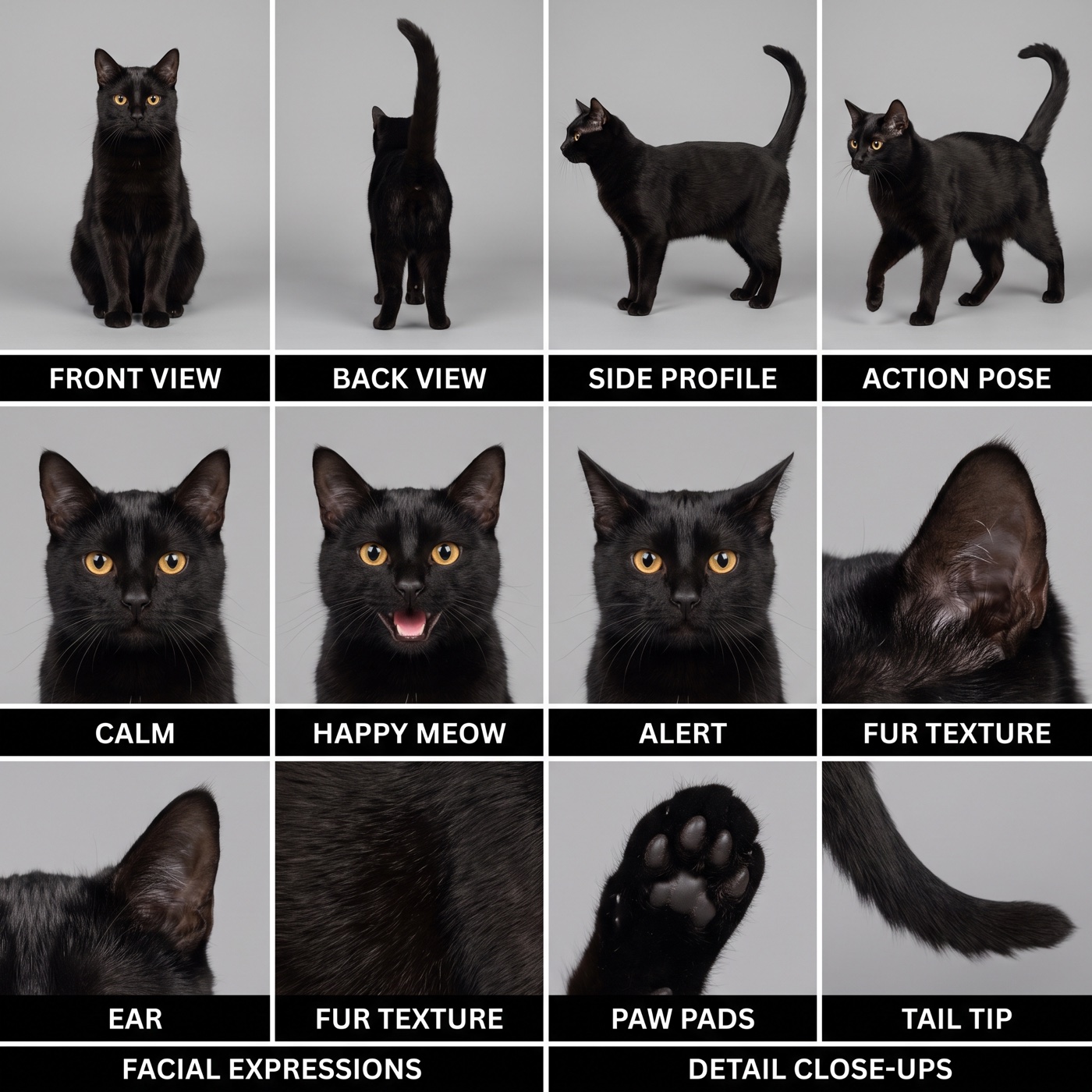
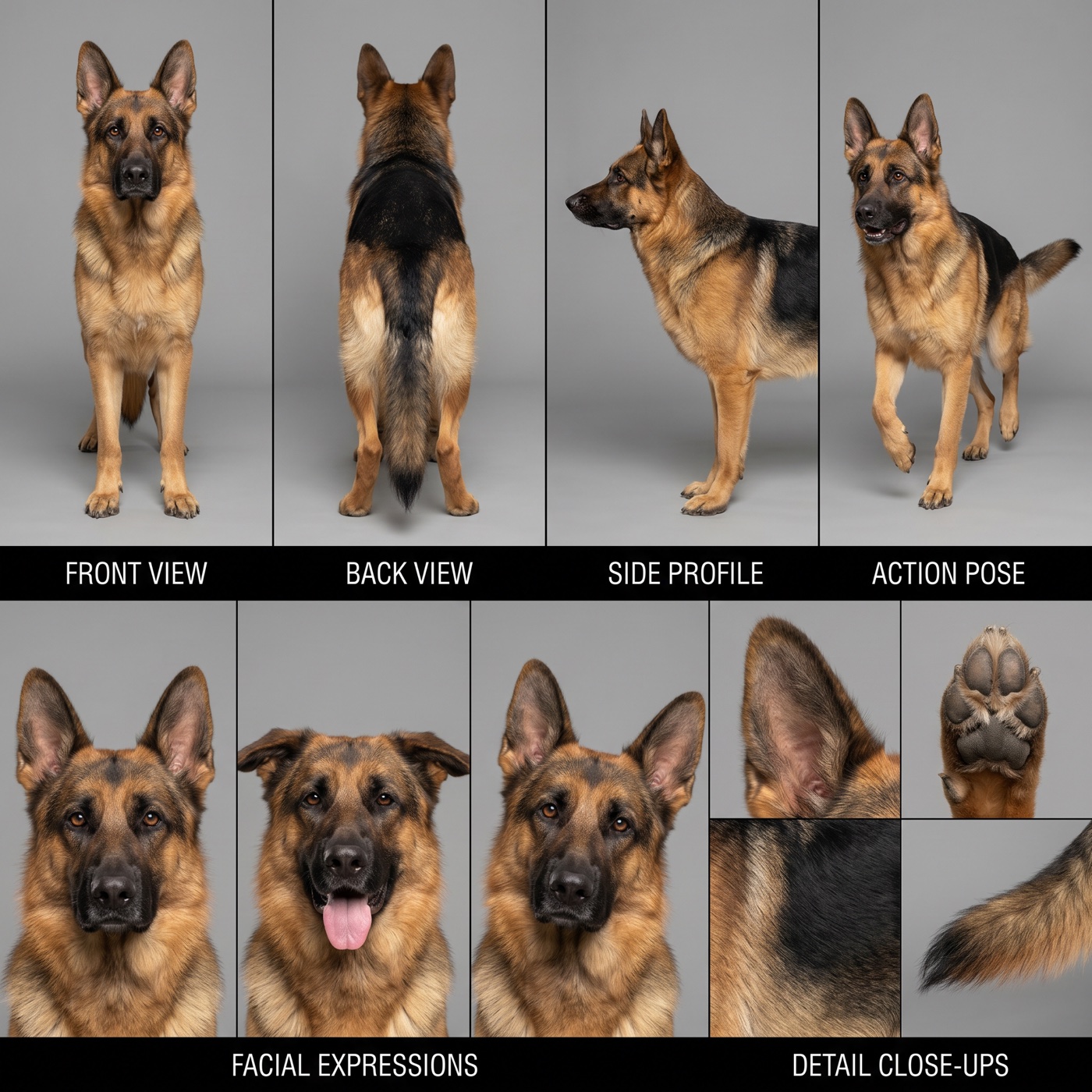
The video needs to know each character from every side. So each one gets a character sheet: one picture with front, back, side and close-up views.
Take one clear photo of your first character. Add it in ImagineArt+200 free credits, pick Nano Banana Pro (or GPT Image 2), set 1:1 and use this prompt. Then do the same for the second character.
Photorealistic character reference sheet of the exact same character from @Image1, studio photography on a plain seamless mid-grey backdrop, soft even softbox light, no shadows on the wall, sharp focus, true-to-life texture.
Keep the character from @Image1 exactly: the same species or face, colours, markings, eyes, ears, body shape and size. Do not change or beautify anything.
Layout: a clean grid with thin black dividers, like a model sheet. Top row, four tall panels, full body, same size and same character: FRONT VIEW (facing camera), BACK VIEW, SIDE PROFILE (facing left), ACTION POSE (mid-step). Black label bar under the top row with white sans-serif capitals: FRONT VIEW, BACK VIEW, SIDE PROFILE, ACTION POSE. Bottom row: three head-and-shoulders close-ups with different expressions (calm, happy with mouth open, alert), then four small detail close-ups of the most important features. Black label bar under the bottom row: FACIAL EXPRESSIONS, DETAIL CLOSE-UPS.
Every panel shows the exact same character. Only one character per panel.
Avoid: extra characters, clothes or props that are not in @Image1, coloured background, cartoon or 3D style, background from @Image1.
These are the two sheets we used.
Fit the prompt to your characters
The video prompt below is written for our dog and our cat. It names the breed, the coat colours and who sings or drums. If your characters are different, change these words first.
The easy way: copy the prompt, open Claude or ChatGPT, and paste it with this message. Add your character sheets or photos to the chat too.
Below is a Seedance 2.5 video editing prompt. Rewrite it for my characters. @Image1 is now [describe character 1, for example: a white poodle / me, a woman with long dark hair]. @Image2 is now [describe character 2]. Change every description of the dog and the cat to match my characters: species, colours, eyes, body size, what they wear, and how they move. If a character is a person, they use hands, not paws, so remove the lines about paws. Keep the structure, the block names, the timeline, the scene and all @ tags exactly as they are. Give me only the new prompt.
Make the video
Open ImagineArt+200 free credits and go to Video. Pick Seedance 2.5 in video editing mode (reference video). Add three files:
- @Video1: the APT. clip from step 1
- @Image1: the character that replaces the man (our cat)
- @Image2: the character that replaces the woman (our dog)
The length and shape come from the clip: 26 seconds, about 4:3. If the page asks for a length, pick the longest one and cut the end later in CapCut. Set 720p or 1080p. Paste the prompt.
[EDIT GOAL] Edit @Video1 for its whole length. Replace the woman with the dog from @Image2 and the man with the black cat from @Image1. Change the pink studio to a bright lime-green studio. Keep everything else.
[SOURCE VIDEO ROLE] @Video1 is the only editing master. It sets the camera positions, camera moves, framing, every cut and its timing, the letterbox bars, the order of events, the props, the lighting direction and the whole rhythm of the edit. Do not use the people from @Video1: not their faces, skin, hair or clothes.
[REFERENCE ROLES] The woman in @Video1 corresponds to the dog from @Image2. @Image2 shows front, back, side, action and face views of one and the same German Shepherd. Use only its breed, coat colours, black saddle, face mask, ears, eyes and body shape. Do not use its grey background, the black label bars or the text. The man in @Video1 corresponds to the cat from @Image1. @Image1 shows several views of one and the same black cat. Use only its jet-black coat, amber eyes, ears, whiskers and slim body. Do not use its grey background, the black label bars or the text. The video contains exactly one dog and one cat. No people.
[SUBJECTS] Dog: the German Shepherd from @Image2, tan and black coat, tall upright ears. It is the singer. Where the woman kneels, dances or leans, the dog does the same pose in a playful animal way: sitting up on its hind legs, paws on the microphone, head tilted, mouth opening and closing as if singing. Cat: the black cat from @Image1, glossy black coat, round amber eyes. It is the drummer. Where the man sits at the drum kit, the cat sits on the drum stool, holds the drumsticks in its front paws and hits the drums and cymbal in the same rhythm. Both animals have natural fur and no clothes. They use only their own furry animal paws for everything: the drumsticks, the microphone, the cup, the sunglasses and the clap game. They keep their real proportions: the cat is clearly smaller than the dog.
[SCENE] The same empty studio as @Video1 with a seamless cyclorama: floor and walls are one smooth bright lime green (light yellow-green, like fresh salad leaves) instead of pink. Keep the same soft, even, high-key studio light; the green softly bounces onto the fur. Keep the dark red drum kit, the cymbals, the black amps along the back wall, the corded microphone, the red plastic cup and the sunglasses exactly as in @Video1.
[TIMELINE INHERITANCE] The dog inherits every position, pose, gesture, entrance and exit of the woman. The cat inherits every position, pose, gesture, entrance and exit of the man. Same timing, same speed, same place in frame, in every shot:
- high-angle opening: the dog on the floor by the drum kit sings into the microphone and reaches one paw towards the camera, the cat plays drums behind the kit;
- letterboxed shots: the cat drums while the dog leans on it, hugs it and dances next to it, then puts on dark sunglasses;
- extreme close-up of a singing mouth: now it is the dog’s muzzle, black lips and pink tongue;
- wide shot: both animals dance side by side on the green floor;
- the cat leans into the lens and points a paw at itself, the dog dances behind;
- both sit on the floor facing each other with the red cup between them and play the paw-clap game;
- close-up: both wear the big star-shaped sunglasses;
- the dog points and spins, the cat lies on its back on the floor, the dog jumps and dances;
- final close two-shot: the dog and the cat look at each other.
[EDIT SCOPE] Change only the two characters and the colour of the studio walls and floor. Do not change the camera, the cuts, the props, the framing or the timing.
[AUDIO] <Drum hits and cymbal crashes in the rhythm of the cat’s playing>, <soft paw taps on the studio floor>, <soft paw-clap slaps>. No music, no vocals, no dialogue.
[MAINTAIN CONSISTENCY] One German Shepherd and one black cat only, the same animals in every shot. Same coat colours, same eyes, same sizes. The studio stays lime green in every shot.
[AVOID] No human hands, no human fingers, no human arms, no human palms, no fingernails, no human legs or feet, no human skin, no hybrid paws with fingers, no hands holding the drumsticks, the microphone or the cup; only real animal paws with fur and paw pads. No pink walls or floor, no people, no human faces, no human bodies, no clothes on the animals, no extra animals, no grey background from the sheets, no label text, no watermark, no split screen, no morphing between the dog and the cat.
The sound in our video was added later, in an editor. The prompt asks only for drums and paw sounds, without music.
Why this prompt works
The clip carries all the motion. The dog sings, the cat drums and both dance at the same seconds as in the original, so the prompt has no dance moves in it.
Each person gets one clear match. “The woman corresponds to the dog” and “the man corresponds to the cat”. So the model knows who takes over which poses.
Each sheet has one job, and the prompt says what not to take from it: the grey background, the black label bars and the text.
The timeline lists every shot of the clip in order. This keeps the dog on the microphone and the cat at the drums the whole time.
Where it goes wrong
| What you got | The fix |
|---|---|
| Human hands hold the drumsticks or the cup | Keep the first line of AVOID and “They use only their own furry animal paws for everything” |
| The studio is still pink | Keep “Change the pink studio to a bright lime-green studio” and “No pink walls or floor” |
| The dog and the cat swap roles | Check the order: the cat sheet is @Image1, the dog sheet is @Image2 |
| The cat is as big as the dog | Keep “the cat is clearly smaller than the dog” |
| Grey patches or label text in the video | Keep “Do not use its grey background, the black label bars or the text” |
| One animal turns into the other | Keep “no morphing between the dog and the cat” |
Questions about the APT AI prompt
Which AI model works for the APT. trend?
We used Seedance 2.5 on ImagineArt in video editing mode. It takes a reference video and keeps its moves and cuts.
Can I make the APT. video vertical?
Not in this mode. The length and shape come from the clip, which is about 4:3. For Reels, place it in a 9:16 frame in CapCut, or crop the middle.
Can I put myself in it?
Yes. Make a character sheet from your own photo in step 2. Then ask Claude or ChatGPT to rewrite the prompt for a person, as in step 3.
Is the prompt free?
Yes. Every prompt on this page is free to copy and use. ImagineArt lets you sign up for free, and videos cost credits.
Is there a version with no prompt at all?
Yes. AIReel has APT. as a ready effect. You add two photos and press a button. See the APT AI trend in four clicks.
Ready? Download the clip and open ImagineArt+200 free credits.
Why this workflow runs here
Everything in one place
Free to start
Minutes, not days
Make yours in the next 30 min
You have the whole prompt and every setting. The only thing left is an account, and that takes a minute.
- 200 free credits on sign-up
- Prompts ready to paste
- Upgrade only if you want more
Referral link — if you subscribe I earn a commission, at no extra cost to you. More on that.
Related prompts
 Cinematic Free
 Action Scene AI Video Prompt: Bike Jump and Fight
Action scene AI video prompt for Seedance 2.5. You jump a futuristic bike off a ramp, land in fire and fight on a burning highway. 15 seconds, one photo.
 Cinematic Free
 Anime Borscht — The Whole Recipe in One 25-Second Video
One prompt cooks Ukrainian red borscht from raw meat to a served bowl, in glossy anime style. Six stages, hands and food only, vertical for Reels.
 Cinematic Free
 Butterfly Eyes Prompt: The Eye Transition AI Video
A free Seedance 2.5 prompt. A black butterfly flies at the camera, the lights go out, and its wing spots become your glowing eyes. 15 seconds, two reference images.