GENER8ION STORM AI Prompt — Recreate the Yung Lean Crowd
Free AI prompt for the GENER8ION STORM trend. Keep the crowd moves from the Yung Lean video and swap in your own character. Clip and prompts included.
Have it running in three steps
- 1
- 2Open ImagineArt
- 3Paste it and generate
What you'll need
40 min- ImagineArt
- Claude


This is a free AI prompt for the GENER8ION STORM trend. You take the crowd scene from the STORM music video with Yung Lean, keep how everyone moves, and put your own character in the middle.
Rows of people fill the frame, front to back. They all wear the same white suit. On the beat they fold forward and snap upright, all together. One woman stands in the middle in a lime green blazer and never moves.
You did not choreograph any of that. The movement, the camera and the cutting all come from a reference video. You only wrote what the people look like and where they are standing.
This is the cheapest kind of video to make well. Motion is the hard part, and you are not making it — you are borrowing it.
The whole process
- Download the reference clip below, or cut 30 seconds out of a video you like.
- Generate a character sheet of your lead — one image, five views.
- Take one front-facing frame from that sheet. This is your only character image.
- Go to ImagineArt → Video and pick a model that accepts a reference video.
- Upload the clip as the reference and the frame as the character image.
- Paste the video prompt. Set 16:9. Generate one shot at a time.
What the GENER8ION STORM AI trend is
STORM is a music video by GENER8ION, the project of DJ Surkin and director Romain Gavras. It came out on 24 April 2026. Yung Lean plays a student at an all-boys British boarding school. The choreography is by Damien Jalet.
One scene became an AI trend. A packed crowd of students in the same uniform moves in sharp, repeated jerks, and one person stays still in the middle. Creators use that scene as a reference video. The AI model keeps the movement, and the prompt replaces the people, the clothes and the place.
This page gives you the full prompt for that, plus the character sheet prompt and the reference clip.
What you need before you start
Two files. That is the whole list.
| Slot | What it is | What it controls |
|---|---|---|
| Reference video | 30 seconds, 720p, no audio | Movement, camera, pacing, where the cuts land |
@image1 | One image of your lead | Her face, her hair, her clothes |
Everything else — the crowd, the place, the light, the colours — is written in the prompt. No extra images.
Get the reference clip
The clip used here is 30 seconds from the music video GENER8ION — STORM (starring Yung Lean). It was picked for one reason: a packed crowd doing one sharp repeated movement, with a single still person in the middle.
This is the clip. Watch it first, so you know what you are downloading.
Download the reference clip — 5.4 MB
This file is ready to use. It is already small enough to upload and it has no sound. Save it and go to the next step.
On an iPhone, tap Download when Safari asks. The clip goes to the Files app, in the Downloads folder. You can upload it to the video tool from there.
Almost any video works as long as the movement is clear. Good reference clips have a lot of motion and few ideas: a crowd doing one thing, a person walking toward camera, a head turning. Bad ones cut a lot and never repeat a shape.
Build the character sheet
Your lead needs to be recognisable from every angle. One selfie is not enough — the model has to know what the back of her jacket looks like when she turns.
So you generate a character sheet first: one image, five views of the same person, same clothes, same light.
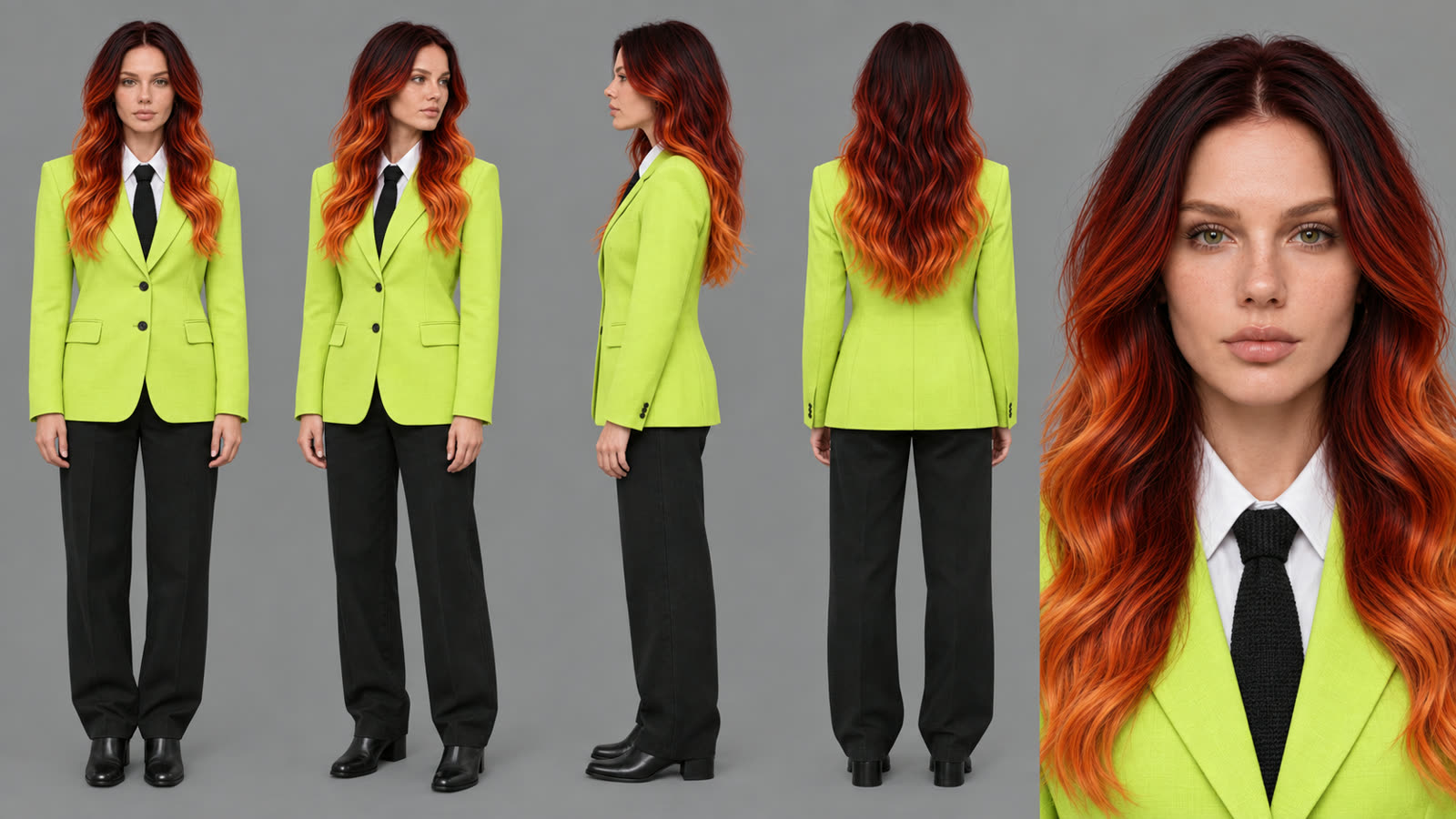
Character reference sheet of ONE woman. Attached photo is the identity — keep her face, bone structure, eyes and hair exactly as shown. Do not restyle her.
IDENTITY: woman, early 30s, fair skin with light freckles across the nose and cheeks, green eyes, straight natural brows, calm closed-mouth expression, no smile. Long wavy hair parted slightly off-centre, falling past the chest — dark burgundy at the roots melting into deep red, then into bright orange at the ends. Same hair length, same wave, same colour transition in every view.
WARDROBE — identical in every view: Single-breasted blazer in acid lime green #d4ff3f, notch lapels, two buttons, buttoned closed, slightly oversized on the shoulder, sleeves ending at the wrist. Plain white cotton shirt underneath, collar out over the lapel line. Narrow black knitted tie, knotted neat, tucked under the buttoned blazer. Straight black trousers, flat front, breaking once on the shoe. Plain black leather ankle boots, low heel, no buckles. No bag, no jewellery, no watch, no belt visible, no phone, no logos, no prints, no patterns anywhere on any garment.
LAYOUT: one single image, 16:9 landscape, five views of the SAME woman in a row, evenly spaced, all standing on the same ground line, all at the same scale. Full body from the front, arms relaxed at the sides, feet together. Full body in a three-quarter turn to her left. Full body in strict side profile, facing right. Full body from directly behind, showing the back of the blazer and the hair. Head and shoulders close-up from the front, filling the same height as the other heads, sharp on skin texture, freckles, eyes and the lime lapel.
BACKGROUND: flat seamless mid-grey #8a8a8a, completely empty. No floor line, no shadow on the background, no props, no furniture, no text, no labels, no numbers, no watermark, no grid.
LIGHT: even, neutral, soft studio light from the front and slightly above, large source, shadows soft and shallow. Identical light on all five views. Colour neutral — the lime must read as the same lime in every view, not warmer on one and colder on another. No coloured gels, no rim light, no glow, no haze, no bloom.
RENDER: photographic, full colour, sharp, real fabric weave and real skin texture. No illustration, no 3D render, no plastic skin, no beauty retouching, no grain, no vignette, no motion blur.
Three things in that prompt are doing real work.
The flat grey background and flat light. The sheet is not a nice picture. It is a specification. Neutral light lets the video model relight her for a dark rainy scene. A moody character sheet fights the scene you put her in.
“Identical in every view”. Say it, or the blazer quietly changes shade between the front and the back view.
The hex code. #d4ff3f is exact. “Lime green” is not — you get a
different green every run, and then she does not match her own sheet.
When the sheet is done, crop one front-facing full-body view out of it. That
crop is @image1.
Write the crowd
Now the video prompt. Read the crowd block first, because that is where these videos usually fall apart.
Keep the movement, camera, pacing, timing and cut points from the reference video. Replace everything else.
@image1 is the lead. She wears a lime green #d4ff3f blazer, same cut as the crowd’s, white shirt, black knitted tie, black trousers, black ankle boots. She stands completely still, arms at her sides, eyes straight into the lens. She is the only one not in white and the only one with long red-to-orange hair. Only ONE of her at any time.
THE CROWD is everyone else — about eighty young women, packed edge to edge, filling every row front to back. Build them by repeating varied women with real variation in face, height, age and build, so the same face never sits next to itself.
Every one of them wears the SAME blazer, same cut, same white shirt, same white low shoes, and the same small plain enamel pin on the left lapel. The cloth colour does not change: all of them in flat clean white, blazer and trousers and tie alike. No men, no boys. No navy blazers, no striped ties, no crests, no cigarettes.
THE PLACE is an open-air amphitheatre of raw grey concrete — broad shallow steps rising back and up, wet from rain, and one blank concrete wall behind the top row. Overcast light, no sky in frame.
NO brick. No red brickwork, no arched doorway, no school building. No signs, no text.
THE ACTION is exactly as the reference plays it: the crowd convulses in unison, sharp jerks of head and shoulders, folding forward and snapping upright on the beat. The lead does not.
LOOK — full colour, cold, dark. One overcast source from directly overhead, falling off fast — lit shoulders, shaded faces, near black in the gaps between bodies. Warm and saturated: #d4ff3f #ff5a00 #c1440e #7a2f0b Cold and drained: #e8ebee #9aa3ab #4a5159 #1c2127 Skin: lit #e8c3a8, shadow #6b4a3c Very dark overall. The brightest point is the lit shoulder line of the front row of white blazers, and it never reaches pure white. Clipped white must never appear. No navy, no golden sunlight, no teal-and-orange, no magenta, no purple anywhere. Deep shadow, soft rolled highlights. No glow, no haze, no bloom, no grain.
FRAME — 16:9, the crowd filling the frame edge to edge, rows receding back.
“So the same face never sits next to itself.” A crowd is built by copying one person. Without this line you get the same face four times in a row and the shot dies. Asking for variation in face, height, age and build gives the model four separate things to vary instead of one vague one.
“Only ONE of her at any time.” Your lead is the most described person in the prompt, so the model likes making more of her. Say the number out loud.
“About eighty.” Not “a large crowd”. A number sets the density. Eighty fills a 16:9 frame front to back. Twenty leaves gaps you can see through.
The uniform, listed part by part. Blazer, shirt, shoes, the pin on the left lapel. Naming each piece is what stops the crowd drifting into a hundred slightly different white outfits.
Kill the old location
The hardest thing to remove from a reference video is the place it was shot in. The original is a red brick school with an arched door, and the model keeps putting it back.
One mention is not enough. Look at how the place is written:
THE PLACE is an open-air amphitheatre of raw grey concrete — broad shallow steps rising back and up, wet from rain, and one blank concrete wall behind the top row. Overcast light, no sky in frame. NO brick. No red brickwork, no arched doorway, no school building. No signs, no text.
The new place is described in materials and shapes only — concrete, steps, wet, a blank wall. No mood words. Then brick is refused twice, in two different ways, and the two other stubborn features are named.
That is the pattern for any reference video. Find the one feature of the original location that keeps coming back. Say no to it twice.
The same trick is used on the light. The original is daylight on a bright morning. So the prompt says the brightest point in the frame, says white must never clip, and bans golden sunlight by name.
Generate
Open ImagineArt+200 free credits → Video. Pick a model that takes a
reference video — Seedance 2.5 does. Upload the 720p clip as the reference and
your cropped character frame as @image1. Paste the prompt. Set 16:9.
Landscape is the right shape here. The whole point is the crowd reaching both
edges of the frame. For a vertical cut, change the last line to
FRAME — vertical 9:16, the crowd filling the frame corner to corner, rows stacking upward —
the rows then stack up the frame instead of across it.
What's actually doing the work
Five things transfer to any video you build from a reference.
One sentence hands over the motion. Movement, camera, pacing, cut points — named as a group, handed to the video, never mentioned again in your text.
Contrast has to be designed. In the original the lead is light against a dark crowd. Here it is flipped: a white crowd with a coloured lead. That means brightness no longer separates her, so the place and the light had to go dark to stop the white crowd flattening into one patch. Change what your lead wears and you have to change the room.
Hex codes, not colour names. Every colour that matters is a hex code. The lead’s blazer, the warm range, the cold range, even skin in light and in shadow.
Name the brightest point. “The lit shoulder line of the front row, and it never reaches pure white.” Without that the model lifts the whole image and your dark scene turns grey.
Refuse things twice. Anything the reference keeps dragging back in gets denied in two different sentences.
Making it your own
Three lines carry the whole look. Change them and you have a different video from the same reference.
- The lead’s colour. Swap
#d4ff3ffor your own. Put the same hex in the character sheet prompt, or she will not match her own sheet. - The crowd’s colour. White here. Any flat colour works, as long as it is far from the lead’s.
- The place. Keep it to materials and shapes. Then name the original location’s most stubborn feature and refuse it twice.
Keep the counts and the structure. “About eighty”, “only ONE of her”, and the part-by-part uniform list are doing the same job whatever the subject is.
Where it goes wrong
| What you got | The fix |
|---|---|
| The upload is rejected | Your clip is too big or still has sound — use the file from step 1, or shrink yours to 720p with no audio |
| Red brick creeps back in | Refuse it a third way, and name another feature of your new location |
| Two women in lime blazers | “Only ONE of her at any time” needs to be in the lead block, not the crowd block |
| The same face repeats across a row | Strengthen “real variation in face, height, age and build, so the same face never sits next to itself” |
| The crowd wears slightly different whites | List the garments part by part and repeat “same cut” |
| The image looks washed out and grey | Name the brightest point and add “clipped white must never appear” |
| Her face drifts between shots | Your @image1 crop is not front-facing or not sharp — re-crop from the sheet |
| The crowd moves out of time | Something in your text is describing motion — delete it and let the reference do it |
| Men appear in the crowd | “No men, no boys” belongs in the crowd block, right after the uniform |
Questions about the STORM AI prompt
Which AI model works for the GENER8ION STORM trend?
Any video model that accepts a reference video. This page uses Seedance 2.5. The model must take two inputs: the reference clip for the movement, and one image of your character.
Do I need the whole STORM music video?
No. You need about 30 seconds of the crowd scene, 720p, with no sound. The clip in step 1 is already cut to that.
Can I make the STORM video vertical for Reels or TikTok?
Yes. Change the last line of the prompt to the vertical version in step 5. Set 9:16 on the generation page too.
Can I put myself in the video instead of a made-up character?
Yes. Attach a clear photo of your own face when you generate the character
sheet in step 2. Then use a front view from that sheet as @image1.
Can I change the colours and the place?
Yes. Keep the structure of the prompt and change three things: the lead’s colour, the crowd’s colour, and the place. “Making it your own” above shows how.
Is the prompt free?
Yes. Every prompt on this page is free to copy and use.
Why this workflow runs here
Everything in one place
Free to start
Minutes, not days
Make yours in the next 40 min
You have the whole prompt and every setting. The only thing left is an account, and that takes a minute.
- 200 free credits on sign-up
- Prompts ready to paste
- Upgrade only if you want more
Referral link — if you subscribe I earn a commission, at no extra cost to you. More on that.
Related prompts
 Cinematic Free
 Action Scene AI Video Prompt: Bike Jump and Fight
Action scene AI video prompt for Seedance 2.5. You jump a futuristic bike off a ramp, land in fire and fight on a burning highway. 15 seconds, one photo.
 Cinematic Free
 Anime Borscht — The Whole Recipe in One 25-Second Video
One prompt cooks Ukrainian red borscht from raw meat to a served bowl, in glossy anime style. Six stages, hands and food only, vertical for Reels.
 Cinematic Free
 APT AI Prompt — A Dog and a Cat Do the APT. Dance
Free APT AI prompt for Seedance 2.5. A dog sings and a cat plays drums in the APT. dance. Download the clip, make two sheets, swap in your own pets.