Snap to Outfit — Four Looks, One Take
She snaps her fingers and her clothes morph into the next outfit. No cuts, no green screen. Six reference images and one prompt do all of it.
Have it running in three steps
- 1
- 2Open ImagineArt
- 3Paste it and generate
What you'll need
30 min- ImagineArt
- Claude


A woman stands in a green living room in her pajamas. She snaps her fingers. The pajamas turn into a full outfit — shirt, trousers, shoes, bag. She snaps again. New outfit. Four times, twenty seconds, one unbroken shot.
The camera never moves and there is no cut. That is the whole appeal. You are not editing four clips together — the clothes actually change on her body while you watch.
It is also cheap to repeat. Swap the four outfit images and you have a new video for a new brand, a new season, or a new client.
The whole process
- Collect four outfit images. Flat-lay photos from Pinterest work well.
- Have one clear face photo of your avatar, or of yourself.
- Have one photo of the room you want her standing in.
- Build the starting frame: your avatar, in that room, in pajamas.
- Go to ImagineArt → Video → Text to Video, pick Seedance 2.5.
- Open the References tab and upload all six images in order.
- Paste the video prompt. Set 9:16, 20s, 720p. Generate.
What you need before you start
Six images, and the order matters — the numbers in the prompt point at these exact slots.
| Slot | What it is | What it controls |
|---|---|---|
@Image 1 | Outfit flat-lay — butter yellow | First outfit after the snap |
@Image 2 | Outfit flat-lay — navy and ivory | Second outfit |
@Image 3 | Outfit flat-lay — cream and brown | Third outfit |
@Image 4 | Outfit flat-lay — blush pink | Fourth and final outfit |
@Image 5 | Face photo | Her identity — face, freckles, hair |
@Image 6 | Starting frame | The opening shot, the room, the camera |
Pick four outfits
Search Pinterest for “outfit flat lay”, “neutral outfit collage” or “pink casual outfit”. Pick four complete looks. Each one needs visible shoes — if the shoes are missing the model guesses, and it usually guesses wrong.
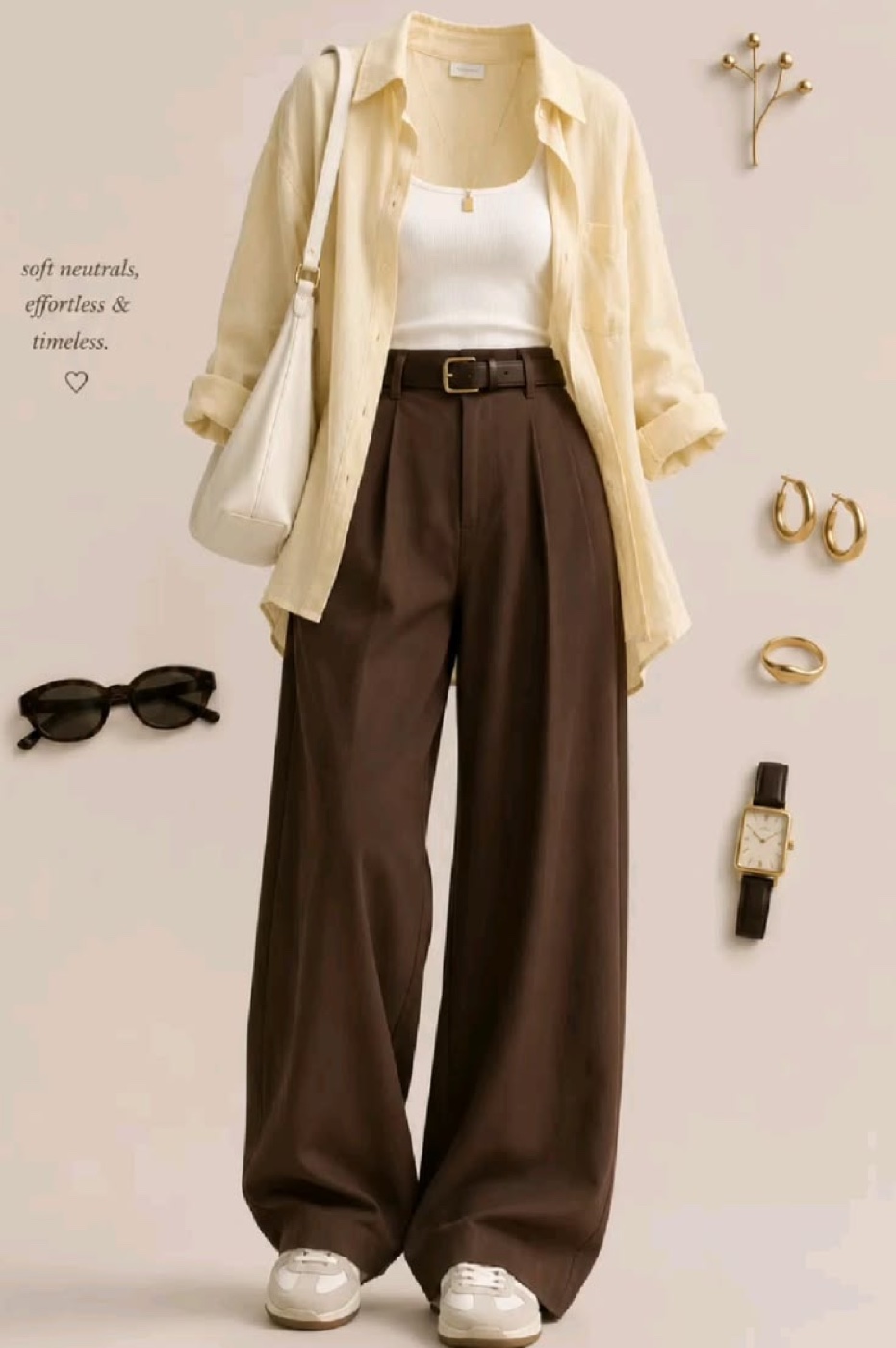
@Image 1 defines outfit one: open butter-yellow shirt with rolled sleeves, white ribbed tank, chocolate-brown wide-leg trousers, brown belt, cream sneakers, cream shoulder bag and delicate gold jewelry. Exclude the flat-lay background, text and sunglasses.
Notice the last sentence. A flat-lay is never only clothes — there are sunglasses, a notebook, flowers, a watch, sometimes handwritten text. You list those and say exclude. Otherwise the model puts sunglasses on her face.
Here are the other three. Each is described the same way: what to take, then what to leave behind.
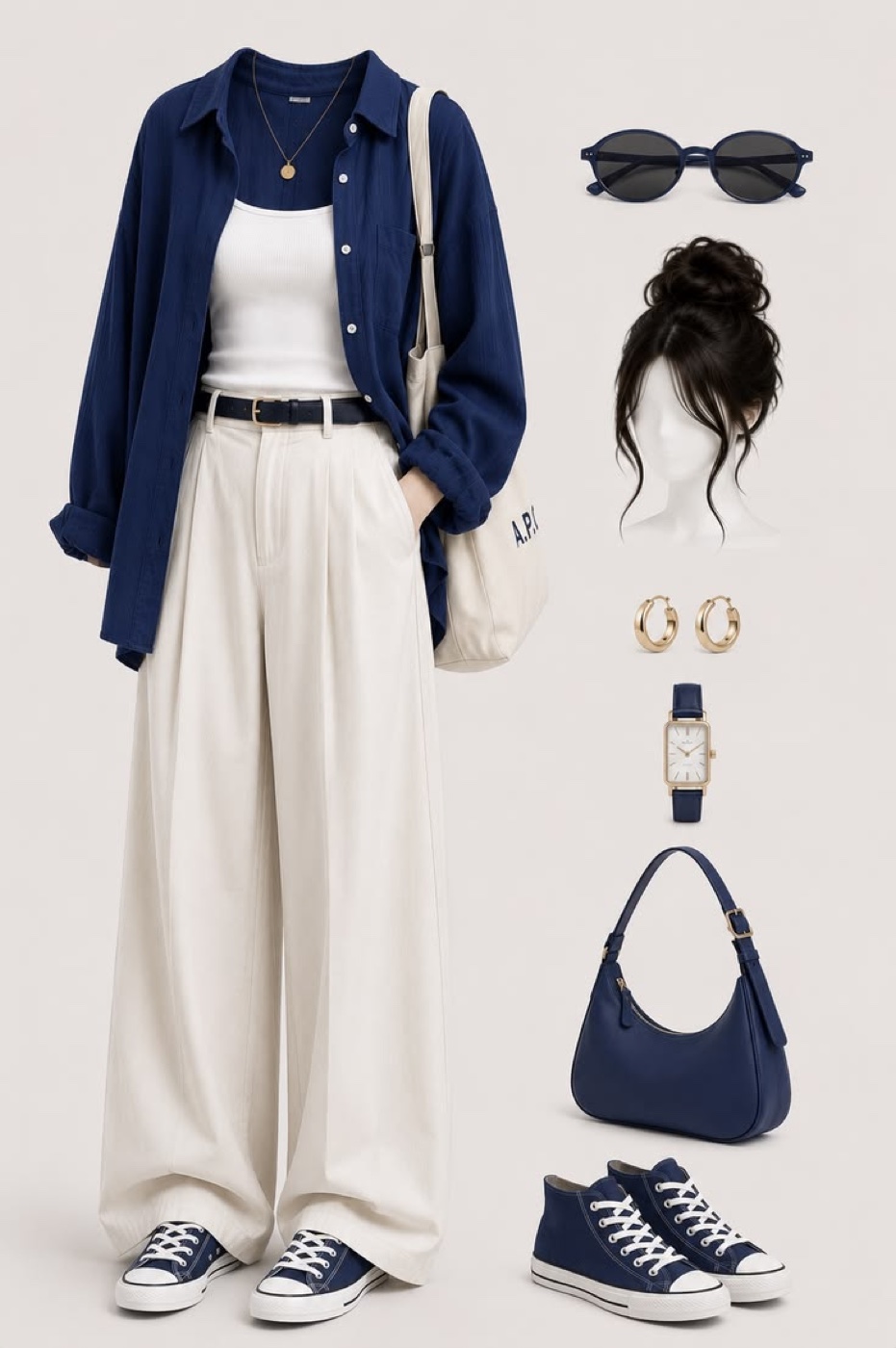
@Image 2 defines outfit two: open navy shirt, white tank, ivory wide-leg trousers, navy belt, navy-and-white canvas sneakers, gold jewelry and one cream canvas tote. Exclude the separate navy handbag, hairstyle illustration, sunglasses, background and text.
This one shows two bags — a cream tote and a navy handbag. The prompt picks one and rejects the other, and says “one cream canvas tote”. Without that she ends up carrying both.
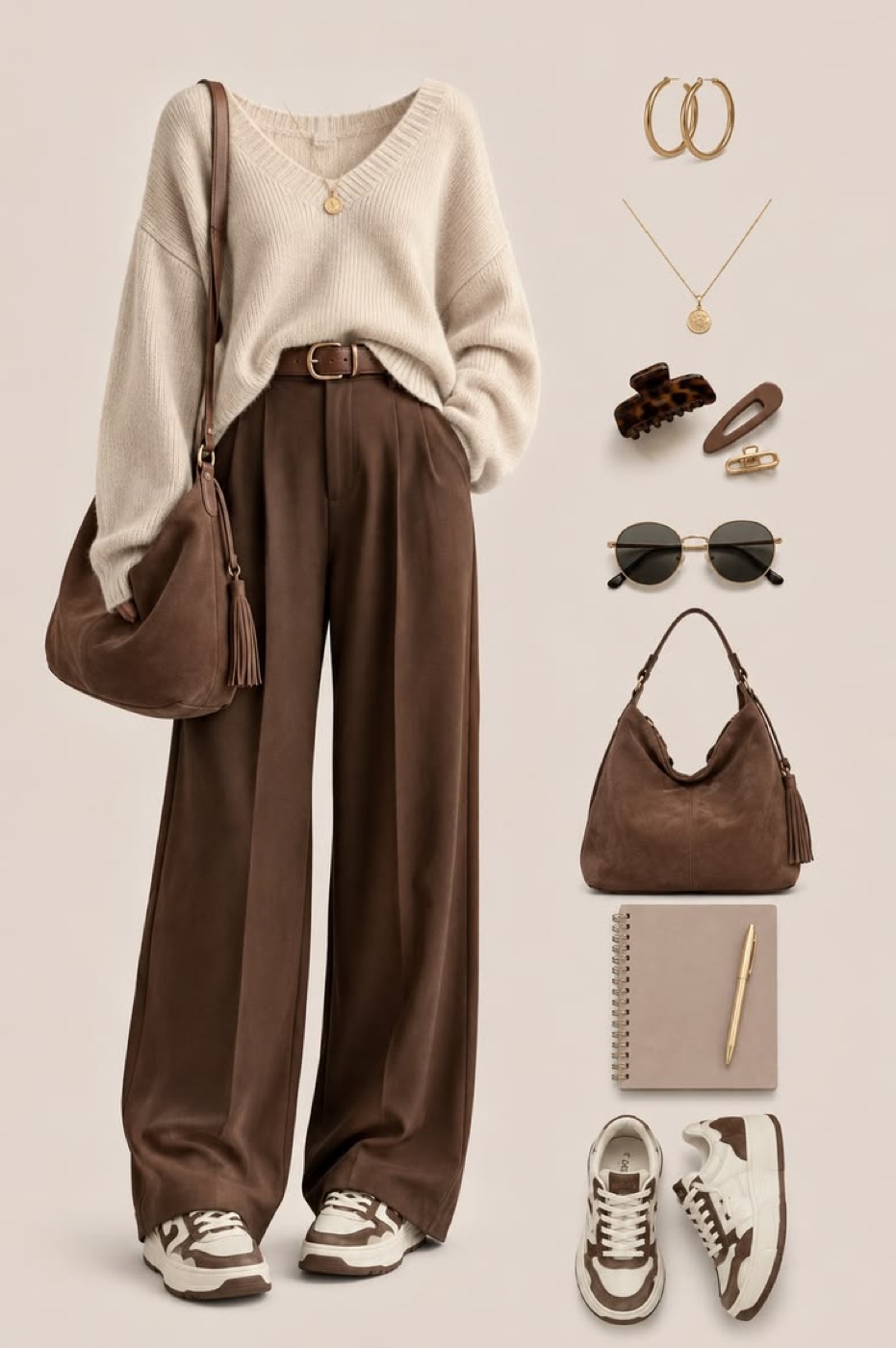
@Image 3 defines outfit three: loose cream V-neck sweater with a front tuck, brown wide-leg trousers, brown belt, brown-and-white sneakers, brown suede shoulder bag and gold jewelry. Exclude the stationery, hair accessories, sunglasses and background.
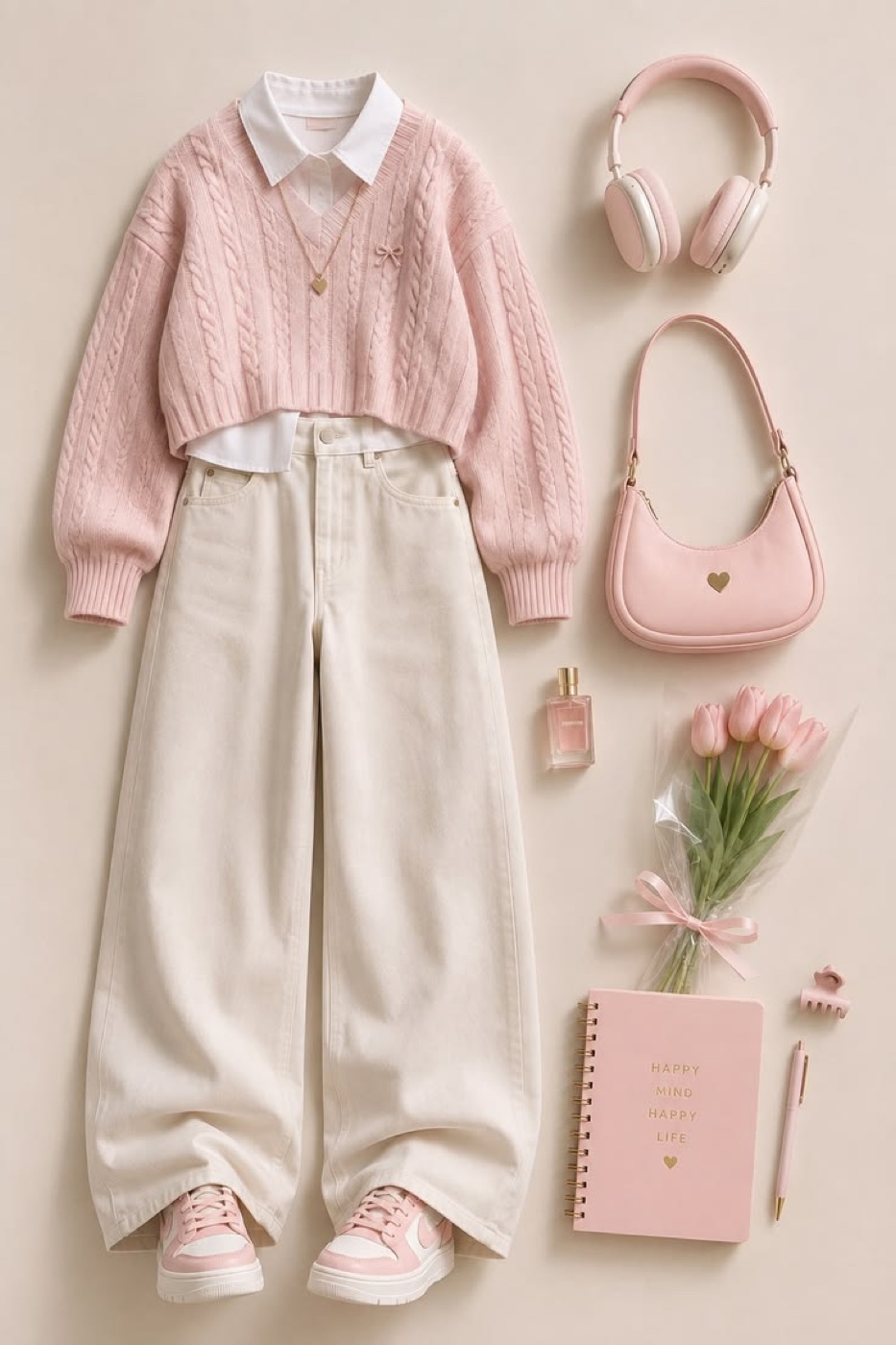
@Image 4 defines outfit four: cropped blush-pink cable-knit sweater over a white collared shirt, ivory wide-leg jeans, pink-and-white sneakers, pink shoulder bag and delicate gold necklace. Exclude the headphones, flowers, perfume, stationery, hair clip and background.
Put the strongest look last. The video ends on outfit four and holds there, so that is the one people remember.
Build the starting frame
This is the step people skip, and it is the one that decides whether the video works. You are making a single still image: your person, in your room, in pajamas, standing still.
You need two inputs for it.
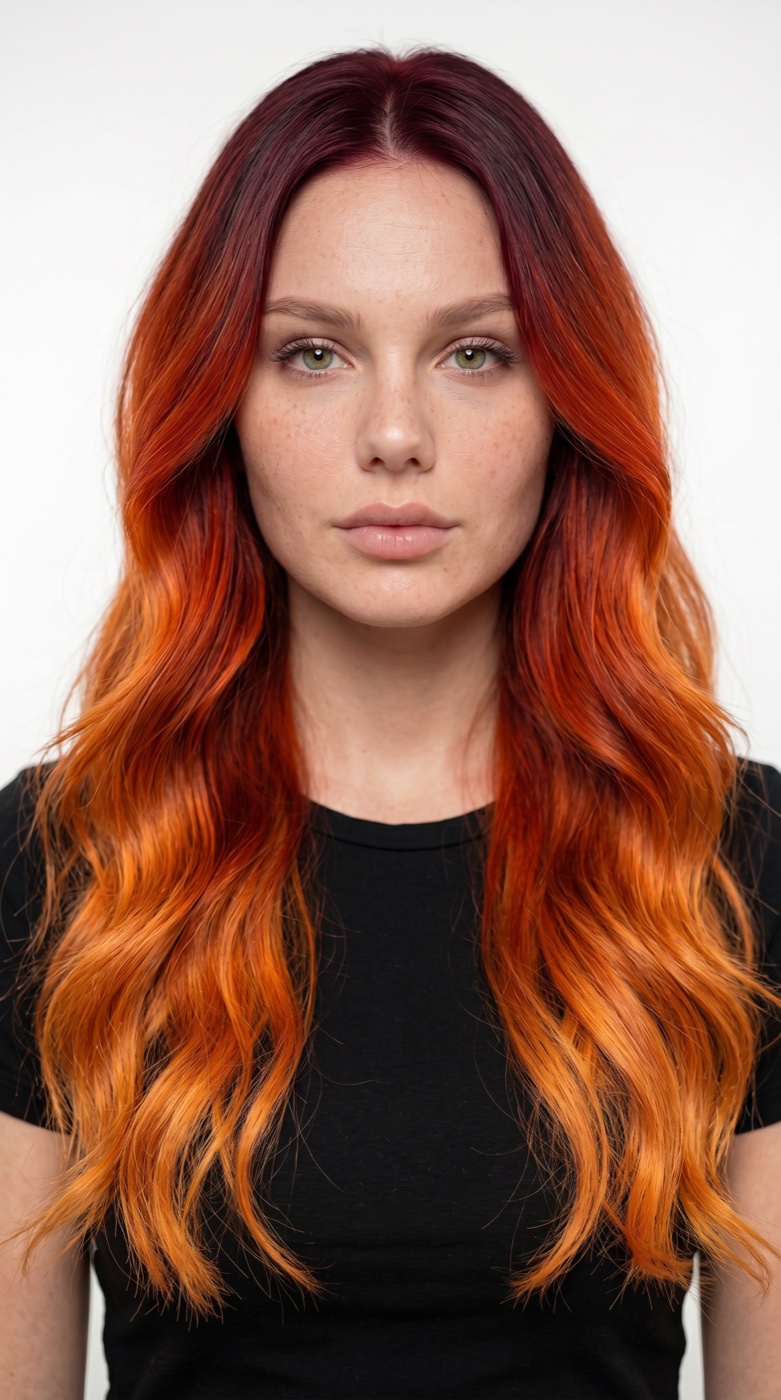
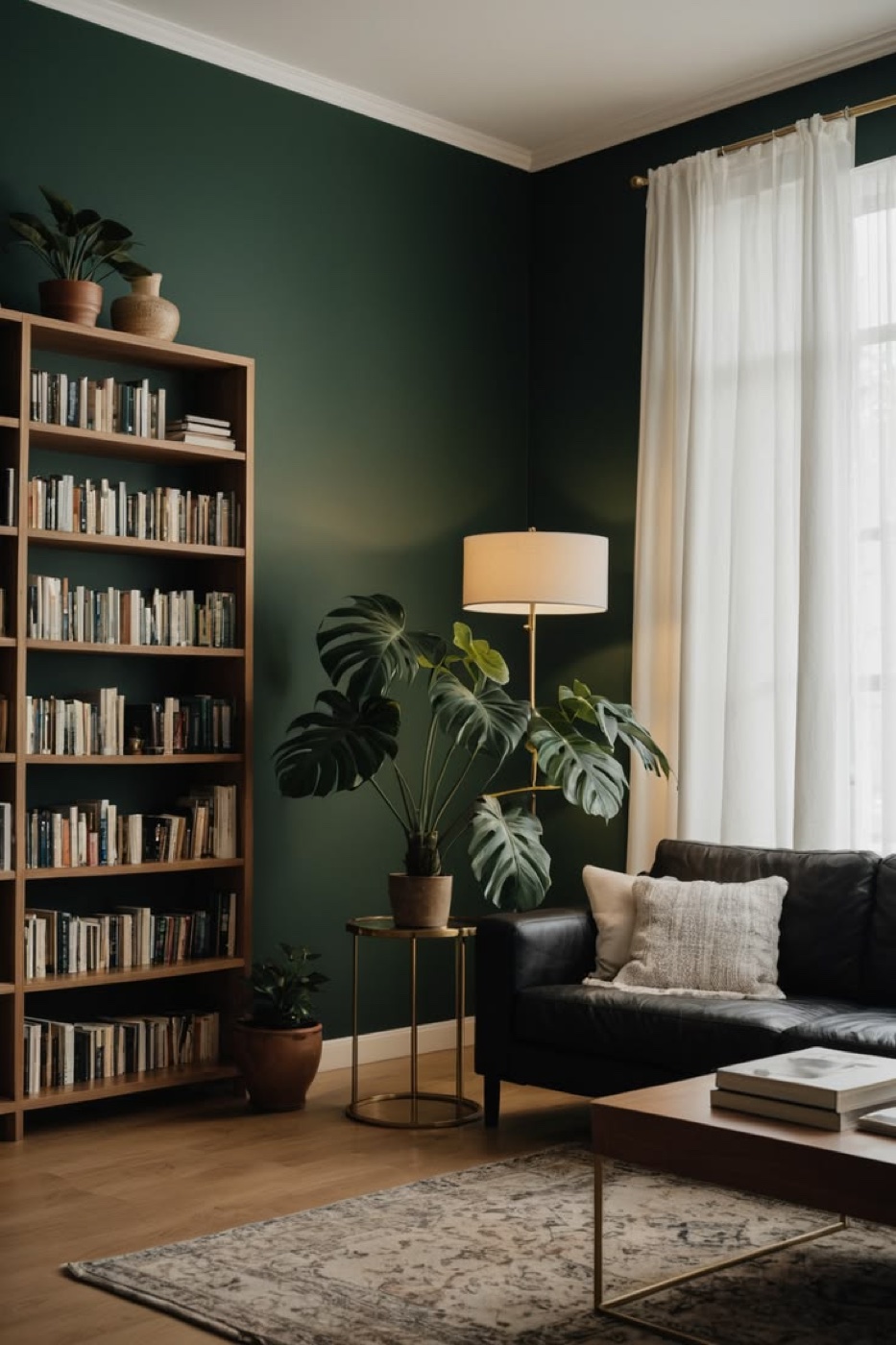
Feed both into any image generator that accepts references and paste the prompt below. It puts her in the room, dresses her in pajamas, and matches the light so she looks photographed there rather than pasted on.
Create a photorealistic vertical 9:16 starting frame for an outfit-change video.
REFERENCE ROLES Image 1 is the avatar reference. Preserve this woman’s facial identity, age, freckles, green eyes and long loose wavy hair with dark burgundy roots transitioning into copper-orange lengths. Do not inherit her black T-shirt, white background or portrait framing. Image 2 is the interior reference. Preserve the deep-green walls, wooden bookcase on the left, black leather sofa, window with sheer curtains on the right, brass floor lamp, plants, wooden floor and patterned rug. Remove the foreground rectangular coffee table and everything on it. Reconstruct the exposed rug and floor naturally.
SUBJECT AND COMPOSITION Place this same woman centrally in the room, standing naturally on the rug. Align her face and torso with the vertical center of the image. Show her full body, including both slippers, with comfortable headroom and visible floor below her feet. Keep her scale realistic relative to the sofa, lamp and bookcase. Leave clear space around her body and hands. She wears an ivory satin button-front pajama shirt with subtle contrasting piping, full-length loose matching pajama trousers and soft ivory house slippers. Closed, modest neckline; realistic fabric creases and weight. No bag or jewelry. She faces the camera with a relaxed, subtly amused expression. Both arms rest naturally at her sides; her right hand is visible and free to lift for a later finger snap. Preserve natural anatomy and proportions.
NATURAL INTEGRATION Match the room’s perspective, lens, exposure and photographic texture. Broad soft daylight enters from the right-hand window, lighting the window-facing side of her face and pajamas and leaving soft shadows on the other side. Include subtle green ambient bounce and the warm contribution of the existing lamp. Both feet bear weight on the rug. Add convincing contact shadows directly beneath the slippers and soft cast shadows consistent with the window light. Integrate hair edges naturally, without a cutout halo. Skin and room must look photographed in the same exposure.
Keep the composition clean and still. No coffee table, additional people, text, borders, watermarks, VFX, particles, glow or separate studio lighting.
Three details in that prompt are doing real work:
Remove the coffee table. The room photo has a table in the foreground. If it stays, it sits between the camera and her legs — and you lose the shoes. The shoes change on every snap, so you need them visible.
Show both feet, with floor below them. Full body, or the last third of each transition happens off-screen.
Her right hand is free. She has to lift it and snap. If her arm is folded or holding something, the model has to move it first and the opening beat gets messy.
Center her before you generate the video
The first result had her standing off to one side. That is fine for a photo and bad for this video — she stands in one spot for twenty seconds, so anything off-center looks like a mistake for the whole run.
Rather than re-rolling the whole frame and losing the face you liked, edit the image you already have.
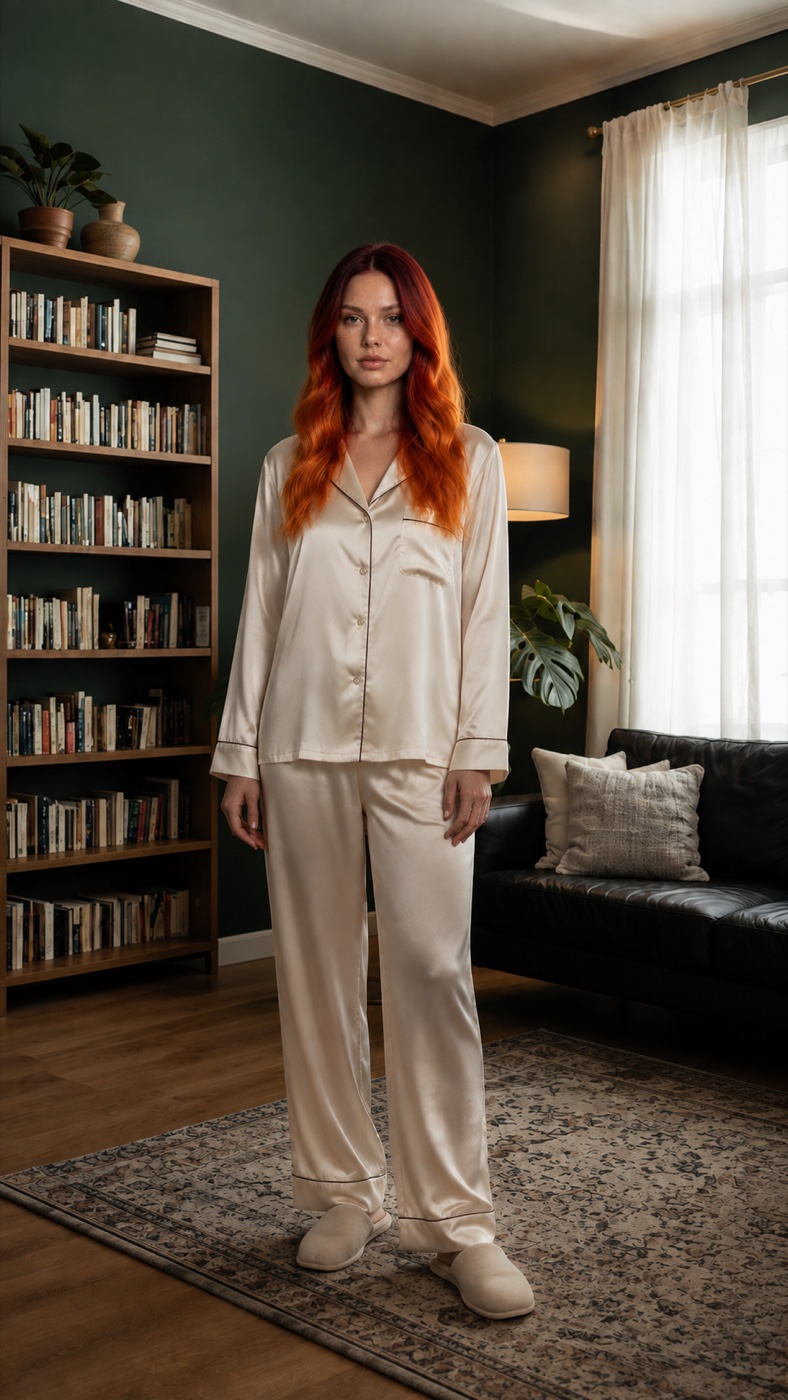
Edit this exact photorealistic image with only two changes: (1) Completely remove the foreground rectangular wooden coffee table, its metal legs and the books sitting on it. Seamlessly reconstruct the patterned rug and floor where the table was, maintaining perspective and texture. Preserve the small round side table behind the woman. (2) Move the same woman horizontally to the CENTER of the image: her face, torso and the midpoint between her feet aligned with the vertical centerline, with balanced space on her left and right. Preserve her current scale, height in frame, full body including slippers, exact face, expression, freckles, burgundy-to-copper long wavy hair, ivory satin pajamas with piping, slippers and relaxed arms-down pose. Preserve the camera, vertical aspect ratio, headroom and floor below feet. Preserve the room architecture, green walls, bookshelf, sofa, lamp, plants, curtains and lighting. Reconstruct the background revealed by her old position naturally. Maintain natural window light from image right, realistic shadows and contact shadows directly under her feet at her new centered position. No new furniture, no VFX, no other changes. Deliver a single finished image.
The edit prompt names everything it must not change. That is most of its length. An edit prompt that only says what you want tends to quietly redraw her face too.
This image is @Image 6. It is the last thing you make before the video.
Set up ImagineArt
Open ImagineArt+200 free credits and go to Video → Text to Video. Pick Seedance 2.5 as the model.
Open the References tab and upload all six images in this order:
- Outfit one
- Outfit two
- Outfit three
- Outfit four
- Face photo
- Starting frame
Settings: 9:16, 20s, 720p.
Paste the video prompt
[REFERENCE ROLES] @Image 1 defines outfit one: open butter-yellow shirt with rolled sleeves, white ribbed tank, chocolate-brown wide-leg trousers, brown belt, cream sneakers, cream shoulder bag and delicate gold jewelry. Exclude the flat-lay background, text and sunglasses.
@Image 2 defines outfit two: open navy shirt, white tank, ivory wide-leg trousers, navy belt, navy-and-white canvas sneakers, gold jewelry and one cream canvas tote. Exclude the separate navy handbag, hairstyle illustration, sunglasses, background and text.
@Image 3 defines outfit three: loose cream V-neck sweater with a front tuck, brown wide-leg trousers, brown belt, brown-and-white sneakers, brown suede shoulder bag and gold jewelry. Exclude the stationery, hair accessories, sunglasses and background.
@Image 4 defines outfit four: cropped blush-pink cable-knit sweater over a white collared shirt, ivory wide-leg jeans, pink-and-white sneakers, pink shoulder bag and delicate gold necklace. Exclude the headphones, flowers, perfume, stationery, hair clip and background.
@Image 5 defines the woman’s facial identity, freckles, green eyes and long loose wavy hair with dark burgundy roots transitioning into copper-orange lengths. Exclude the black T-shirt, white background and portrait framing. Preserve her identity while allowing natural facial expressions.
@Image 6 defines the exact opening composition: this woman standing centrally in the green living room, wearing ivory satin pajamas and slippers, with her arms relaxed. Inherit her placement, scale, full-body framing, room arrangement, lighting and floor contact. There is no foreground coffee table. Do not reinterpret this image as an empty background or add another woman.
[SCENE AND CAMERA] Begin directly from @Image 6. One continuous photorealistic shot of the same woman, centered in the same room throughout.
Locked camera. No cuts, zooms or reframing. Keep her entire body, both feet and snapping hand visible, with headroom and floor below her shoes. Preserve the bookcase, sofa, plants, lamp and curtains.
Soft window light from the right, natural skin texture, realistic fabric and grounded contact shadows. Lighting and background remain stable during every clothing transition.
[ONE CONSISTENT TRANSITION — CONTINUOUS GARMENT MORPH] Use exactly the same transition technique for all four changes: a smooth, detailed transformation of the actual garments on her body.
Each visible right-hand finger snap initiates a continuous clothing morph lasting approximately one and a half seconds. A subtle ripple in the fabric travels from the shoulders down to the shoes. Along this moving ripple, the existing fabric visibly changes color, weave, cut and construction: seams migrate, collars reshape, sleeves adjust, hems extend or shorten, and folds settle into the next silhouette.
The viewer must see the intermediate transformation, not just a before-and-after swap. Keep fabric opaque, tangible and attached to her body. Preserve convincing thickness, gravity and movement. This is a polished fashion-commercial morph, not a watery melt or a transparent crossfade.
Transform footwear and accessories with the same continuous reshaping. During the first change, a fold at her left shoulder extends into the cream bag’s strap and body. In subsequent changes, the existing bag smoothly reshapes into the next bag. Only one bag, always on her left shoulder.
Her face, hair, skin and anatomy remain stable. No body morphing.
No magic, sparkles, particles, glowing outlines, flashes, energy rings, flying ribbons, smoke or scene distortion. No sudden outfit replacement, jump cuts or double-exposed clothing.
Each transition uses the same restrained sound design: <A close, dry finger SNAP, followed immediately by a soft textured fabric SWISH that follows the morph, ending with a quiet cloth-settling rustle.> No magical chimes, electrical cracks, explosions or heavy bass hits.
[OPENING — PAJAMAS] She stands as shown in @Image 6, wearing ivory satin pajamas and slippers. She briefly glances down at her pajamas, then looks back into the camera with a tiny amused smile, as if deciding to try something else.
She raises her right hand beside her shoulder, away from her face. End state: still wearing pajamas, right fingers ready to snap.
[CHANGE ONE — PLEASED SURPRISE] Continue from the opening with the same woman, position and room.
She snaps once. The pajamas and slippers smoothly morph into the complete outfit from @Image 1 using the shared garment transition.
Once the transformation finishes, she glances down at the yellow shirt and brown trousers. Her eyebrows lift slightly; she looks back at the camera with a small, pleasantly surprised smile. End state: complete first outfit, cream bag on her left shoulder, a brief still pose that clearly shows the look.
[CHANGE TWO — QUIET CONFIDENCE] Continue from the first outfit, preserving identity, hair, framing and room.
She resets her right hand and snaps once. Outfit one smoothly morphs into the complete navy-and-ivory outfit from @Image 2 using exactly the same transition.
Once it finishes, she gently shifts her weight onto one leg, straightens her shoulders and lifts her chin a little. Looking directly at the camera, she gives a restrained, confident half-smile. End state: complete second outfit with one cream tote on her left shoulder, holding the confident pose.
[CHANGE THREE — COZY APPROVAL] Continue from the second outfit with the same woman and composition.
She snaps once with her right hand. The navy-and-ivory clothes smoothly morph into the cream sweater and brown trousers from @Image 3, including the shoes and brown suede bag.
After the morph settles, she looks down and lightly brushes the sweater sleeve with her right fingertips. Her shoulders relax; she gives a small approving nod and a soft closed-mouth smile. End state: complete third outfit, brown suede bag on her left shoulder, relaxed and comfortable.
[CHANGE FOUR — PLAYFUL DELIGHT] Continue from the third outfit, preserving the same identity, hairstyle and room.
She raises her right hand and snaps once. The sweater outfit smoothly morphs into the complete pink-and-ivory outfit from @Image 4 using the same fabric transformation.
After it finishes, she glances down at the pink sweater, then meets the camera with a brighter, natural smile. She tilts her head slightly and makes one small playful shoulder lift, enjoying the final look. End state: complete fourth outfit with one pink bag on her left shoulder. She lowers her hand and holds the final pose long enough to appreciate the outfit.
[PERFORMANCE, PACING AND CONTINUITY] Exactly four visible right-hand snaps and four clothing transformations, in the stated order. Each snap triggers one morph. Let each morph fully finish before the reaction; let each reaction read before the next snap.
Her expressions are distinct but subtle, like a real person trying on clothes in front of a mirror. Natural blinking, breathing and small shifts of weight. No exaggerated acting, repeated identical smiles or frozen mannequin expression.
She stays centered in the same floor position, with only small pose changes. Clothing covers her continuously. No extra people, duplicated accessories or malformed hands.
Sound effects only: finger snaps, the same soft fabric-transition sound and natural clothing rustles. No music, beat, speech, narration or vocal reactions. No text, captions or overlays.
What's actually doing the work
Five things transfer to any video you build this way.
Describe the transition once, then reuse it. The whole [ONE CONSISTENT TRANSITION] block is written before any of the four changes. Each change then
says “using the shared garment transition” or “using exactly the same
transition”. That is why the four morphs match.
Say what the effect is not. The prompt names the wrong versions out loud: not a watery melt, not a transparent crossfade, not a before-and-after swap, no sparkles or glowing outlines. Those are the results you get by default. Naming them is how you rule them out.
Give every reference an exclusion list. Each outfit line ends with “Exclude…”. A flat-lay is a collage, and without that list the props come along with the clothes.
One bag, on one shoulder. The prompt says the bag reshapes into the next bag, and “only one bag, always on her left shoulder”. Models tend to add a second bag instead of changing the first one.
Tell it to wait. “Let each morph fully finish before the reaction; let each reaction read before the next snap.” Without that the changes stack up and you cannot see any single outfit clearly.
Making it your own
Swap the four outfit lines in [REFERENCE ROLES] and you have a different
video. If you change the avatar or the room, update those two descriptions as
well. Keep the slot numbers exactly as they are.
Some things worth knowing before you change more than that:
- Four changes in twenty seconds is close to full. Each morph takes about one and a half seconds, and each reaction needs room after it. Adding a fifth outfit means cutting the reactions short.
- Keep the starting outfit simple. Pajamas are a good opening because they are plain — there is little detail the model has to destroy on the first snap.
- The room must stay still. A locked camera in a stable room is what sells the effect. Motion in the background competes with the clothes.
Where it goes wrong
| What you got | The fix |
|---|---|
| Clothes pop straight to the next outfit | Restate “the viewer must see the intermediate transformation, not just a before-and-after swap” |
| Sparkles or a glow during the change | The negative list is there for this — keep “no magic, sparkles, particles, glowing outlines, flashes” |
| Clothes turn see-through mid-morph | “Keep fabric opaque, tangible and attached to her body” |
| She is carrying two bags | “Only one bag, always on her left shoulder” |
| Sunglasses or props from the flat-lay appear | Your exclusion list is missing something — list every object in that image |
| Her face changes between outfits | @Image 5 sets identity; keep “preserve her identity while allowing natural facial expressions” |
| Only the shirt changes, shoes stay | “Transform footwear and accessories with the same continuous reshaping” |
| The shoes are cut off | Your starting frame is not full-body — rebuild it with floor below her feet |
| A second woman appears in the room | “Do not reinterpret this image as an empty background or add another woman” |
Why this workflow runs here
Everything in one place
Free to start
Minutes, not days
Make yours in the next 30 min
You have the whole prompt and every setting. The only thing left is an account, and that takes a minute.
- 200 free credits on sign-up
- Prompts ready to paste
- Upgrade only if you want more
Referral link — if you subscribe I earn a commission, at no extra cost to you. More on that.
Related prompts
 Effect Free
 24 GTR AI Prompt: Swap the Car for Your Dragon
A 24 GTR AI prompt for the AIReel effect. You flash the UNO cards, the scene cuts to a stone mountain, and a dragon stands behind you instead of a car.
 Effect Free
 Fan Blade Outfit Change: The Top-Down AI Prompt
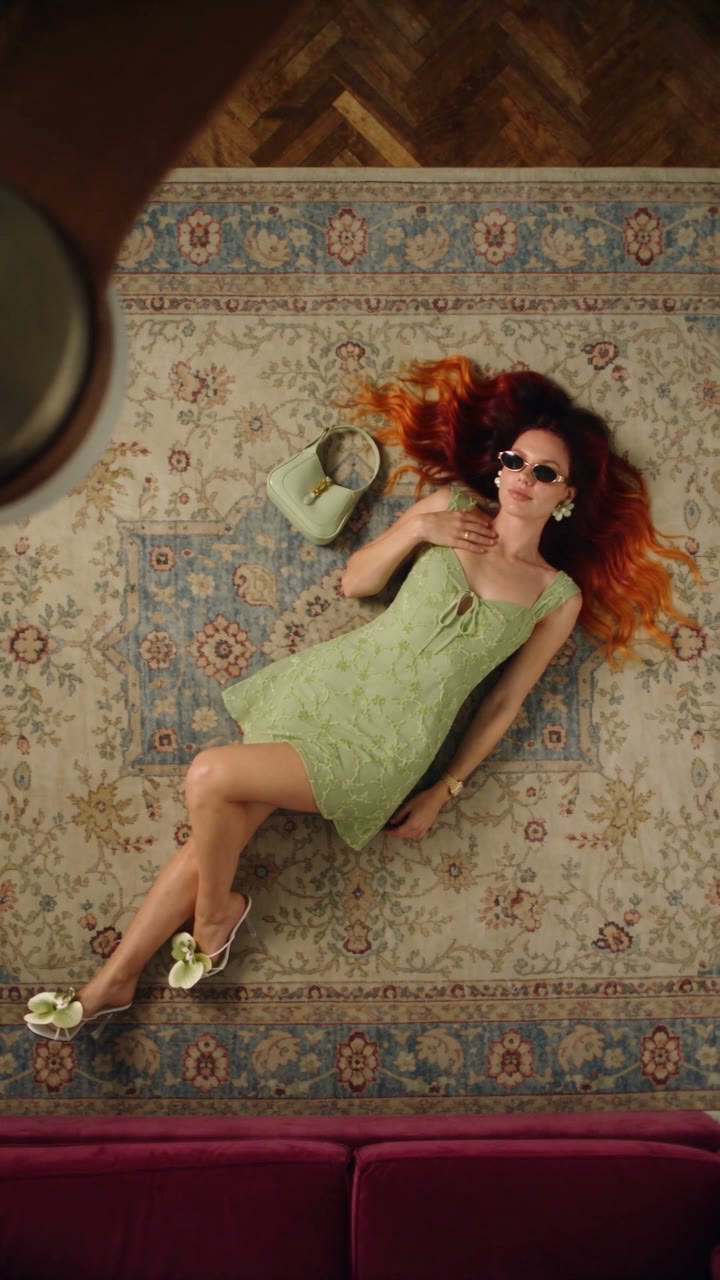
A free Seedance 2.5 prompt. She lies on a rug, a slow ceiling fan blade sweeps over her, and her outfit is new. Five looks, 20 seconds, five reference images.
 Effect Free
 Fit Check Hit by a Car: The AI Video Prompt
A free Seedance 2.5 prompt. She films a street fit check on her phone, shows the outfit from every side, and a car takes her out of frame. 12 seconds, one reference image.