You Save Yourself — A 15-Second Cinematic Reel
Two versions of the same woman on a storm-lashed sea arch, and the one that made it reaches down. Nine shots, three reference images, one prompt.
Have it running in three steps
- 1
- 2Open ImagineArt
- 3Paste it and generate
What you'll need
40 min- ImagineArt
- Claude


The video above is fifteen seconds long and came out of one prompt. Everything in it was generated — the location, both women, the storm, the rescue.
The idea is simple enough to say in a sentence: the person pulling her up is not a stranger. It’s the version of herself who made it. That’s why it lands, and it’s also why the technical side is hard — the model has to understand that two people in frame are one person in two states.
The whole process
- Go to ImagineArt and open the Image section.
- Upload one clear face portrait — your avatar, or yourself.
- Generate all three reference images: the successful state, the vulnerable state, and the location.
- Switch to Video and pick Seedance 2.5.
- Change the tab from text-to-video to Reference.
- Upload your three images in order: successful, vulnerable, location.
- Paste the full nine-shot video prompt and generate.
- Check the result against the export list before you post it.
About forty minutes end to end, most of it spent getting the two character sheets to agree on one face.
The story arc
Five beats, and each one has to land before the next begins:
| Beat | What happens |
|---|---|
| Danger | She slips |
| Struggle | She tries again |
| Recognition | The hand appears |
| Rescue | She’s lifted |
| Acceptance | Embrace, then a smile |
Generate the three references
Everything starts with one clear face portrait. That single photo is the identity source for both character sheets, which is what keeps them the same person.
Open the Image section in ImagineArt+200 free credits, upload your portrait, and run the three prompts below. Replace only the uploaded portrait. Change nothing else in the wording.
The successful state
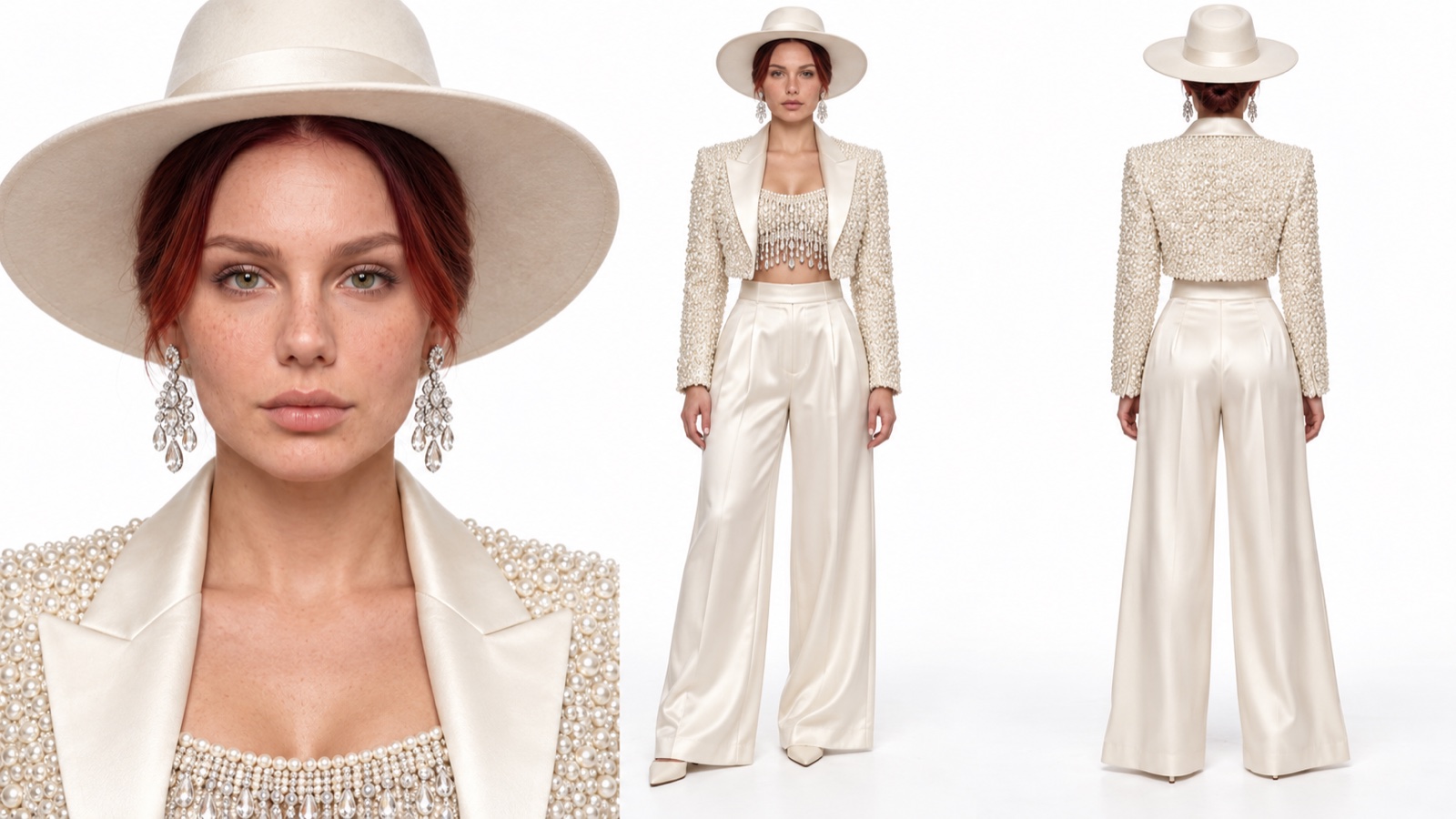
Create a clean ultra-photorealistic horizontal 16:9 character sheet. Use the uploaded portrait as the only identity source and preserve the exact recognisable adult face, gray-blue eyes, age, skin tone and facial proportions.
Show exactly three views on a seamless white studio background: large close portrait on the left, full-body front view in the center, full-body back view on the right.
Successful state: ivory wide-brim hat; dark-brown hair secured beneath it; crystal chandelier earrings; cropped ivory jacket densely covered in tiny pearls; satin lapels; pearl top with crystal fringe; high-waisted ivory satin palazzo trousers; ivory pointed shoes.
Keep face, outfit, hat, jewelry, body proportions and materials identical in every view. Real skin pores, realistic pearls, crystal strands, satin texture, natural anatomy and hands. Finished studio image only. No text, logos, watermark, extra people, scenery, crew or production equipment.
The vulnerable state
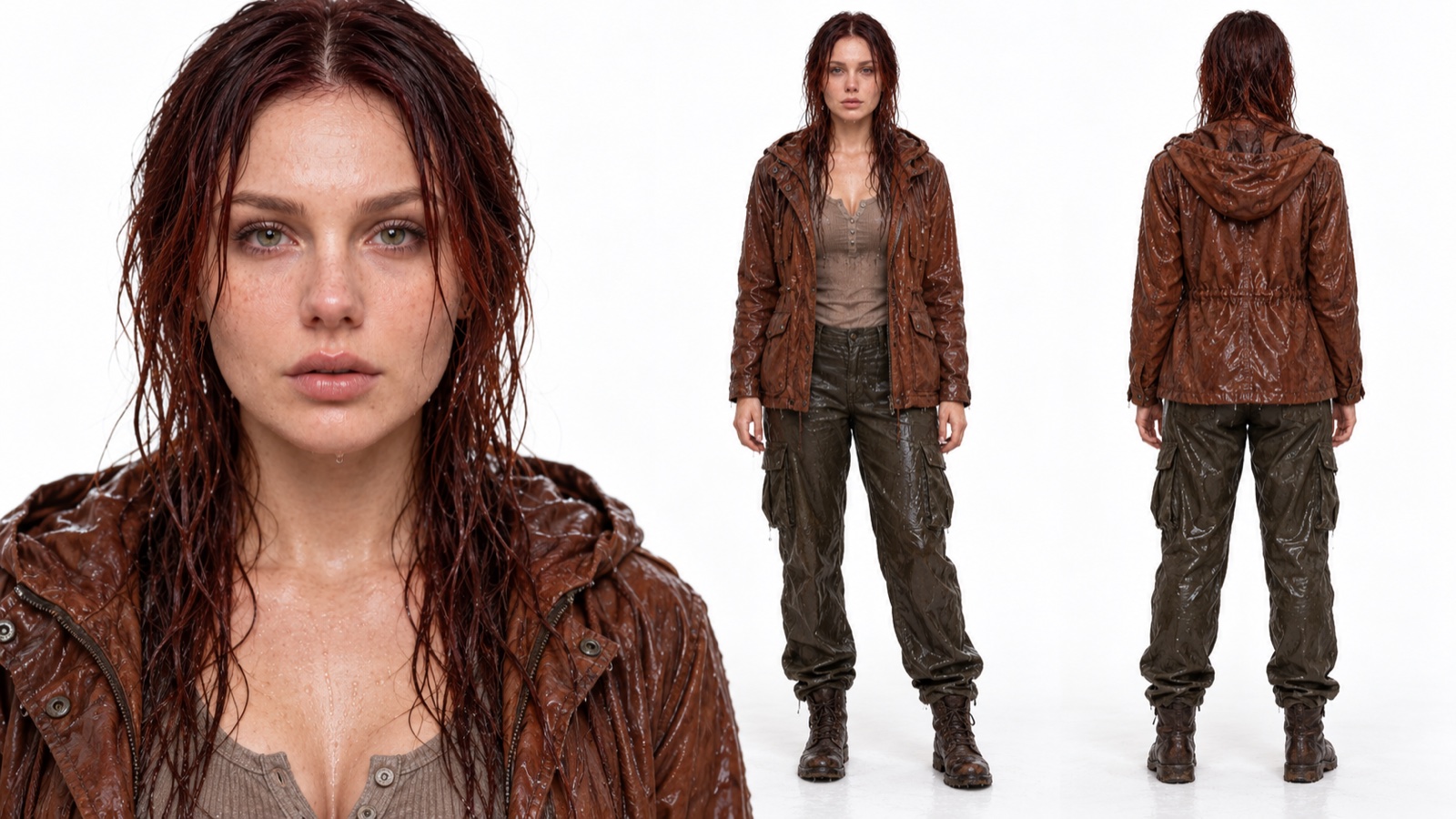
Create a clean ultra-photorealistic horizontal 16:9 character sheet of the exact same woman in a vulnerable storm-soaked state. Use the uploaded portrait and successful sheet only for identity. Preserve the same recognisable face, gray-blue eyes, age, skin tone and body proportions.
Show exactly three views on a seamless white studio background: large wet portrait on the left, full-body front view in the center, full-body back view on the right.
Vulnerable state: soaked long dark-brown hair clinging to face and neck; exhausted watery eyes; almost no makeup; wet rust-brown hooded field jacket; taupe ribbed henley; soaked dark-olive cargo trousers; worn dark-brown lace-up boots.
Show real water beads, wet eyelashes, saturated canvas and heavy fabric folds. No wounds, blood or horror styling. The face must remain identical to the successful state. Finished studio image only. No text, logos, watermark, extra people, scenery, crew or production equipment.
The location
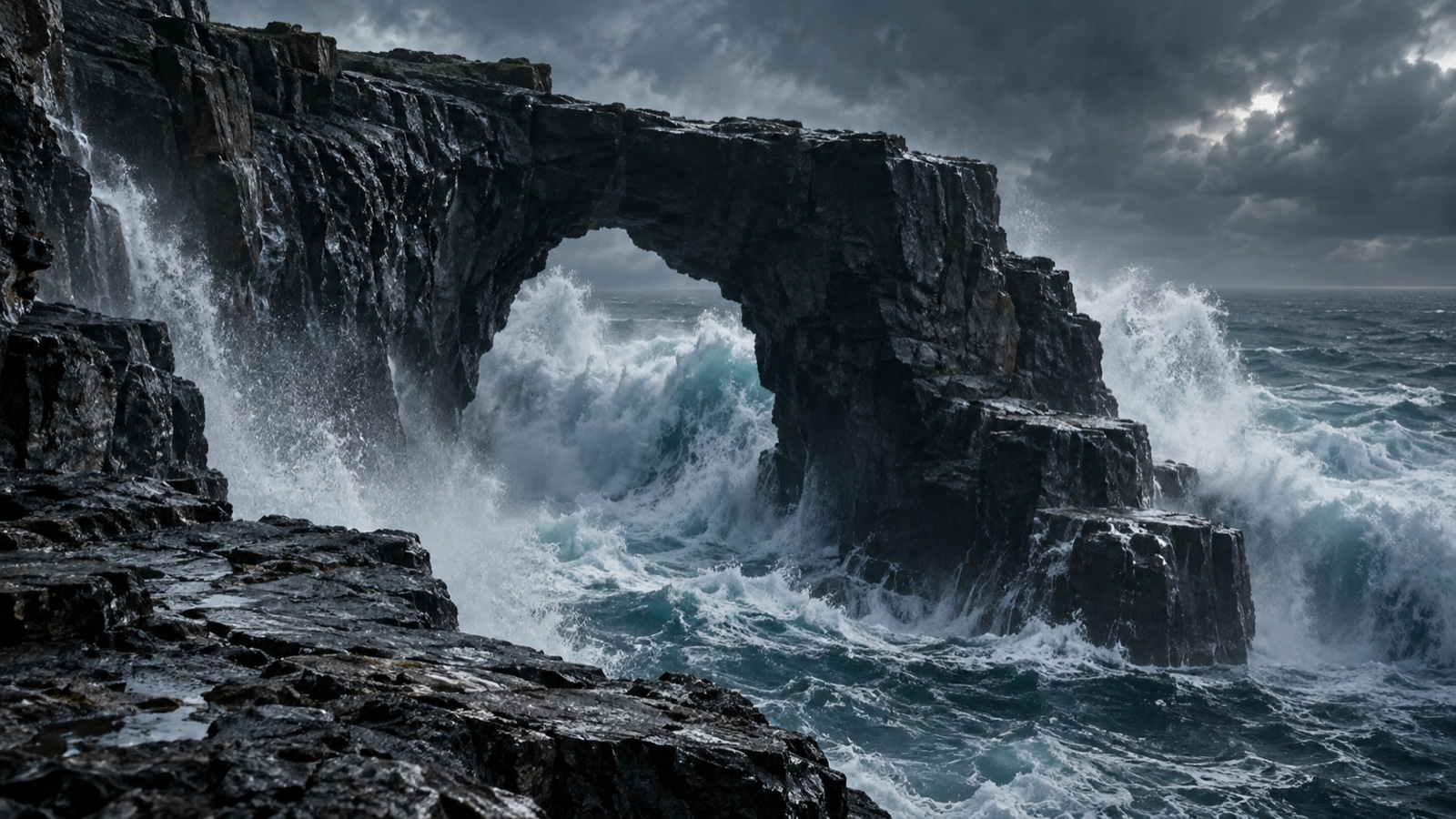
Create an empty ultra-realistic horizontal 16:9 feature-film location: a
colossal wet black stone sea arch above a violent steel-blue ocean, a readable
upper platform and lower climbing ledge, enormous waves exploding through the
arch, powerful wind, dense sea spray and microscopic droplets, cold silver-gray
storm sky. ARRI ALEXA 35 and Cooke 35mm image character, cinematic
blue-charcoal grade, organic film grain, 4K. No people, buildings, text, logos,
crew, camera gear or backstage elements.
Generate the location empty, with nobody in it. The video model needs a stage, not a scene — if there’s already a person on that arch, it fights you in every shot.
Switch to video with references
Still in ImagineArt: go to Video, pick Seedance 2.5, and start in text-to-video. Then switch the tab to Reference and upload your three images in this exact order:
@image1— successful@image2— vulnerable@image3— location
The order is not cosmetic. The prompt calls them by number in every shot, so a swapped upload puts the couture outfit on the wrong woman.
Paste the full video prompt
One block. Copy it whole and paste it — it’s long, and shortening it is the most common way this breaks.
Create a 15-second ultra-photorealistic multi-shot vertical cinematic sequence. A vulnerable woman struggles to climb a storm-lashed sea arch until the successful version of herself reaches down and saves her. The result must look only like finished footage from a prestige psychological feature film.
FORMAT Native vertical 4K, 2160 x 3840, strict 9:16, 24 fps, natural cinematic motion blur.
REFERENCE MAP @image1 - successful state: exact face and complete pearl-covered ivory couture outfit with wide-brim hat. @image2 - vulnerable state of the exact same woman: exact face, wet dark-brown hair, soaked rust-brown jacket, taupe shirt, dark-olive cargo trousers, brown boots. @image3 - the only location: exact black stone sea arch, upper platform, lower ledge, steel-blue ocean, enormous waves and storm sky.
CORE RULE Attach and use @image1 @image2 @image3 in EVERY SHOT. The two women are two psychological states of THE EXACT SAME PERSON. Preserve face, gray-blue eyes, age, skin tone, height and body proportions. Keep both outfits and the location unchanged in every shot.
CONTINUITY Every action must show anticipation, execution, follow-through and a brief stable ending. Transition only after the physical action is complete. Preserve body position, hands, screen direction and geography. No abrupt cuts, missing phases, jumps, teleportation or frozen gestures.
SHOT 1 - 0.0-1.7 SEC - DANGER HOOK @image1 @image2 @image3 Start directly above the wet edge. The vulnerable woman already hangs beneath the platform, both hands gripping rock, ocean churning below. She pulls her face and shoulders above the edge. One boot loses contact; her body swings outward; fingers slide and she almost falls. At the final moment she stops and restores a stable two-hand grip. Water streams over her face and clothes. Intense 35mm top-down angle, restrained organic handheld movement, immediate vertigo.
SHOT 2 - 1.7-3.2 SEC - SECOND ATTEMPT @image1 @image2 @image3 Continue from the stable grip. She breathes once. Her right hand stays on the rock. Her left hand releases, reaches farther, finds a hold and closes firmly. She pulls until one elbow nearly reaches the platform. Complete the reach and pull before transitioning.
SHOT 3 - 3.2-4.8 SEC - WAVE AND FAILURE @image1 @image2 @image3 At the highest point a huge wave crashes through the arch. Real sea spray hits her and tears her left hand away while her right hand remains attached. She swings against the cliff, searches with the left hand, restores a secure two-hand grip, coughs and completes one difficult breath. She never falls into the ocean.
SHOT 4 - 4.8-6.3 SEC - UNKNOWN HAND @image1 @image2 @image3 Tight frontal close-up after her grip is restored. Her wet face appears between her hands; droplets hang from her eyelashes. She looks up. The successful woman’s RIGHT hand enters cleanly from the upper-right, pearl-covered ivory sleeve visible, and extends downward with an open palm. Show only this hand before the reveal. Complete the reach and hold still. Her expression changes from panic to recognition. Controlled 50mm close-up and gentle focus transition from eyes to hand. SHOT 5 - 6.3-7.8 SEC - SUBJECTIVE REVEAL @image1 @image2 @image3 Reveal the successful woman from below, leaning over the edge and offering her RIGHT hand. Preserve her exact face and complete couture outfit. Her hat remains securely fixed. She looks at her vulnerable self with calm certainty. Wind moves pearl fringe and satin trousers. Her right arm completes the extension and waits. Low 35mm subjective framing without facial distortion.
SHOT 6 - 7.8-9.2 SEC - CLEAN OPPOSITE-HAND GRIP @image1 @image2 @image3 Show exactly two active hands. The successful woman offers her RIGHT hand. The vulnerable woman keeps her RIGHT hand on the cliff and reaches only with her LEFT. Palms approach, fingertips touch, wet fingers briefly slide, then the successful right hand closes around the vulnerable left wrist and the vulnerable left hand closes around the successful right wrist. Establish one clear right-to-left wrist grip. Never reverse hands. Five correct fingers per hand, natural thumbs, joints, tendons and skin compression. Hold the finished grip before pulling.
SHOT 7 - 9.2-11.8 SEC - COMPLETE RESCUE @image1 @image2 @image3 Continue from the secured right-to-left grip. The successful woman braces both feet, lowers her center and pulls. Her left hand initially braces on rock. The vulnerable woman keeps her right hand on the edge and pushes with both boots. One boot slips, completes the slide and finds a crack. Her shoulders rise above the platform. The successful woman places her free left arm under the vulnerable upper arm and pulls her chest over the edge. The vulnerable woman places one knee, then the other, then both boots on the platform. Show weight and effort. Do not transition until her entire body is safe.
SHOT 8 - 11.8-13.3 SEC - COMPLETE EMBRACE @image1 @image2 @image3 The vulnerable woman’s knees soften. The successful woman catches her, brings her upright, wraps one arm around her shoulders and places the other hand behind her wet head. The vulnerable woman wraps both arms around her, rests her head on the successful shoulder and closes her eyes. Complete the embrace and let both bodies settle. Water transfers naturally onto the pearl jacket. Protective and sincere, never romantic or posed.
SHOT 9 - 13.3-15.0 SEC - FINAL CLOSE-UP @image1 @image2 @image3 Remain in the completed embrace. Move into a close-up primarily focused on the successful woman while the vulnerable woman stays visible and protected. The successful woman slowly raises her face, looks toward the viewer and gives a small sincere, warm, confident smile. Keep her exact face, gray-blue eyes, hat, earrings and pearl shoulders visible. Hold the completed smile and embrace, then fade smoothly to black. Never end during movement.
IMAGE CHARACTER ARRI ALEXA 35 ARRIRAW and LogC4 character. Cooke S4/i 35mm for action and subjective angles; 50mm for faces, hands and final close-up. T2.0-T2.8, soft highlight roll-off, dimensional skin, restrained focus breathing, gentle halation, fine organic film grain. Controlled professional handheld weight with subtle balance corrections. Cold steel-blue ocean, blue-charcoal shadows, silver-gray sky, warm-neutral ivory couture, earthy rust and olive, natural warm skin, Kodak 2383 print-film character, readable blacks and no plastic digital sharpness.
SOUND Sound design only: multidirectional wind, deep ocean roar, pressure before the wave, explosive water impact, wet hands scraping stone, boots slipping, soaked fabric, pearl fringe, breathing, coughing and effort. During the embrace foreground close breathing, wet fabric compression and dripping water. No music, instruments, dialogue, narration or voice-over.
NEGATIVE LOCK Show only the cinematic story world. No visible camera, lens, matte box, hood, filter, rig, monitor, operator, crew, lights, boom, reflections of equipment, backstage angle or behind-the-scenes framing. No extra people or hands, reversed hands, malformed fingers, identity drift, wardrobe or hat changes, body merging, unfinished motion, text, logos, watermark or social-media interface.
Understand the five locks
Most of that prompt is structure rather than description, and five rules are doing the heavy lifting. If you adapt this for your own story, these are the parts to keep.
Identity. Both states are one person. Stated in the CORE RULE and repeated by attaching all three references to every shot. This is the lock that stops the face drifting.
Wardrobe. Never mix the ivory and the storm outfits. Video models love to blend two referenced looks into a hybrid, and the moment that happens the psychological premise collapses.
Hands. Right hand from above meets left hand from below. Spelled out in shot 6 down to the wrist grip, because hands are where these models fail most often. Naming exactly two active hands and which is which prevents the three-armed horror you’d otherwise get.
Motion. Finish each action before the next angle. That’s what all the “complete the reach”, “hold still before pulling”, “do not transition until” phrasing is for. Without it, actions get cut mid-gesture and the whole thing reads as a slideshow.
World. No camera gear, crew or backstage elements. Long cinematic prompts mentioning ARRI and Cooke will otherwise cheerfully show you the film crew.
Check it before you post it
Run the output against this, in order. Anything failing goes back to a regeneration rather than into an editor.
- Three images attached in the correct order
@image1 @image2 @image3present in every shot- Face and wardrobe stable across all angles
- The successful right hand meets the vulnerable left hand
- Every reach, grip, pull and embrace has a completed ending
- Only the story world visible — no production equipment
- Final frame: completed embrace, close-up, calm warm smile
- 15 seconds, 9:16, 24 fps, sound design only
When it goes wrong
| What you got | The fix |
|---|---|
| Film crew or a camera in shot | Regenerate with the full NEGATIVE LOCK, unshortened |
| Three arms, or hands reversed | Restate shot 6: right from above, left from below, exactly two hands |
| The face changes between shots | Raise reference strength; never change the attachment order |
| A cut lands mid-gesture | Add “complete the action and hold before transitioning” to that shot |
| The couture outfit on the wrong woman | Your uploads are in the wrong order — check 1, 2, 3 |
Why this one travels
The craft is real, but it’s not why this reel gets shared. It gets shared because of what it says: the person who rescues you is you, later. Everyone recognises that, and nobody needs it explained.
Worth remembering when you adapt the technique. The nine-shot structure, the reference locks and the hand choreography all transfer to any story you want. The story is still the part that has to be worth fifteen seconds.
Why this workflow runs here
Everything in one place
Free to start
Minutes, not days
Make yours in the next 40 min
You have the whole prompt and every setting. The only thing left is an account, and that takes a minute.
- 200 free credits on sign-up
- Prompts ready to paste
- Upgrade only if you want more
Referral link — if you subscribe I earn a commission, at no extra cost to you. More on that.
Related prompts
 Cinematic Free
 Action Scene AI Video Prompt: Bike Jump and Fight
Action scene AI video prompt for Seedance 2.5. You jump a futuristic bike off a ramp, land in fire and fight on a burning highway. 15 seconds, one photo.
 Cinematic Free
 Anime Borscht — The Whole Recipe in One 25-Second Video
One prompt cooks Ukrainian red borscht from raw meat to a served bowl, in glossy anime style. Six stages, hands and food only, vertical for Reels.
 Cinematic Free
 APT AI Prompt — A Dog and a Cat Do the APT. Dance
Free APT AI prompt for Seedance 2.5. A dog sings and a cat plays drums in the APT. dance. Download the clip, make two sheets, swap in your own pets.