Outfit Rotation AI Prompt: One Camera Move, 4 Looks
Outfit rotation AI prompt for Seedance 2.5. The camera flies over the sofa four times, and every time it lands she wears a new look. Free camera file included.
Have it running in three steps
- 1
- 2Open ImagineArt
- 3Paste it and generate
What you'll need
30 min- ImagineArt

This outfit rotation AI prompt makes a 12-second fashion reel in one go. She lies on an orange sofa. The camera rises from the floor, stops right above her, then flips over and falls past her feet. When it rises again, she wears a new outfit.
That happens four times. Four looks, four poses, one camera move on repeat.
The outfit never changes on screen. It changes in the blur, while the camera is moving too fast to see. That is why it looks like a real edit and not a glitch. This page gives you the prompt, our images, and the camera file that holds the move together.
The whole process
- Download the camera file from this page. It is grey boxes, and it only carries the camera move.
- Make a character sheet wearing look one.
- Pick three more looks as flat lays, with shoes.
- Give the prompt below and your outfit pictures to Claude. Ask it to rewrite the outfit lines.
- Open ImagineArt, go to video and pick Seedance 2.5.
- Add the four images and the camera file. Set 12 seconds, 9:16, paste your prompt and generate.
The camera move, step by step
Each look gets exactly 3 seconds, and the camera does the same thing every time.
| Part | Time in each look | What the camera does |
|---|---|---|
| Rise | first 0.6 s | Starts low at the foot of the sofa, behind a palm. Flies up and over her fast, then slows down hard |
| Hold | about 1.8 s | Right above the sofa, looking straight down. Her head at the top, her feet at the bottom. This is when she moves |
| Flip | last 0.5 s | Keeps turning the same way, past her feet. The sofa slides up out of the frame, the floor comes in, the picture turns upside down in a blur |
The flip is the cut. One look ends in the blur, the next one starts in a blur, and your eye reads it as one move.
What happens in 12 seconds
| Time | Look | Pose |
|---|---|---|
| 0–3s | Camel coat, black turtleneck, leather skirt | On her back, phone in both hands, scrolling |
| 3–6s | Leather jacket, ivory slip dress | Arm behind her head, she slides her sunglasses down |
| 6–9s | Cap, grey cardigan, plaid skirt | On her side, knees bent, cap pulled over her face |
| 9–12s | Cream knit dress, suede boots, scarf | Lying back with a book, turning a page |
Download the camera file
This is the reference for the camera only. A grey sofa, a grey figure, a lamp and a palm, and the same flip four times in 12 seconds. The figure changes pose every time, so the model knows the pose should change too.
Make your character sheet, wearing look one
The camera is far away for most of the video, so her face is small. A character sheet gives the model her face close up, her body from three sides and small detail tiles. That keeps her looking like herself in every look.
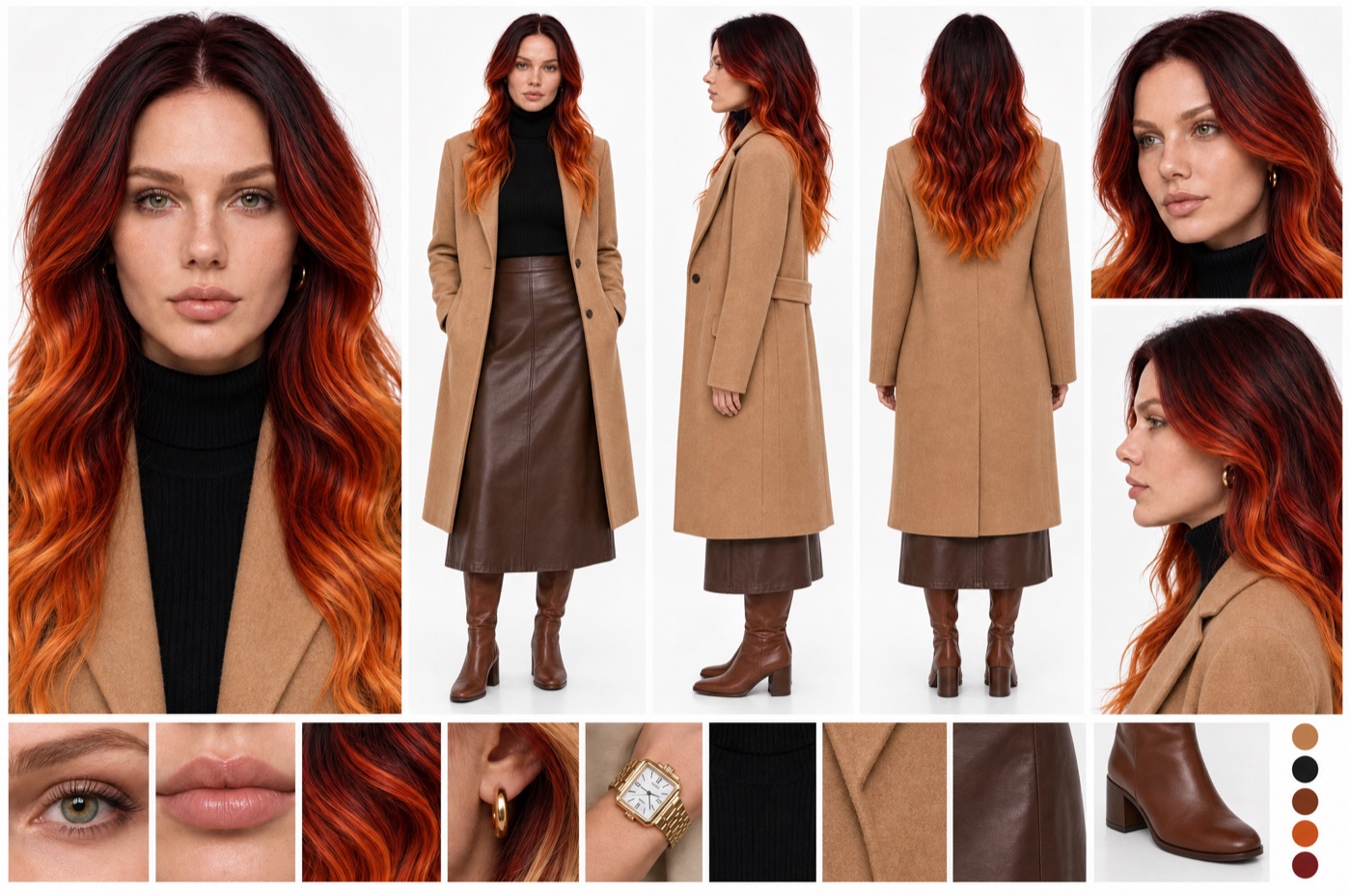
The sheet is also look one. She starts the video in whatever the sheet is wearing, so dress it in a look you want on screen, shoes included.
Pick the other three looks
Use flat lays: the clothes laid out on a plain background, every piece visible. Search Pinterest for “autumn outfit flat lay”, or make them with an image model.
Every look needs shoes. The camera sees her from head to feet the whole time.
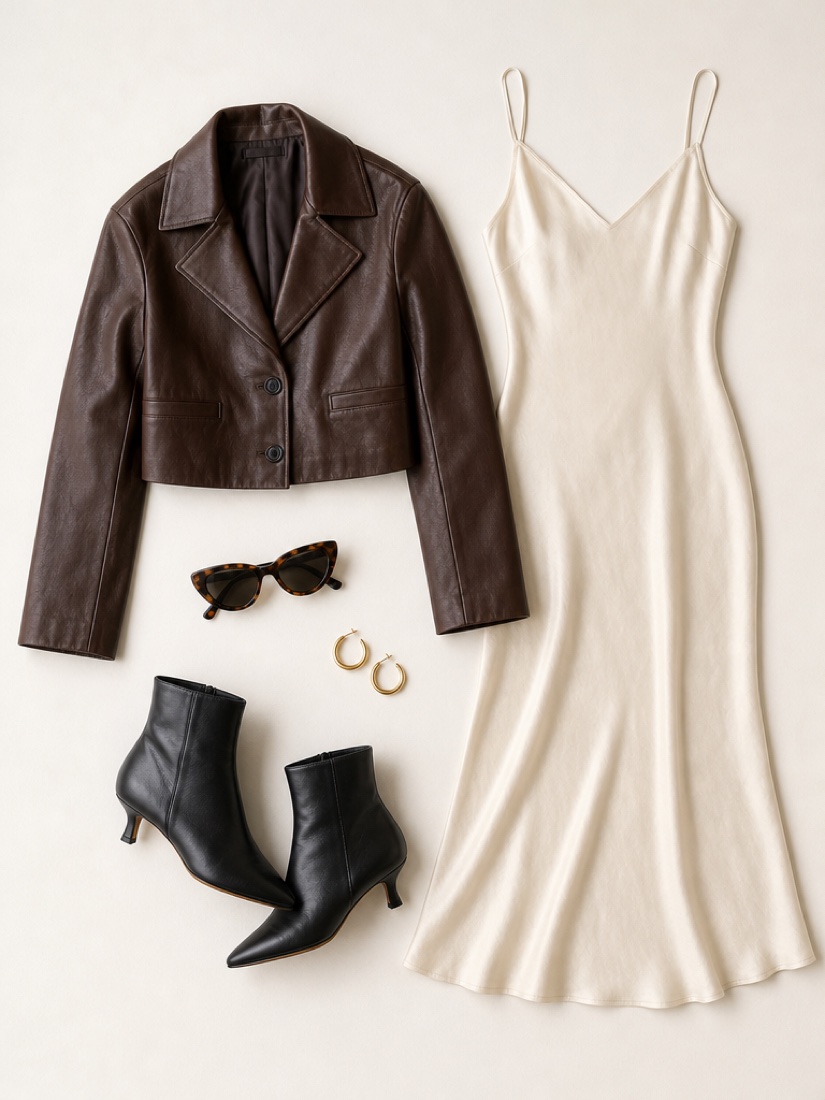
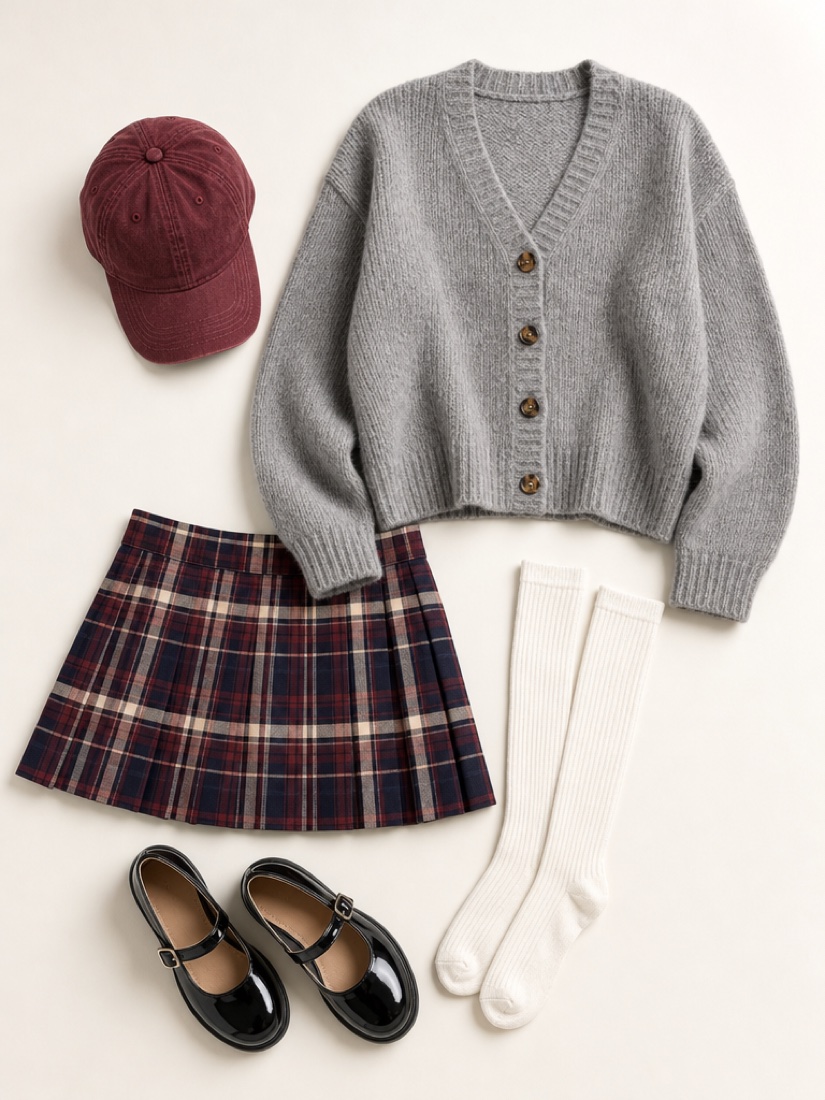
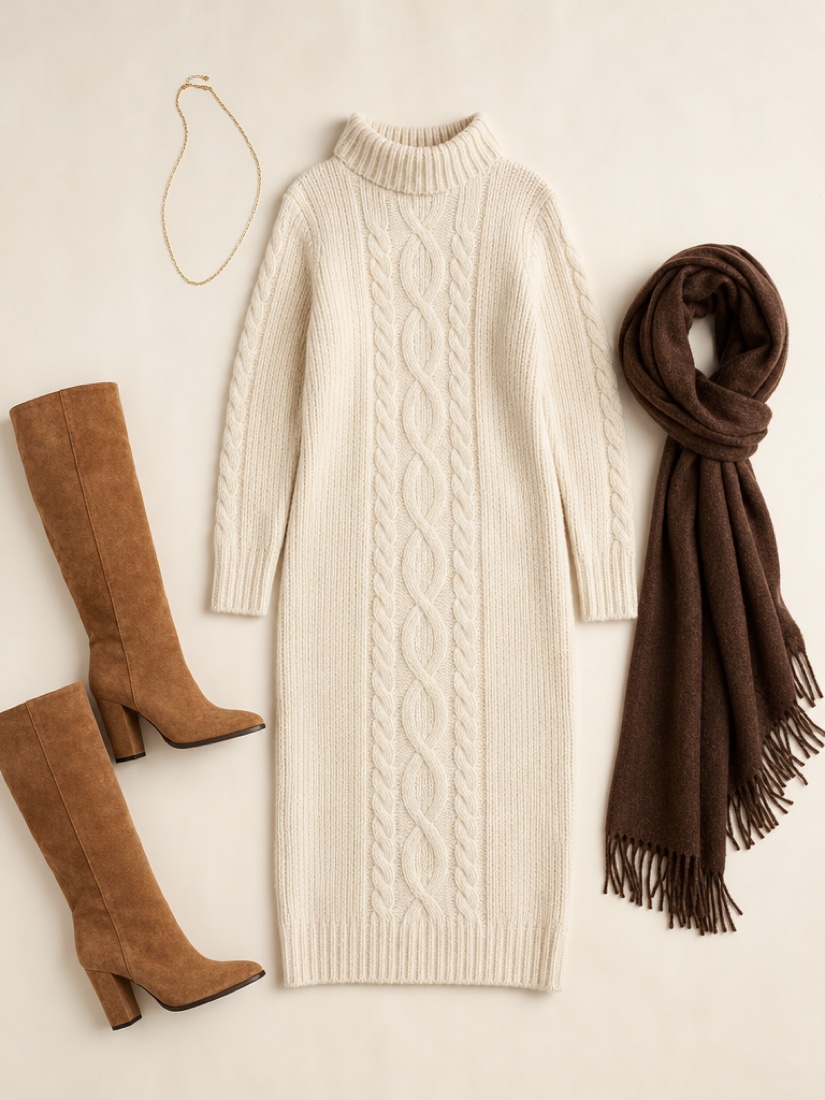
Give each look its own prop or gesture: a phone, sunglasses, a cap, a book. Four poses on the same sofa only look different if her hands have something to do.
Have Claude rewrite the outfit lines
The prompt below names our clothes. If you upload your own pictures and keep our words, the model mixes the two.
Open Claude. Attach your character sheet and your three flat lays. Paste the whole prompt from step five, then send this:
Here is a video prompt and my four reference images. Image 1 is my character sheet and it is also look 1. Images 2 to 4 are looks 2 to 4. Rewrite only the REFERENCES block so each line describes my pictures piece by piece, shoes included. If a look has a prop that fits (sunglasses, a cap, a bag), update that look’s pose line in its STAGE so she uses it. Keep everything else in the prompt exactly as it is: the camera, the room, the timings and the rules.
Set it up and generate
Open ImagineArt+200 free credits, go to video and pick Seedance 2.5. Add the images in this order, then the camera file.
| Slot | What it is |
|---|---|
@Image1 | Character sheet, also look one |
@Image2 | Look two |
@Image3 | Look three |
@Image4 | Look four |
@Video1 | The camera file from step one |
Set 12 seconds and 9:16. We used 720p. Paste your prompt and generate.
[LOOK — LOCKED, APPLIES TO EVERY STAGE] Digital cinema capture, 24 mm wide prime, deep focus that holds her from head to feet, fine low-noise film grain, warm tungsten highlights rolling off softly, slightly lifted blacks, medium-low contrast. 1970s editorial interior mood. Grade: burnt-orange and rust hero tone, faded Persian-red and warm teak secondary field, cream walls, shadows biased warm brown.
[CAMERA — THE SAME SWING IN EVERY STAGE] Every stage is one shot with the exact same camera path: one continuous half-turn of the camera over the sofa, about 180 degrees of rotation in total, on a crane or drone, speed-ramped: fast in, hold, fast out. ENTRY, the first half second: the shot opens inside a heavy dark motion blur that clears at once. The camera starts low at eye level at the FOOT END of the sofa, just behind a large potted palm in the soft foreground, looking down the length of the sofa toward the floor lamp. It booms up and forward over her body in one fast sweep while pitching down, and decelerates hard as it arrives. HOLD, about the next 1.8 seconds: the camera sits directly above the sofa looking straight down, bird’s-eye, 90 degrees. The sofa runs vertically through the centre of the frame, her head at the top and her feet at the bottom. Almost locked off, only a very slow push-down. This is where she performs. EXIT, the last half second: the camera does NOT go back the way it came. It keeps rotating in the same direction past straight-down, pitching over the top toward the floor beyond her feet. Her head stays at the top of the frame; the whole sofa slides up and out of the top of the frame while the floor beyond the foot end — the white rug, the magazines, the small side table — rushes in from the bottom, and the picture keeps turning until it is upside down, smeared into heavy directional motion blur. Hard cut on the blur. Each stage’s exit blur cuts directly into the next stage’s entry blur, so the four shots read as one continuous rhythmic camera move. The camera path, speed curve, height and angles are identical in all four stages. @Video1 is a grey-box camera reference: follow its camera movement, timing and speed ramps exactly, frame for frame. Use it for camera motion only — do not copy its grey boxes, untextured shapes, grid floor or flat colours; the scene, the woman and the clothing come only from the image references and the text.
[REFERENCES] All images show one single woman. The video contains exactly one person from start to finish. @Image1 defines her identity and her Look 1 clothing — face, long wavy dark-red-to-copper ombré hair, green eyes, light freckles, small gold hoops, and her full outfit exactly as in the reference image: long camel wool coat, fitted black turtleneck, brown leather midi skirt, brown leather knee-high boots, small gold hoops. Do not use the white studio background, the standing poses, the grid layout, or any duplicated figure from it. @Image2 defines Look 2 clothing and accessories — exactly as in the reference image: cropped chocolate-brown leather jacket with a wide collar, ivory silk bias-cut midi slip dress with thin straps, black leather pointed ankle boots with a low kitten heel, tortoiseshell cat-eye sunglasses, small gold hoops. Do not use the background or the collage layout. @Image3 defines Look 3 clothing and accessories — exactly as in the reference image: burgundy baseball cap, oversized heather-grey chunky knit cardigan with tortoiseshell buttons, pleated mini skirt in burgundy, navy and cream tartan, white ribbed knee-high socks, black patent Mary Jane shoes. Do not use the background or the collage layout. @Image4 defines Look 4 clothing and accessories — exactly as in the reference image: cream chunky cable-knit high-neck sweater dress, knee length, tan suede knee-high boots with a block heel, long chocolate-brown fringed wool scarf, thin gold chain necklace. Do not use the background or the collage layout.
[SCENE — LOCKED] A warm 1970s-style living room. A long burnt-orange velvet sofa with two seat cushions, a long back cushion and low wooden legs. A faded red Persian rug lies under and beside the sofa on a dark polished concrete floor. At the head end of the sofa: an amber glass mushroom-dome floor lamp, switched on and glowing warm, and a low teak dresser with stacked vinyl records, a turntable, small potted plants and a framed print leaning against the cream wall. A large potted palm stands at the foot-end corner of the sofa. Beyond the foot end of the sofa: a white rug with a few fashion magazines, a small round wooden side table with a coffee cup, a pair of shoes. Body placement: she is on the sofa along its length in every stage, head at the end near the lamp, feet toward the foot end — in the overhead hold her head is at the top and her feet at the bottom of the frame. Her pose changes from stage to stage. Lighting: warm tungsten from the floor lamp plus soft diffused daylight from the side. Her face, hands and clothing keep dimensional shape and warm highlights. Never flat, never grey.
[TRANSITION RULE] The outfit never changes on screen. It changes only across the hard cut hidden inside the motion blur between two stages. Within a stage the clothing stays exactly the same from the first frame to the last. Across every cut her face, hair, the sofa, the rug, the lamp, the room and the light stay identical. The clothing, her pose, the prop and the small action change with every look — every stage has a clearly different pose. No morph, no flash, no glitch, no dissolve.
[STAGE 1 — 0-3s — LOOK 1] Camera: the half-turn — up from the foot end to overhead, hold, then over the top toward the floor beyond her feet. Pose: phone scrolling. She lies on her back in Look 1 (@Image1), the coat spread open around her, one knee bent up, holding her phone above her face with both hands, absorbed in it. During the hold she scrolls with her thumb, then breaks into a small amused smile at something on the screen.
[STAGE 2 — 3-6s — LOOK 2] Hard cut on the blur. Same camera half-turn, same room, same sofa — a new pose. Pose: just lying there, pleased with herself. She lies on her back in Look 2 (@Image2), one arm folded behind her head, cat-eye sunglasses on, legs stretched out and crossed at the ankles, the slip dress falling over the cushions. During the hold she slides the sunglasses down her nose with one finger and smiles straight up into the lens.
[STAGE 3 — 6-9s — LOOK 3] Hard cut on the blur. Same camera half-turn, same room, same sofa — a new pose. Pose: playful, on her side. She lies on her side, turned away from the backrest, in Look 3 (@Image3), head propped on one hand, knees bent and stacked, the Mary Janes kicked up behind her. During the hold she tugs the cap brim down with her free hand and laughs under it.
[STAGE 4 — 9-12s — LOOK 4] Hard cut on the blur. Same camera half-turn, same room, same sofa — a new pose. Pose: reading, half-sitting. She is half-reclined against the armrest at the head end in Look 4 (@Image4), knees drawn up, the scarf loose around her neck, an open paperback resting on her knees. During the hold she turns a page without looking up, then glances up into the lens over the book. The final exit ends in motion blur that fades to black.
[MAINTAIN CONSISTENCY] Exactly one woman throughout, identity and hair unchanged in every stage. The same rust velvet sofa, Persian rug, amber dome lamp, teak dresser, potted palm and white rug with magazines in every stage. The same camera half-turn in every stage: low at the foot end → fast rise to straight overhead → hold → keeps rotating over the top toward the floor beyond her feet, upside down into blur. A different pose in every stage. Four looks in fixed order: Look 1, Look 2, Look 3, Look 4, one look per stage, changes only across the cuts.
[PERFORMANCE] She stays alive and natural throughout: blinking, breathing, small weight shifts, relaxed hands, a clearly different editorial pose in each stage (phone, sunglasses, on her side, reading). Never stiff, never symmetrical, never posed like a mannequin.
[AUDIO] <a fast airy whoosh on every entry and every exit swing> <soft fabric rustle, a page turning in stage 4> Quiet warm room tone. No music, no voice.
[NEGATIVE] No outfit change on screen. No morphing between looks. No second person. No change of room, sofa colour or lamp between stages. No different camera path in any stage. No shaky handheld. No slow-motion. No sideways or tilted body across the frame in the overhead hold. No face distortion. No body warping. No overlay text, captions, subtitles or watermarks.
Why this prompt works
The camera file carries the move. Text tells the model what the camera does. The file shows it when, how fast and how far. The prompt then says to copy only the motion, so the grey boxes never show up.
The outfit only changes in the blur. The TRANSITION RULE says the clothes stay the same from the first frame of a look to the last. The change happens across the cut inside the blur, so you never see it morph.
The flip keeps going. The camera does not swing back the way it came. It turns past her feet and the picture ends upside down. That is the “rotation” in outfit rotation, and it is what makes the cut feel like one move.
Every look has its own pose and its own small action. Without them, four looks on one sofa read as the same shot four times.
The room is locked. The same sofa, rug, lamp, palm and white rug in every look, so the only things that change are her clothes and her pose.
Where it goes wrong
| What you got | The fix |
|---|---|
| Grey boxes or a grid floor in the video | Keep the @Video1 line that says “use it for camera motion only” |
| The camera swings back the same way after the hold | Keep the EXIT lines, “the camera does NOT go back the way it came” |
| The camera does something different in each look | Upload the camera file as @Video1. Text alone drifts |
| You see her clothes morph on screen | Keep the TRANSITION RULE block and the first NEGATIVE line |
| She lies in the same pose four times | Give each STAGE its own pose and a prop |
| The outfits are a mix of yours and ours | You did not rewrite the REFERENCES block. Go back to step four |
| She starts in the wrong clothes | Look one comes from the character sheet, not from a flat lay |
| The room changes between looks | Keep the SCENE block and the MAINTAIN CONSISTENCY block |
Questions people ask
Which model is this for?
Seedance 2.5. We made this one on ImagineArt at 12 seconds, 9:16 and 720p.
Do I need Blender for the camera file?
No. The camera file on this page is free to download. It works for any sofa scene where the person lies along the sofa.
Can I put myself in it?
Yes. Make a character sheet from your own photos and use it as @Image1.
Then have Claude rewrite the outfit lines for your looks.
Does it have to be vertical?
The prompt and the camera file are both 9:16. The sofa runs from the top of the frame to the bottom, so a wide shape leaves empty space on the sides.
Is the prompt free?
Yes, the prompt, the images and the camera file are free. Generating the video uses credits on the platform.
Can I add more looks?
Yes, 3 seconds per look. For six looks set 18 seconds, add a STAGE block for each new look, and loop the camera file to the same length.
Ready? Download the camera file and open ImagineArt+200 free credits.
Why this workflow runs here
Everything in one place
Free to start
Minutes, not days
Make yours in the next 30 min
You have the whole prompt and every setting. The only thing left is an account, and that takes a minute.
- 200 free credits on sign-up
- Prompts ready to paste
- Upgrade only if you want more
Referral link — if you subscribe I earn a commission, at no extra cost to you. More on that.
Related prompts
 Effect Free
 24 GTR AI Prompt: Swap the Car for Your Dragon
A 24 GTR AI prompt for the AIReel effect. You flash the UNO cards, the scene cuts to a stone mountain, and a dragon stands behind you instead of a car.
 Effect Free
 Fan Blade Outfit Change: The Top-Down AI Prompt
A free Seedance 2.5 prompt. She lies on a rug, a slow ceiling fan blade sweeps over her, and her outfit is new. Five looks, 20 seconds, five reference images.
 Effect Free
 Fit Check Hit by a Car: The AI Video Prompt
A free Seedance 2.5 prompt. She films a street fit check on her phone, shows the outfit from every side, and a car takes her out of frame. 12 seconds, one reference image.