Halloween Costume AI Video Prompt: Crimson Sorceress
A free Halloween costume AI video prompt for Wan 3.0. A phone follows your boots down a pumpkin-lit street, jerks up, and finds you as a crimson sorceress.
Have it running in three steps
- 1
- 2Open OpenArt
- 3Paste it and generate
What you'll need
30 min- OpenArt

This Halloween costume AI video prompt puts you in a crimson sorceress costume on Halloween night. It looks like a friend filmed you on a phone. You walk down a small-town street with carved pumpkins on the porches and leaves on the sidewalk.
At first the phone only sees your legs: maroon boots, a long burgundy cape and red magic curling around your hands. Then the phone jerks up. You spread your arms, lean into the lens and laugh.
You need one clear photo of yourself. The walk comes from a short 3D video of a blue figure, and you can download it below. This page has two prompts: one for the character sheet and one for the video.
The whole process
- Make a character sheet of you in the costume from one photo, with the first prompt.
- Download the walk video from this page.
- Open OpenArt, go to video and pick Wan 3.0.
- Add the sheet as @Image1 and the walk video as @Video1.
- Set 15 seconds and 9:16. Paste the video prompt and generate.
What happens in 15 seconds
The prompt plans 12 seconds. We set 15, so the model spread the beats out and the tilt up came a little earlier than written.
| Time | What happens |
|---|---|
| 0–5s | The phone is low and only sees her legs. Boots step through dry leaves, the cape swings, red glow coils around her hands |
| 5–6s | The phone jerks up. A short blur, then her face and tiara come into focus |
| 6–9s | Medium shot. She keeps walking at the camera, pumpkins and porch lights behind her |
| 9–11s | She spreads her arms, the red glow flares, and she leans into the lens |
| 11–15s | Close-up. A smirk, one raised eyebrow, then an open laugh into the camera |
Make the character sheet
The video needs the tiara, the cape and the boots to look the same in every second. One photo of you cannot give the model that. So first make a character sheet: you in the costume from every side, plus close-ups of the parts the camera sees up close.
Open OpenArt and pick an image model that takes a reference picture. We used Nano Banana 2.1. Add your photo, set the shape to 16:9 and paste this prompt. Your face comes from the photo. The costume is written in the prompt.
Character reference sheet, horizontal 16:9, clean light-grey studio background, soft even lighting, photorealistic photo quality.
Use the person from Image 1: keep their exact face, features, freckles, eye colour, skin tone and natural hair colour. Dress them as a crimson sorceress for Halloween.
Costume (same in every panel): long loose glossy waves; pointed crimson metallic tiara with two tall horn-like spikes framing the forehead; sleeveless fitted bodice in deep maroon leather with layered sculpted panels and dark-red piping, high stand-up collar; short pointed peplum panels over the hips with a small silver clasp at the waist; long fingerless maroon gauntlet gloves up to above the elbow with leather straps; dark textured fitted trousers with maroon leather panel lines down the legs; knee-high dark maroon leather boots; floor-length burgundy cape attached at the shoulders, open at the front, textured fabric with a darker inner lining. Dark smoky eye makeup, muted berry lips.
Layout:
Left side, large: four full-body views in a row, same neutral standing pose, arms slightly away from the body, head to toe: front view, three-quarter view, left side profile, back view (full cape visible from behind).
Right side: a large close-up portrait of the face and tiara, front view, calm intense stare at the camera; below it three small detail close-ups: both hands with glowing crimson wispy energy swirling around the fingers, the bodice and peplum with the waist clasp, the boots and cape hem mid-step from a low camera angle.
Consistent costume and face across all panels. No text, no labels, no captions, no watermark.
This is the sheet we used.
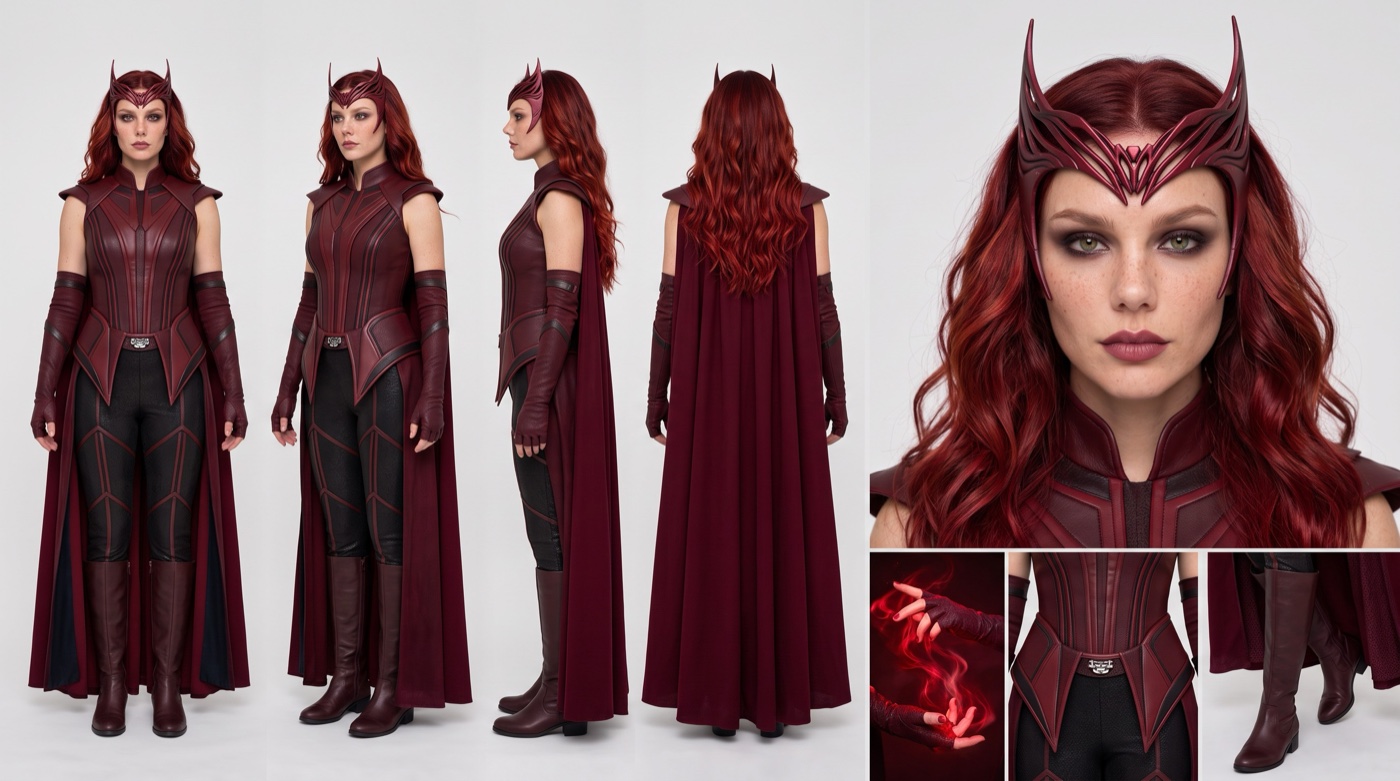
Look at the boot close-up before you move on. The camera stays on the legs for the first third of the video, so the boots and the cape matter as much as the face.
Download the walk video
The model copies the walk from a video. It is a simple 3D clip: a blue figure walks along a night street toward the camera. Near the end it spreads its arms and leans in. Download it here and use it as it is.
Download the walk video (1.3 MB)
The blue figure, the cars and the 3D street do not end up in your video. The prompt tells the model to take only the movement.
Set it up and generate
Open OpenArt, go to video and pick Wan 3.0. Add the character sheet as the image reference and the walk video as the video reference. Set the length to 15 seconds and the shape to 9:16. Paste the prompt below as it is.
@Image1 is a character sheet of one woman in a crimson sorceress costume. Use only her face, her long red wavy hair, the pointed crimson tiara and the full costume exactly as in @Image1 . Do not use the grey studio background, the panel layout or the multiple poses. Only one woman appears in the video.
@Video1 defines her body movement only: her walk, step rhythm, arm swings, the moment she spreads her arms and leans toward the camera, and the timing of every move. She repeats the whole movement from @Video1. Do not use the blue mannequin body, the low-poly street, the cars or the camera angles of @Video1 .
[LOOK — LOCKED]
Vertical smartphone video shot at night on an iPhone, held in one hand by a friend walking backwards in front of her. Wide phone lens, slight barrel distortion, digital noise in the shadows, warm streetlamps and glowing pumpkin lanterns with blown-out highlights, deep dark sidewalk, auto-exposure that pumps a little, autofocus that hunts. Raw, unedited social-media footage, not cinematic.
[Environment]
A quiet small-town American suburban street on Halloween night: a concrete sidewalk covered in fallen autumn leaves, white picket fences, neat lawns, wooden houses with lit porches. Carved jack-o’-lanterns glowing orange on the porch steps, fake cobwebs on the bushes, strings of small orange lights along the fences, old-fashioned streetlamps. No other people.
[Magic]
Glowing crimson energy wraps around both her hands and forearms the whole time: thin wispy red smoke-like tendrils coil around her fingers and wrists, curl up her forearms and drift off into the air. The red glow casts a soft red light on her gloves, her cape and the sidewalk near her.
[Stage 1, 0–7.5 seconds]
Low handheld shot at hip height, the phone pointing down at her legs. The frame shows only from her waist to her feet: the long burgundy cape swaying behind her, the knee-high maroon boots stepping through fallen leaves on the sidewalk, her hands swinging at her hips with the red glow coiling around them. She walks straight toward the camera with a confident, playful catwalk strut, the cape swishing and stirring the leaves. The camera shakes and bobs with every step of the person holding it, and slightly loses framing now and then.
End state: still on her legs and cape, she is close to the camera.
[Stage 2, 7.5–8.2 seconds]
Whip tilt up: the phone jerks fast upward from her legs to her face and chest. Heavy motion blur and a brief focus loss during the move, then the autofocus snaps onto her.
End state: medium shot, waist up, her face and tiara sharp, glowing jack-o’-lanterns and porch lights soft in the background.
[Stage 3, 8.2–12 seconds]
Medium shot, still handheld and shaky, walking backwards in front of her. She keeps walking at the camera and does the arm movement from @Video1: spreads her arms wide, leans in toward the lens, and ends in a close-up of her face. As she spreads her arms, the red glow flares brighter and swirls around both arms. Emotion: playful and teasing. She gives a cheeky smirk, raises one eyebrow, her eyes sparkle, she bites her lip, then laughs with an open mouth right into the lens.
End state: close-up of her laughing face, red glow drifting at the edges of the frame and lighting her cheek.
[Maintain Consistency]
One woman, same face as @Image1, same costume and tiara in every second, same street, same night lighting. The red glow stays wrapped around her hands and forearms.
Audio: quiet night ambience, distant crickets, her boot heels on the sidewalk, dry leaves crunching, cape fabric rustle, a low crackling hum of the red energy, her playful laugh at the end.
Why this prompt works
The look is written like a phone, not a film camera. Noise in the dark, blown out pumpkin lights, a focus that hunts, an exposure that pumps. So it looks like a friend filmed it on the street, and not like an ad.
The magic has its own block. It says where the glow sits, how it moves and what it lights up. Because it is there “the whole time”, the red light stays on her hands in every second, even when the camera only sees her legs.
The video has three parts, and each part ends in a clear state. Legs only, then the jerk up, then the face. The model knows what must be on screen when each part ends, so the tilt up happens once and does not repeat.
The emotion is written as things a camera can see. A smirk, one raised eyebrow, a bitten lip, a laugh. The word “playful” alone gives a blank smile.
Where it goes wrong
| What you got | The fix |
|---|---|
| The blue figure or a 3D street shows up | Keep “Do not use the blue mannequin body, the low-poly street, the cars” |
| A grey wall shows up behind her | Keep “Do not use the grey studio background” |
| Her whole body is in frame from the start | Keep “The frame shows only from her waist to her feet” |
| The camera jumps up twice | Keep the end state lines. They tell the model the camera stays on her face after Stage 2 |
| The tilt up comes earlier than 7.5 seconds | That is normal at 15 seconds. The times are a guide, not an exact cut. Trim the start in an editor if you need it on a beat |
| The red glow fades out halfway | Keep “the whole time” in the Magic block and “The red glow stays wrapped around her hands and forearms” |
| Your hair turns red in the video | The video prompt says “her long red wavy hair”. If your hair is another colour, change the word “red” to your colour |
| The video looks too clean, like an ad | Keep the whole LOOK block. It is what makes it look like a phone |
Questions people ask
Which AI model makes this video?
We made the sheet with Nano Banana 2.1 and the video with Wan 3.0, both on OpenArt.
Can I put myself in it?
Yes. Make the character sheet from your own photo. The video copies your face from the sheet.
Do I need the walk video?
Yes, for this prompt. It gives the model a natural walk and the arm spread at the end. You can download ours for free on this page.
Is it vertical?
Yes, 9:16, ready for Reels, TikTok and Shorts.
Is it free?
The prompts are free. OpenArt runs on credits, so the sheet and the video use credits from your account.
Can I use it for a different Halloween costume?
Yes. Change the costume line in the sheet prompt and the Magic block in the video prompt. Keep the LOOK block and the three stages. They make the phone walk work for any costume.
Ready? Open OpenArt, make your sheet and paste the video prompt.
Why this workflow runs here
Many models, one account
Free credits every day
Compare before you commit
Make yours in the next 30 min
You have the whole prompt and every setting. The only thing left is an account, and that takes a minute.
- Free to start
- Prompts ready to paste
- Upgrade only if you want more
Referral link — if you subscribe I earn a commission, at no extra cost to you. More on that.
Related prompts
 Cinematic Free
 Action Scene AI Video Prompt: Bike Jump and Fight
Action scene AI video prompt for Seedance 2.5. You jump a futuristic bike off a ramp, land in fire and fight on a burning highway. 15 seconds, one photo.
 Cinematic Free
 Anime Borscht — The Whole Recipe in One 25-Second Video
One prompt cooks Ukrainian red borscht from raw meat to a served bowl, in glossy anime style. Six stages, hands and food only, vertical for Reels.
 Cinematic Free
 Butterfly Eyes Prompt: The Eye Transition AI Video
A free Seedance 2.5 prompt. A black butterfly flies at the camera, the lights go out, and its wing spots become your glowing eyes. 15 seconds, two reference images.