Fire Sorceress and Baby Dragon: The AI Video Prompt
A free Seedance 2.5 prompt. You become a dark fantasy fire sorceress, a baby dragon lands on your shoulder and breathes fire into the lens. 15 seconds, one photo.
Have it running in three steps
- 1
- 2Open ImagineArt
- 3Paste it and generate
What you'll need
30 min- ImagineArt

This AI video prompt turns you into a fire sorceress in a dark fantasy world. She stands in an old stone courtyard with twisted trees and mist. A small flame lights up in her palm and grows into a fireball. She passes it from hand to hand like a dancer.
Then a baby dragon flies in and lands on her shoulder. It rubs its head on her cheek like a cat. At the end it turns to the camera and breathes fire straight into the lens, and the screen goes black.
It is one shot, 15 seconds, with no cuts. You need one clear photo of yourself. This page gives you two prompts. The first makes a character sheet of you in the costume, with the dragon. The second makes the video.
The whole process
- Pick one clear photo of your face, in good light.
- Make a character sheet of you and the dragon with the first prompt below.
- Open ImagineArt, go to video and pick Seedance 2.5.
- Add the character sheet as the only reference image.
- Set 15 seconds and 9:16. Paste the video prompt and generate.
What happens in 15 seconds
| Time | What happens |
|---|---|
| 0–4s | She stands alone in the courtyard. A small flame lights up in her palm |
| 4–7s | The flame grows into a fireball. She passes it between her hands, embers in the air |
| 7–11s | The baby dragon flies in from the right and lands on her shoulder. The camera moves in closer |
| 11–15s | The dragon looks at the camera and breathes fire into the lens. Fade to black |
Make the character sheet
The video has a costume, horns and a dragon, and they must look the same in every second. A single photo of you does not give the model any of that. So first make a character sheet: you in the costume from every side, and the dragon from two angles.
Add your photo to an image model in ImagineArt+200 free credits that accepts a reference picture. Set the shape to 16:9 and paste this prompt. You do not need to describe yourself. Your face, skin and hair colour come from the photo. The costume and the dragon are written into the prompt.
Use Image 1 as the only source for the person’s identity. Turn this person into a dark-fantasy fire sorceress with a small pet dragon, as real living beings, photographed. Not painted, not a 3D render, not cosplay.
IDENTITY — IMAGE 1: Preserve exactly:
- face, facial proportions and bone structure
- eye shape and eye color
- eyebrows, nose, lips
- skin tone, freckles, moles and other visible features
- age
- body build
- hair color
Do not beautify, redesign or replace the face. The same person must be recognizable in every panel.
Real skin with pores, fine vellus hair and uneven tone, no airbrushing.
HAIR: Keep the hair color from Image 1. Style it long, loose and voluminous, with natural waves, flyaways and strand separation.
COSTUME:
- two curved dark horns growing from the hairline, matte textured keratin with natural ridges
- a hand-worked brass diadem across the forehead with one red cut-glass stone at the center
- a high collar necklace of black leather and brass with a red stone
- small brass drop earrings
- a deep burgundy velvet corset bodice with brass edging
- a long flowing burgundy velvet skirt with a side slit, on a belt of pointed brass plates with a red stone
- black leather bands on the upper arms and leather wrist cuffs with brass trim
- knee-high dark leather boots with brass details
All materials are real: velvet with pile and folds, brass with scratches and patina, cut glass stones, stitched leather.
DRAGON: A small baby dragon, cat-sized, as a real living animal. Red-orange scales, cream belly scales, two curved dark horns and small spikes on the head and along the back, large wet glossy amber eyes with detailed irises, a long tail, clawed feet. Real reptile anatomy: overlapping scales with a dry matte sheen, soft wrinkled skin at the joints, thin semi-translucent red-orange wing membranes with visible veins. When perched, its claws press into the fabric and its body sits heavily on her shoulder.
LAYOUT: One character reference sheet on a landscape 16:9 canvas. Seamless neutral warm-grey studio backdrop, identical lighting in every panel, thin white gutters between panels.
Panels:
- the person full-body, front
- the person full-body, side profile
- the person full-body, back
- head-and-shoulders close-up with the dragon perched on her shoulder, both facing the camera
- the dragon alone, full-body side view with wings spread
- the dragon alone, front close-up of the head
Same person, same costume, same dragon in every panel, consistent scale. Head to boots fully visible in the full-body panels.
PHOTOGRAPHY: Medium-format studio photo, 85mm, f/8 for full-body and f/4 for close-ups, soft key light from front-left, gentle rim light, true-to-life color, slightly warm grade.
CONSTRAINTS: One person only. One dragon only. No fire, no magic effects, no background scenery, no text, no labels, no numbers, no watermark, no painterly or illustrated look, no plastic skin, no toy-like or cartoon dragon, no exaggerated body proportions.
This is the sheet we used. Three full-body views of the costume on the left, a close-up with the dragon on her shoulder, and the dragon alone from the side and the front.
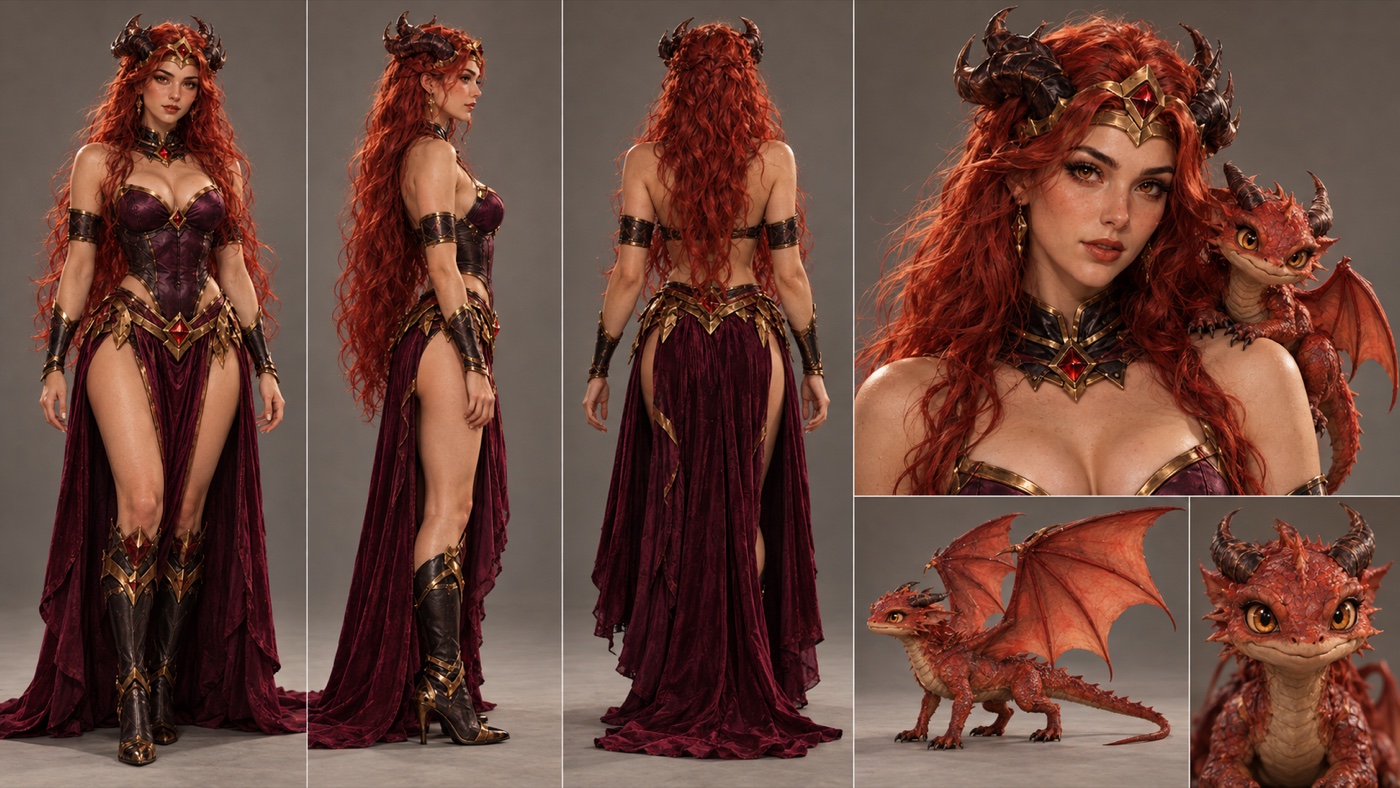
Check the dragon before you move on. It needs the same colour, horns and eyes in every panel. If it changes between panels, it will change in the video too.
Set it up and generate
Open ImagineArt+200 free credits, go to video and pick Seedance 2.5.
Add the character sheet as the only reference. Set the length to 15 seconds and the shape to 9:16. Paste the prompt below as it is.
The prompt does not describe her face, the costume or the dragon in words. It only tells the model to copy them from the sheet. So it works for anyone’s sheet without changes.
Use the uploaded character sheet as the absolute visual reference for both the woman and the small dragon. The woman’s face, hair, horns, headpiece, jewelry, costume and body: the same as in the reference image. The dragon: the same as in the reference image. Keep both consistent for the entire shot. No face morphing, no redesign, no costume changes.
15-second photorealistic dark-fantasy shot, one continuous take. An ancient weathered stone courtyard surrounded by massive gnarled trees, twisted roots, moss-covered stones and faint drifting mist. No modern objects, no text.
0–4 sec: Medium-wide shot from slightly below eye level. She stands alone in the center, weight shifted onto one hip, relaxed and graceful. Her hair and the velvet skirt move softly in the wind. She slowly lifts one hand, palm up, and a small flame ignites in her palm. She looks at it with a soft, knowing half-smile.
4–7 sec: She turns her wrist and the flame grows into a glowing fireball. She brings up her second hand and passes the fire between her palms with slow, fluid, dancer-like movements. The fire moves like soft ribbons along her forearms. Warm orange light plays across her face, collarbones and hair. Embers drift around her.
7–11 sec: The small dragon flies into frame from the right, wings beating, and lands on her shoulder, claws gripping the costume. It rubs its head against her cheek like a cat. She tilts her head toward it and smiles, still holding the fireball in her open palm. The camera slowly pushes in to a medium close-up of both of them.
11–15 sec: The dragon turns its head straight to the camera, opens its jaws and breathes a stream of fire directly into the lens. The flames fill the entire frame, then the image fades fully to black.
The dragon is not in frame and not visible before 7 sec.
Visual style: photorealistic live-action dark fantasy, realistic fire simulation, physically believable cloth and hair movement, volumetric haze, real skin texture, cool overcast ambient light contrasted with warm flickering firelight on her face, costume, stones and trees.
Camera: anamorphic look, 35mm at the opening, slow smooth push-in to 50mm, shallow depth of field, subtle handheld micro-movement, natural motion blur.
Constraints: one continuous shot, no cuts, no extra characters, no second dragon. She moves softly and gracefully — no aggressive or stiff poses, no clenched fists, no intimidating scowl. The fire stays in her hands until the dragon breathes. No cartoon fire, no glowing eyes, no excessive camera shake.
Why this prompt works
The time is split into four parts, each with one main action. The model knows what should be on screen at every second, so the video builds up step by step.
The light has two sides. Cool grey daylight from the sky, warm orange light from the fire. The fire lights up her face and the stones around her. That contrast gives it the look of a film.
The camera starts wide at 35mm and moves in slowly to 50mm when the dragon lands. You see the whole courtyard first, then the two faces up close, just in time for the dragon to look into the lens.
She moves softly. The prompt asks for dancer-like hands and a half-smile, and says no fists and no angry face. Fire magic pulls models toward battle poses, and those lines keep her calm and graceful.
The ending closes the video for you. The fire fills the frame and fades to black, so the reel has a clean last frame and loops well.
Where it goes wrong
| What you got | The fix |
|---|---|
| The dragon is on her shoulder from the start | Keep “The dragon is not in frame and not visible before 7 sec” |
| Two dragons appear | Keep “no second dragon”. Check that the sheet shows only one |
| The dragon looks like a cartoon or a toy | Make the sheet again. Keep “no toy-like or cartoon dragon” in the sheet prompt |
| Her face changes during the video | Use a sheet with a sharp, large face in the close-up panel |
| She makes fists or looks angry | Keep the line about soft, graceful moves and no scowl |
| The fire leaves her hands too early | Keep “The fire stays in her hands until the dragon breathes” |
| The fire looks flat and cartoonish | Keep “realistic fire simulation” and “no cartoon fire” |
| The video cuts to a new angle | Keep “one continuous shot, no cuts” |
| A grey studio wall shows up behind her | Add a line after the first paragraph: “Use only their appearance. Do not use the grey background or layout of the sheet.” |
Questions people ask
Which AI model makes this video?
We made it with Seedance 2.5 on ImagineArt+200 free credits. The video prompt is written for it: 15 seconds, one shot, one reference image.
Can I put myself in it?
Yes. That is what the character sheet is for. Make the sheet from your own photo, and the video copies your face from it.
Does it work for a man?
The costume and the video prompt are written for a woman. For a man, change “woman” to “man” and “she” and “her” to “he” and “his” in both prompts, and swap the corset and skirt for a leather and velvet armour coat.
Is it vertical?
Yes, 9:16, ready for Reels, TikTok and Shorts.
Is it free?
The prompts are free. ImagineArt runs on credits, so the video itself uses credits from your account.
Ready? Open ImagineArt+200 free credits, make your sheet and paste the video prompt.
Why this workflow runs here
Everything in one place
Free to start
Minutes, not days
Make yours in the next 30 min
You have the whole prompt and every setting. The only thing left is an account, and that takes a minute.
- 200 free credits on sign-up
- Prompts ready to paste
- Upgrade only if you want more
Referral link — if you subscribe I earn a commission, at no extra cost to you. More on that.
Related prompts
 Cinematic Free
 Action Scene AI Video Prompt: Bike Jump and Fight
Action scene AI video prompt for Seedance 2.5. You jump a futuristic bike off a ramp, land in fire and fight on a burning highway. 15 seconds, one photo.
 Cinematic Free
 Anime Borscht — The Whole Recipe in One 25-Second Video
One prompt cooks Ukrainian red borscht from raw meat to a served bowl, in glossy anime style. Six stages, hands and food only, vertical for Reels.
 Cinematic Free
 Butterfly Eyes Prompt: The Eye Transition AI Video
A free Seedance 2.5 prompt. A black butterfly flies at the camera, the lights go out, and its wing spots become your glowing eyes. 15 seconds, two reference images.