Car Jump AI Video Prompt: Your Car Flies Behind You
A car jump AI video prompt for Seedance 2.5. You sit calm in the desert while your own car flies over you and lands in a wall of dust. 12 seconds, 9:16.
Have it running in three steps
- 1
- 2Open AIReel
- 3Paste it and generate
What you'll need
30 min- AIReel
This car jump AI video prompt puts you in a camping chair in the desert. You look at the camera and move one hand. Behind you, a red sports car flies high through the air, lands in a big cloud of dust and drives past your shoulder. You never look back.
The joke is the calm face. The car is loud and huge, and she does not care.
The motion comes from a real trend video. We turned it into a grey 3D layout, so the model copies the camera and the timing but not the people or the truck. You can download that layout below and put your own person and car into it.
The whole process
- Download the grey layout video from this page.
- Make a photo of your character, full body.
- Make a picture of your car from four sides.
- Open AIReel, pick Seedance 2.5, add the layout video and both pictures, and paste the final prompt.
What happens in 12 seconds
| Time | What happens |
|---|---|
| 0–4s | She sits alone in the chair, legs crossed, and lifts one hand as she talks |
| 4–8s | The car flies in high behind her, nose up, dust falling under it |
| 8–10s | It lands hard. Orange dust fills the whole background |
| 10–12s | It drives past close behind her chair. She smiles at the camera |
Download the layout video
This grey video guides all the motion. Everything in it is grey clay: the woman, the chair, the truck, the ground. There are no real faces in it, so the final video cannot copy anyone.
We made it from the original trend video with Seedance 2.5. Download it here and use it as it is.
Make your character
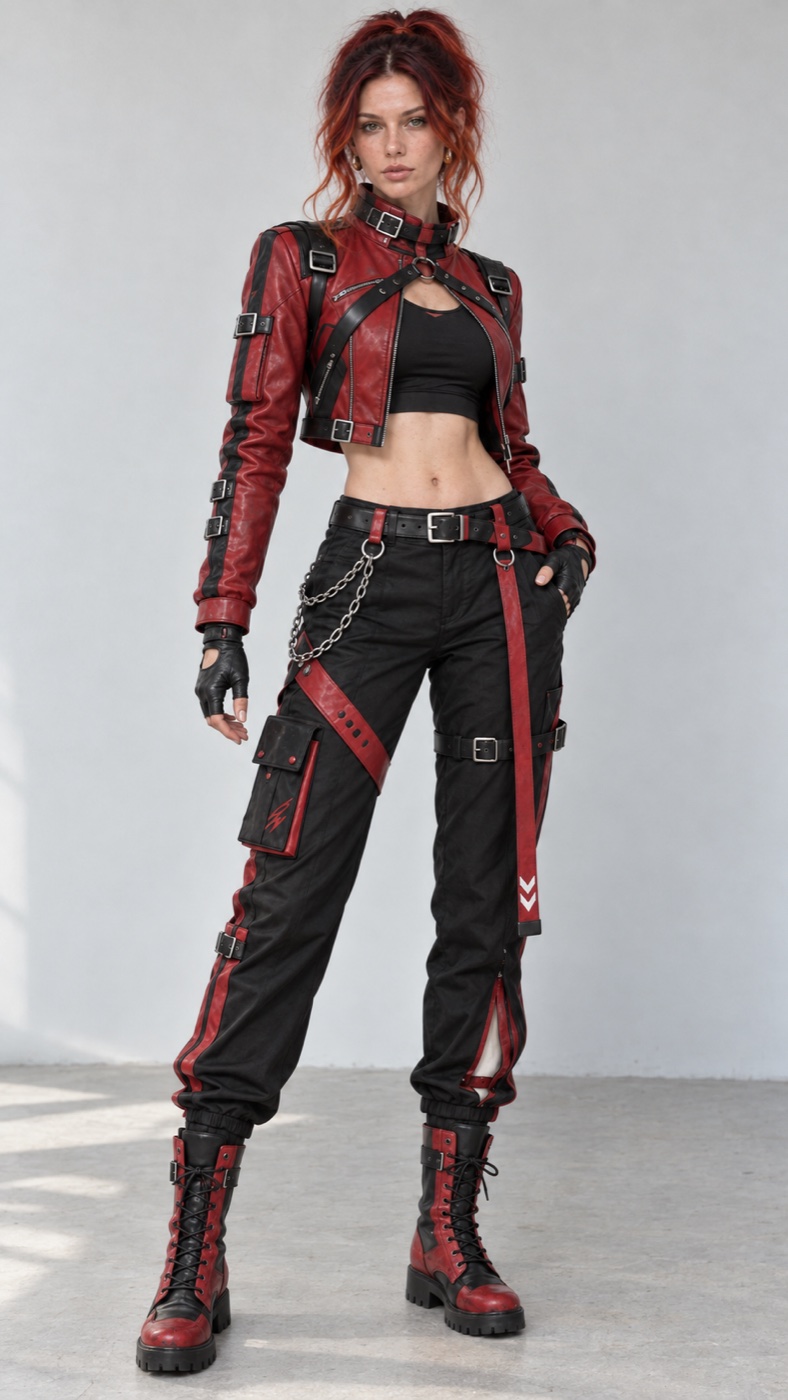
The final video needs one clear picture of the person, from head to boots. The outfit must be easy to see, because it is on screen for all 12 seconds.
Add a clear photo of your face to Nano Banana 2 in AIReel, set 9:16 and use this prompt. Change the outfit words if you want a different look.
Full-body studio photo of the person from @Image1. Keep the exact face, facial features, skin tone, freckles and age from @Image1. Do not change or beautify the face. Messy copper-red hair tied up high, loose strands falling on the face, small gold hoop earrings. Outfit: cropped red-and-black leather moto jacket with black harness straps and silver buckles, black crop top, black fingerless leather gloves, black cargo pants with red straps, a thigh pocket and a silver chain, red-and-black lace-up combat boots. She stands straight, head to boots in frame, relaxed pose, looking at the camera. Plain light-grey wall and pale concrete floor, soft even daylight, sharp photo, real skin texture. One person only. No text, no logos, no watermark.
This is the character we used.
Make your car
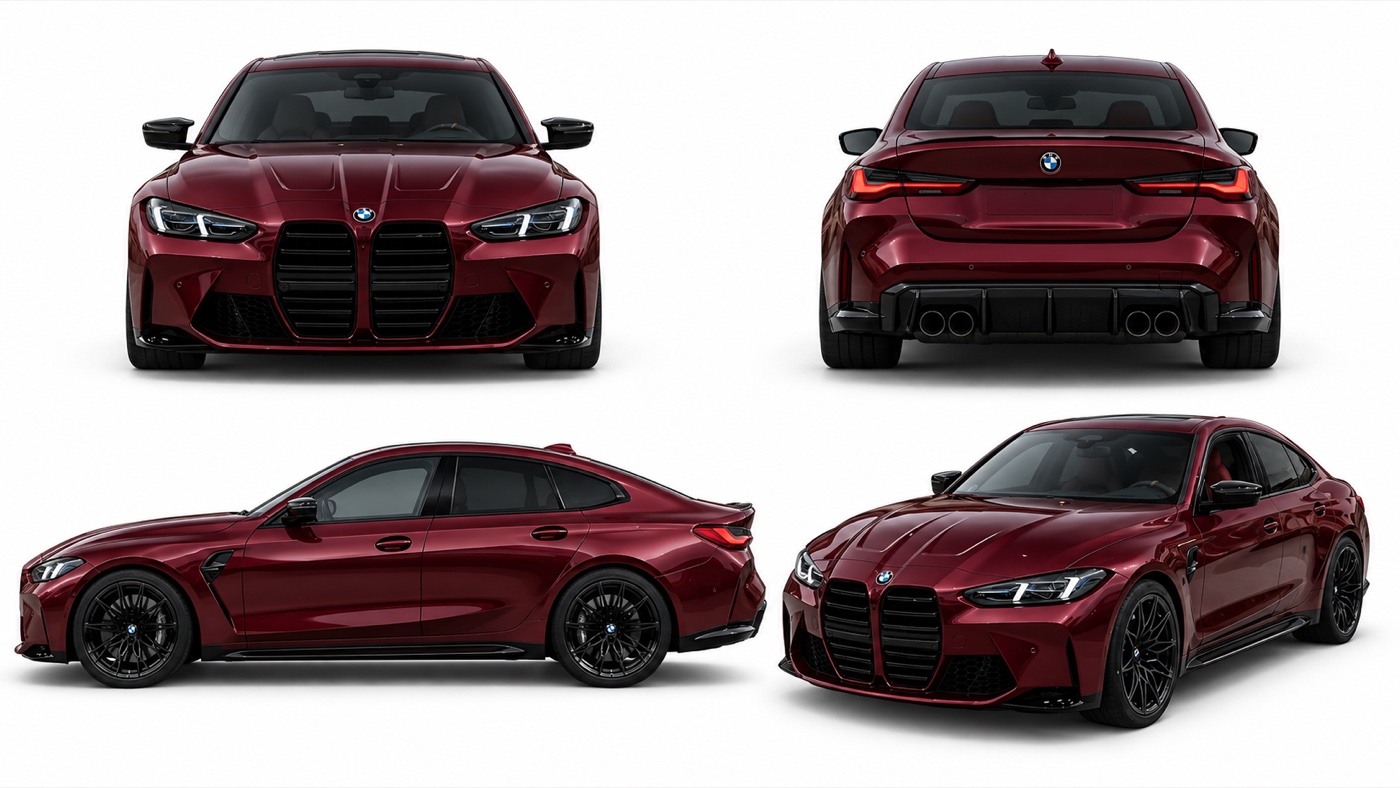
The car flies toward the camera, turns, lands and drives past sideways. So the model has to see it from the front, the back and the side. One photo is not enough.
Make one picture with four views of the same car. Use GPT Image 2.5 or Nano Banana 2 in AIReel, shape 16:9. If you have photos of your own car, add them as references and say so in the first line.
A product reference sheet of one car on a plain white background, four views in a 2x2 grid: front view top left, rear view top right, side view bottom left, front three-quarter view bottom right. The car is a low four-door sport sedan in dark cherry-red metallic paint, with a large black vertical double grille, thin sharp LED headlights, black mirrors, a black rear diffuser with four exhaust tips, and black multi-spoke wheels with low-profile tyres. The same car in all four views, same colour and details. Studio lighting, soft shadow under the car, sharp photo-real render. No people, no text, no labels, no watermark.
This is the car we used.
Make the final video
Open AIReel and pick Seedance 2.5. Add three files in this order:
- @Video1: the grey layout video from step 1
- @Image1: your character from step 2
- @Image2: your car from step 3
Set the length to 12 seconds and the shape to 9:16. Paste the prompt below. If your character or car look different from ours, change the words in the SUBJECTS block to match your pictures.
[LOOK — LOCKED FOR THE WHOLE VIDEO] Photorealistic live-action footage, long telephoto lens at eye level: flattened perspective, very shallow depth of field, the woman sharp, the desert behind her soft and creamy. Fine film grain, soft highlight roll-off, rich but not crushed blacks, gentle contrast. Warm golden-hour grade: amber skin and hair, honey-gold grass, dusty brown-orange haze. Slight handheld drift, exactly as in @Video1.
[REFERENCES] @Video1 is a blockout reference. For the woman, the chair, the ground and the camera, it is a fine blockout: keep her exact position in frame, seated crossed-leg pose, head turns, hand gestures and their timing, plus the camera position, framing, drift and small reframing. For the grey pickup truck it is only a coarse guide: take only its timing, flight path, jump arc, landing spot and drive path behind the woman. Do not use the truck’s shape, size, height, grille, lettering, lights or wheels. Do not use any grey clay material, grey sky or empty grey background. The grey mannequin in @Video1 corresponds to the woman from @Image1. The grey pickup truck in @Video1 corresponds to the car from @Image2. @Image1 defines the woman’s face, freckles, copper-red hair, gold hoop earrings and full outfit. Do not use its white studio wall, concrete floor or standing pose. @Image2 shows the front, rear, side and three-quarter views of one and the same car. It defines the car’s body shape, size, proportions, colour, grille, lights and wheels. Do not use its white background. The video contains only one car.
[SUBJECTS] Woman: the woman from @Image1, loose messy copper-red hair tied up with strands on her face, freckles, small gold hoops. Cropped red-and-black leather moto jacket with black harness straps and silver buckles, black crop top, black cargo pants with red straps and a silver chain, red-and-black lace-up combat boots. She sits in a black folding camp chair with her legs crossed. Her face stays calm and unbothered: relaxed brows, slow blinks, a small half-smile, she never flinches. Car: the dark cherry-red metallic sport sedan from @Image2. Low four-door body, long hood, big black vertical double kidney grille, thin sharp LED headlights, black mirrors, black multi-spoke wheels with low-profile tyres. It keeps its real sedan size: when it drives behind her, its roof is only a little higher than her head and it does not fill the frame like a tall pickup.
[SCENE] Open high desert at golden hour. Flat ground of dry golden grass and pale sand, low green creosote bushes and a few Joshua trees in the middle distance, soft brown mountains far behind under a hazy warm sky. Low late-afternoon sun behind and to the side: warm rim light on her hair and on the car’s paint, soft warm fill on her face, long soft shadows.
[Stage 1 — 0 to about 4 seconds] Initial state: the woman sits alone in the chair, the desert is empty and quiet behind her. Primary event: she looks calmly at the camera and raises one hand in a small, relaxed gesture, as in @Video1. End state: she is still seated, legs crossed, the sky above her is empty.
[Stage 2 — about 4 to 8 seconds] Continue from the previous stage: same woman, same pose, same framing. Primary event: the red sedan flies into the upper frame behind her, high in the air, nose tilted up, wheels hanging down, orange-brown dust trailing below it, moving slowly as if in slow motion. End state: the car is at the top of its arc above and behind her; she keeps her relaxed pose and never looks back.
[Stage 3 — about 8 to 12 seconds] Continue from the previous stage: same woman, same car, same colour and size. Primary event: the car lands hard behind her, throws up thick glowing dust clouds lit by the low sun, then drives past close behind her chair from left to right. End state: the car’s red side panel and dark window pass right behind her shoulder in soft focus, dust drifts across the frame, she smiles calmly at the camera.
[AUDIO] <Soft desert wind and light grass rustle>, <a deep sport engine roaring as the car flies in>, <a heavy thud and tyre crunch on landing>, <gravel and sand spraying>, <the engine passing close behind her>. No music, no dialogue.
[MAINTAIN CONSISTENCY] One woman and one car only. Keep her face, hair, outfit and pose, and the car’s shape, colour, size and design, the same in every frame. The camera stays on the woman the whole time.
[AVOID] No Ford grille, no “FORD” lettering or badge, no pickup truck body, no truck bed, no lifted suspension, no big off-road tyres, no roof light bar, no amber lights on the hood, no yellow fog lamps. Do not copy the pickup truck’s size or height from @Video1; the car is a low sedan. No grey clay surfaces, no mannequin skin, no text, no watermark, no split screen, no morphing, no extra cars or people.
Why this prompt works
The grey layout carries all the motion. Her hand moves, the car flies and the camera drifts at the same seconds as in the trend. The prompt does not have to describe any of it in words.
Every file has one job. The layout gives motion, the character picture gives the face and clothes, and the car picture gives the car. Each line also says what not to take, like the white studio wall or the truck’s grille.
The desert is written in words. The layout is grey, so the model needs to hear about the golden grass, the Joshua trees, the low sun and the orange dust.
The action is split into three stages, and each stage says what is true at the end. The car is at the top of its jump at 8 seconds. It is behind her shoulder at 12. This keeps the model from skipping or repeating the jump.
Where it goes wrong
| What you got | The fix |
|---|---|
| The car is as tall as a truck | Keep “Do not copy the pickup truck’s size or height from @Video1” and the line about the roof being a little higher than her head |
| “FORD” letters or a truck grille on your car | Keep the AVOID block and “Do not use the truck’s shape, size, height, grille, lettering” |
| Grey patches or a grey sky | Keep “Do not use any grey clay material, grey sky or empty grey background” |
| Two cars in one shot | Keep “The video contains only one car” |
| She turns around to look at the car | Keep “she never flinches” and “never looks back” |
| Her outfit changes when the dust hits | Use a sharper character picture, head to boots |
| The hand moves at the wrong time | Check that @Video1 is the layout video from step 1 |
Questions people ask
Which model makes this? Seedance 2.5 on AIReel makes the final video. The character and car pictures come from an image model.
Can I put myself in it? Yes. Use your own face photo in step 2.
Can I use my own car? Yes. Add photos of your car in step 3, or change the car words in the prompt.
Is it vertical? Yes. Set 9:16 for both videos. It is made for Reels and TikTok.
Is it free? The prompts are free. AIReel lets you sign up for free, and videos cost credits. The code W3Q01VVD gives 15% off.
Why not upload the trend video straight away? Then the model sees real faces and a real truck, and copies them. The grey layout keeps only the motion.
Ready? Open AIReel, download the layout video and pick Seedance 2.5.
Why this workflow runs here
Seedance 2.5, up to 30 seconds
Vertical is one click
Free to start
Make yours in the next 30 min
You have the whole prompt and every setting. The only thing left is an account, and that takes a minute.
- Free to start
- Prompts ready to paste
- Upgrade only if you want more
Related prompts
 Cinematic Free
 Action Scene AI Video Prompt: Bike Jump and Fight
Action scene AI video prompt for Seedance 2.5. You jump a futuristic bike off a ramp, land in fire and fight on a burning highway. 15 seconds, one photo.
 Cinematic Free
 Anime Borscht — The Whole Recipe in One 25-Second Video
One prompt cooks Ukrainian red borscht from raw meat to a served bowl, in glossy anime style. Six stages, hands and food only, vertical for Reels.
 Cinematic Free
 Butterfly Eyes Prompt: The Eye Transition AI Video
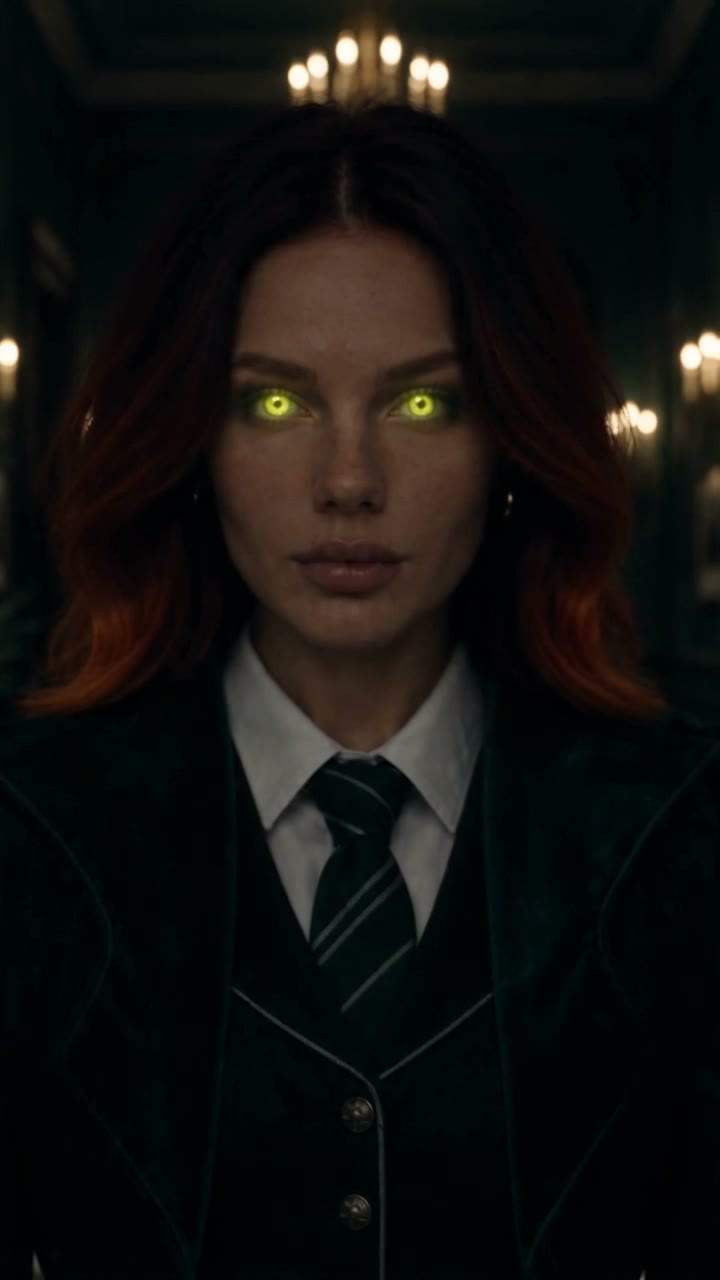
A free Seedance 2.5 prompt. A black butterfly flies at the camera, the lights go out, and its wing spots become your glowing eyes. 15 seconds, two reference images.