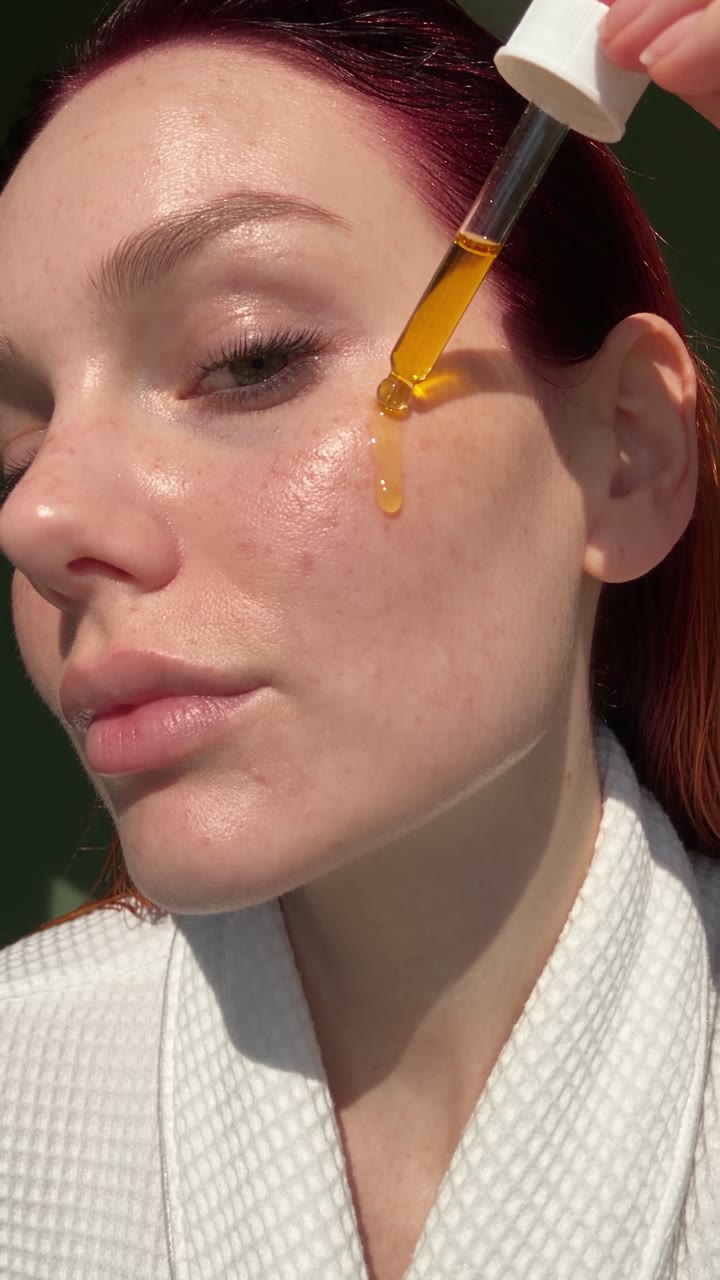
How to Make AI Photos That Don't Look AI: 5 Prompt Fixes
Same face, same model, two prompts. Five fixes that turn a glossy AI portrait into a photo that looks like a friend took it. Plus the first-frame trick for talking heads that don't look plastic. All 12 prompts are free.

Have it running in three steps
- 1
- 2Open ImagineArt
- 3Paste it and generate
What you'll need
10 min- ImagineArt

Every picture on this page shows the same woman, made with the same model: GPT Image 2 in ImagineArt+200 free credits, with the same reference photo for her face. The only thing that changes is the prompt.
On the left is the kind of prompt most people still write: masterpiece, 8k, perfect lighting. On the right is a prompt that describes a real photo. The model is not the problem. The words are.

The whole process
- Name a real camera, not a quality level.
- Describe the light that is actually there.
- Add proof of real life: clutter, cables, crumbs.
- Catch her mid-moment, not posing.
- Ask for imperfection on purpose, then list what not to do.
Why AI photos look AI
They are too clean. The skin is airbrushed, everything glows, the background melts into creamy blur, and she stares straight into the lens. Real photos almost never look like that.
Words like masterpiece, 8k, ultra detailed and perfect lighting push the model toward stock-photo polish. That polish is exactly what people’s eyes now read as “AI”. So the fix is not a better model. It is describing a photo a real person would take.
Fix 1: name a camera, not a quality
Write the device and the situation, and the model copies its flaws: phone noise, flat colours, a slightly awkward angle. “Quick iPhone photo a friend took across the table” does more than any quality word.
Use the reference image only for the woman’s identity: same face, green eyes, freckles, long burgundy-to-copper ombre hair. Ignore the reference layout, outfit and background.
A quick candid iPhone photo a friend took of her across a small café table. She sits holding a cup of coffee with both hands, wearing a cream knit sweater, half-smiling as if mid-sentence, eyes slightly off the lens. Shot on an iPhone rear camera, slightly high angle, casual framing with the table edge cutting the bottom of the frame. Overcast daylight from the café window on one side, the other side of her face a little darker. Background: other tables, a menu chalkboard, a person’s arm half in frame, all naturally soft but not creamy bokeh. Real skin texture: visible pores, freckles, peach fuzz, slight redness on the nose and cheeks, no makeup glow. Fine phone sensor noise, natural phone colors, no filter. Negative: studio lighting, airbrushed skin, plastic skin, glossy, beauty filter, dramatic bokeh, perfect symmetry, posed, 8k, masterpiece.
Fix 2: describe the light that is really there
“Golden hour” is the most overused light in AI images. Name a real source instead: one bulb, a window, a fridge, a phone screen. Say where the shadows fall. A bit underexposed is fine. Real rooms are darker than renders.

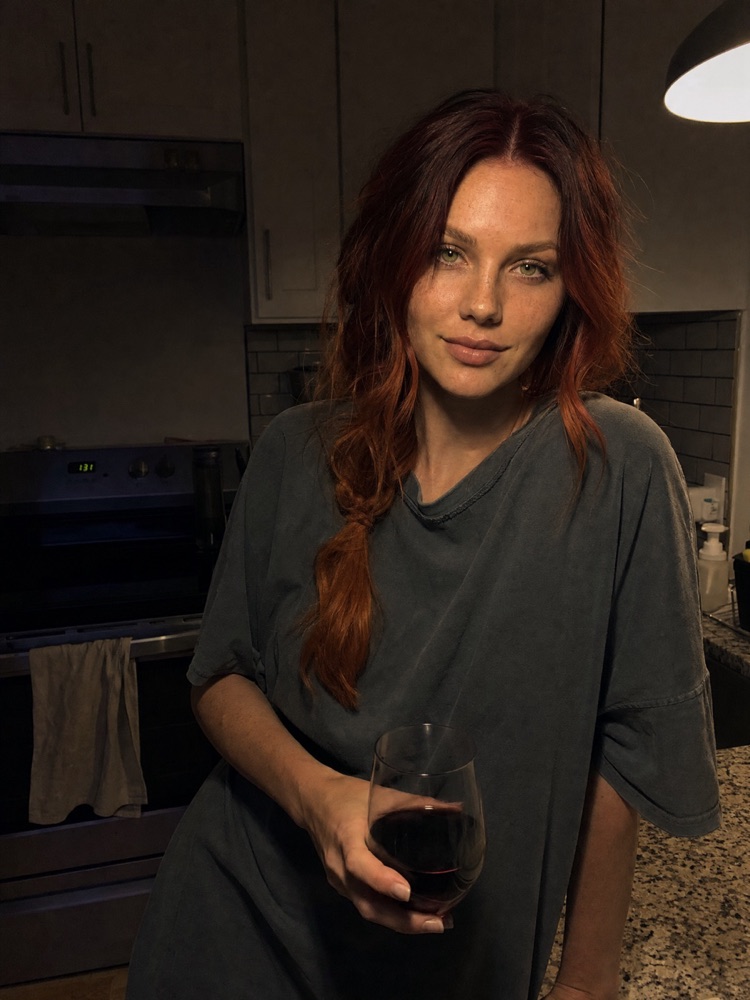
Use the reference image only for the woman’s identity: same face, green eyes, freckles, long burgundy-to-copper ombre hair. Ignore the reference layout and background.
A candid iPhone photo of her at home in a small apartment kitchen late at night, leaning on the counter with a glass of wine, wearing an old oversized grey t-shirt, hair loosely tied. The only light is one yellow tungsten bulb above the counter: warm orange cast, hard shadows under her eyes and chin, the corners of the room falling into darkness. Shot on an iPhone, slight noise in the shadows, a bit underexposed, natural phone colors, no filter. Real skin texture: pores, freckles, slight shine on the nose, faint under-eye shadows. Negative: golden hour, sunlight, lens flare, studio lighting, glowing skin, airbrushed, beauty filter, cinematic grading, 8k, masterpiece.
Fix 3: add proof of real life
Clutter is the strongest realism signal there is. A tangled charger, a chipped mug, crumbs, sticky notes, a half-eaten apple. Nobody styles their desk before a friend snaps a photo, so a perfect desk tells the eye it is fake.


Use the reference image only for the woman’s identity: same face, green eyes, freckles, long burgundy-to-copper ombre hair. Ignore the reference layout and background.
A candid iPhone photo of her working at a messy home desk, typing on an old laptop with stickers on the lid. On the desk: a tangled white charger cable, a chipped mug with a tea bag string hanging out, cookie crumbs, sticky notes on the monitor edge, a hair tie, an open notebook with scribbles, a half-eaten apple. She glances at the screen with a tired focused look, hair clipped up messily, wearing a hoodie. Flat daylight from a window on the left. Shot on an iPhone, natural phone colors, slight noise, no filter. Real skin texture: pores, freckles, no makeup. Negative: minimalist, clean desk, aesthetic styling, studio lighting, airbrushed skin, beauty filter, creamy bokeh, 8k, masterpiece.
Fix 4: catch her mid-moment
Posed means fake. Ask for the half-second between poses: mid-laugh, eyes half shut, a hand moving, looking at someone outside the frame. A stranger walking past, slightly blurred, sells it even more.
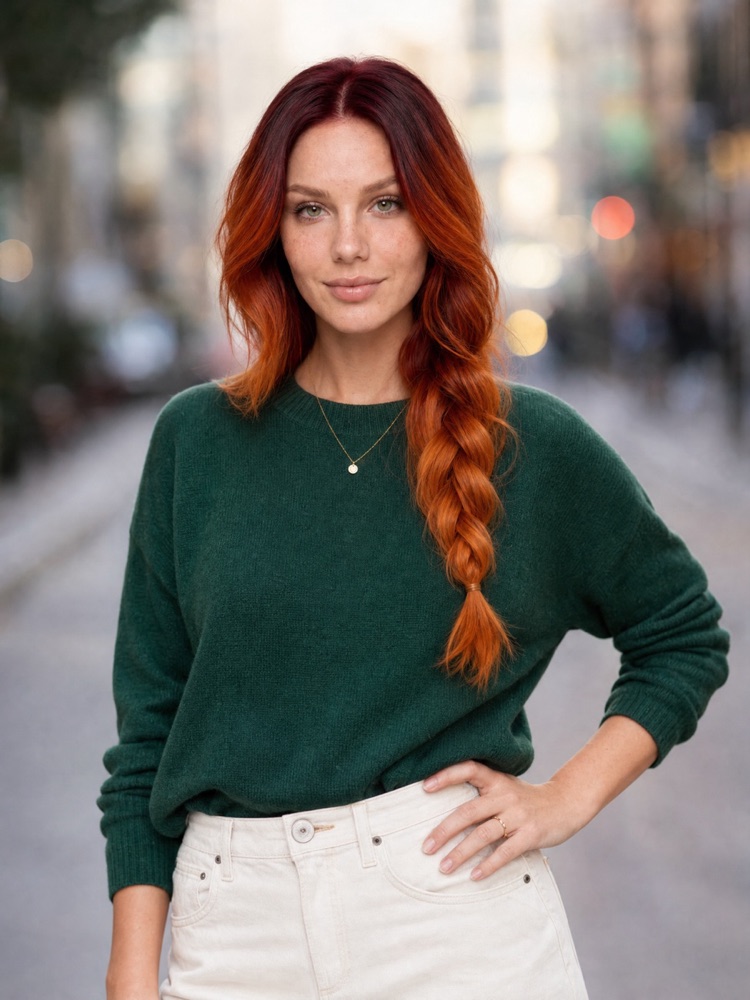

Use the reference image only for the woman’s identity: same face, green eyes, freckles, long burgundy-to-copper ombre hair. Ignore the reference layout and background.
A candid iPhone photo a friend snapped of her on a city sidewalk, caught mid-laugh: head tilted back, eyes squeezed half shut, one hand coming up toward her mouth, looking away from the camera at someone off-frame. Hair blown slightly across her face by the wind. Wearing a denim jacket over a striped top, a tote bag on her shoulder. Overcast afternoon light, a stranger walking past half in frame and slightly motion-blurred. Shot on an iPhone, natural colors, slight noise, no filter. Real skin texture: pores, freckles, laugh lines around the eyes. Negative: posed, looking at camera, symmetrical smile, fashion pose, studio lighting, airbrushed skin, creamy bokeh, 8k, masterpiece.
Fix 5: break it on purpose
Ask for the mistakes a real camera makes: harsh on-camera flash, a tilted frame, grain, a blink, a date stamp in the corner. Then say what you do not want, in plain words: no creamy bokeh, no studio lighting.


Use the reference image only for the woman’s identity: same face, green eyes, freckles, long burgundy-to-copper ombre hair. Ignore the reference layout and background.
A messy flash snapshot of her at a rooftop party at night, taken with a cheap point-and-shoot camera with harsh on-camera flash. The frame is tilted about 10 degrees, she is off-centre to the right, cut slightly at the shoulder. Flash makes her face bright and a little blown out with a hard shadow behind her, while the background drops almost to black with a few blurry string lights. She is mid-sentence, holding a plastic cup, eyes half-blinking. Black dress, hair a bit messy. Slight motion blur, visible film grain, a faint orange date stamp in the bottom right corner. Negative: centered composition, creamy bokeh, cinematic lighting, studio lighting, airbrushed skin, perfect smile, 8k, masterpiece.
Bonus: talking heads that don’t look plastic
This is where the AI look hurts most. If you let a video model invent the face, it invents it smooth, glossy and symmetrical. Video models are good at motion and bad at skin.
So don’t make them do both. Make the first frame yourself, as a photo, with everything above: a real room, window light, visible pores, a hand mid-gesture. Then give that frame to the video model and only describe the motion and the voice.
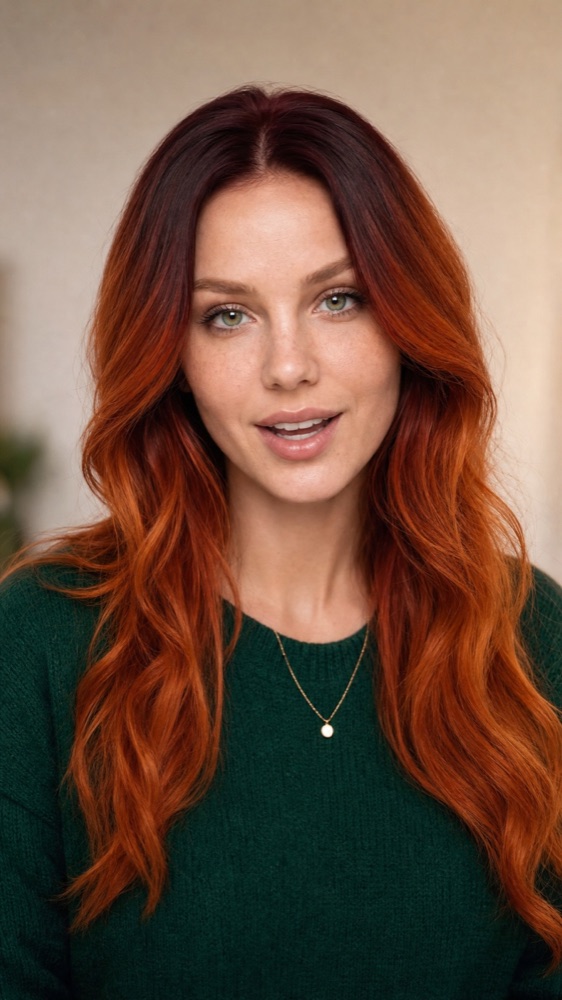

Use the reference image only for the woman’s identity: same face, green eyes, freckles, long burgundy-to-copper ombre hair. Ignore the reference layout and background.
A vertical selfie-video still from a phone propped on a desk: she is recording a talking-head video for her followers in her bedroom, sitting slightly off-centre, framed from the chest up, mid-word with her mouth slightly open and one hand raised mid-gesture. Light comes from a window on her left, soft and uneven, the right side of her face a little darker. Behind her: an unmade bed, a clothes rack with a few jackets, a plant, a fairy-light strand switched off. Shot on an iPhone front camera, slight wide-angle distortion, natural phone colors, fine noise, no filter. Real skin texture: visible pores, freckles, peach fuzz, a small blemish on the chin, faint under-eye texture, natural sheen on the nose and forehead. Negative: ring light, studio lighting, glossy skin, airbrushed, beauty filter, symmetrical, perfectly centered, digital human, avatar, 8k, masterpiece.
The template
Swap the brackets for your own scene. Keep the order: who, what is happening, which camera, which light, what is lying around, the skin, then the negatives.
Use the reference image only for the person’s identity: [face details]. Ignore the reference layout and background.
A candid [phone / point-and-shoot / film camera] photo of [who] [where], [doing what, caught mid-moment], [looking away / mid-word / mid-laugh]. [Clothes, a little lived-in]. Light: [one real source, where it comes from, where the shadows fall]. Around them: [3–5 everyday objects or people half in frame]. [One imperfection: tilt / grain / soft focus / flash / date stamp]. Real skin texture: visible pores, [freckles / fine lines / small blemish], natural sheen, no makeup glow. Natural colours, no filter. Negative: studio lighting, airbrushed skin, plastic skin, beauty filter, creamy bokeh, perfect symmetry, posed, 8k, masterpiece.
masterpiece, best quality, 8k, ultra detailed, hyperrealistic portrait of a beautiful woman holding a cup of coffee in a café, cream knit sweater, perfect lighting, flawless glowing skin, perfect makeup, looking directly at the camera with a perfect smile, cinematic lighting, rim light, creamy bokeh background, sharp focus, award-winning photography, trending on artstation


masterpiece, 8k, ultra detailed, beautiful woman in a modern kitchen bathed in perfect golden hour glow, warm magical sunlight, lens flare, glowing flawless skin, perfect hair, holding a wine glass, elegant pose, looking at camera, cinematic color grading, dreamy atmosphere, creamy bokeh, award-winning photography


masterpiece, 8k, ultra detailed, beautiful woman working at a perfectly clean minimalist white desk, sleek laptop, single succulent plant, aesthetic lifestyle shot, perfect styling, flawless skin, soft perfect lighting, smiling at the camera, pinterest aesthetic, clean composition, creamy bokeh, high-end commercial photography


masterpiece, 8k, ultra detailed, beautiful woman posing on a city street, standing perfectly still, hand on hip, staring directly into the camera with a perfect symmetrical smile, flawless skin, perfect hair, fashion model pose, perfect lighting, creamy bokeh city background, sharp focus, magazine cover quality


masterpiece, 8k, ultra detailed, beautiful woman at a rooftop party at night, perfectly centered symmetrical composition, glowing fairy lights, dreamy creamy bokeh, perfect cinematic lighting, flawless glowing skin, elegant black dress, holding a champagne glass, perfect smile at the camera, ultra sharp, award-winning photography


AI avatar talking head frame, beautiful woman speaking to the camera, perfect symmetrical face, flawless smooth glossy skin, perfect makeup, ring light reflection in the eyes, plain blurred background, perfectly centered, digital human, ultra smooth, 8k, masterpiece, perfect lighting, glamour retouch
Want more talking-head prompts?
If talking heads are what you make, we have free talking-head prompts on this site, and a 50-prompt Talking Head collection with face-locked portraits ready to animate.
Every image on this page was made with GPT Image 2 in ImagineArt+200 free credits.
Why this workflow runs here
Everything in one place
Free to start
Minutes, not days
Make yours in the next 10 min
You have the whole prompt and every setting. The only thing left is an account, and that takes a minute.
- 200 free credits on sign-up
- Prompts ready to paste
- Upgrade only if you want more
Referral link — if you subscribe I earn a commission, at no extra cost to you. More on that.