Luxury Macaron Commercial — Product Sheets, Then a 20-Second Ad
Two prompts: a product sheet for each macaron, then a 20-second food commercial with a bite, a caramel pour and a five-tier tower. Swap the macarons for your own products.
Have it running in three steps
- 1
- 2Open Creatify
- 3Paste it and generate
What you'll need
30 min- Creatify

A woman squeezes a pistachio macaron until the filling bulges out. She bites a strawberry one in slow motion. Then lemon glaze drips, cookie crumbs fall and caramel pours. It ends on a tower of five macarons with red sauce running down.
It is a 20-second food ad in the style of a big dessert brand. We made it with five macarons, but it works for any food: cakes, donuts, burgers, sushi.
You do not have to rewrite the prompts yourself. Give both prompts to the Creatify agent, add photos of your own products, and ask it to adapt them. The agent swaps the macarons for your products and changes the drips, pours and toppings to match. The prompts below are what we used. Treat them as a reference, not a fixed template.
The whole process
- Take one clear photo of each of your five products.
- Open the Creatify agent. Give it the photos and both prompts from this page.
- Ask it to make a product sheet for each product first, with GPT Image 2.5.
- Check the five sheets.
- Ask it to adapt the video prompt to your products and generate the video with Seedance 2.5 and the five sheets as references.
The nine stages
| Stage | Time | What happens |
|---|---|---|
| 1 | 0–2s | Fingertips hold the pistachio macaron. Focus moves to the filling |
| 2 | 2–5s | The fingers squeeze. The shells crack, the filling bulges out |
| 3 | 5–7s | She brings the strawberry macaron to her lips and stops |
| 4 | 7–9s | The bite. Crumbs in the air, cream on her lip |
| 5 | 9–11s | She chews with her eyes closed and smiles |
| 6 | 11–13s | A drop of lemon glaze falls on the cut lemon macaron |
| 7 | 13–15s | Cookie crumbs rain onto the floating vanilla macaron |
| 8 | 15–17s | Salted caramel pours onto the banana macaron |
| 9 | 17–20s | The five-tier tower. Red sauce runs down. A whispered line |
Give the agent your products and both prompts
Open Creatify and start a chat with the agent. Upload one photo of each product. Then paste both prompts from this page: the product sheet prompt and the video prompt.
Now tell the agent what to do, step by step. This is the message we would send. Change the words in the brackets.
I uploaded 5 photos of my products: [product 1], [product 2], [product 3], [product 4], [product 5]. I also pasted two reference prompts: a product sheet prompt and a video prompt. They were written for macarons.
Work in two steps. Do not skip step 1.
Step 1. Use the product sheet prompt with GPT Image 2.5. Make one 16:9 product sheet for each of my 5 photos, one photo per sheet. Show me the 5 sheets and wait for my OK.
Step 2. Rewrite the video prompt for my products. Replace every macaron with one of my products. Change the fillings, drips, pours, toppings and colors so they fit my products. Keep the structure, the timing and the camera work. Then generate the video with Seedance 2.5 and the 5 product sheets as the references, in the same order as the products in the prompt. 9:16, 20 seconds.
Make the product sheets
The agent uses this prompt once per product. Each sheet has a large hero shot, nine views from every side, a cut in half and a macro detail. Only the product photo goes in. The background colour is picked to contrast with the product.
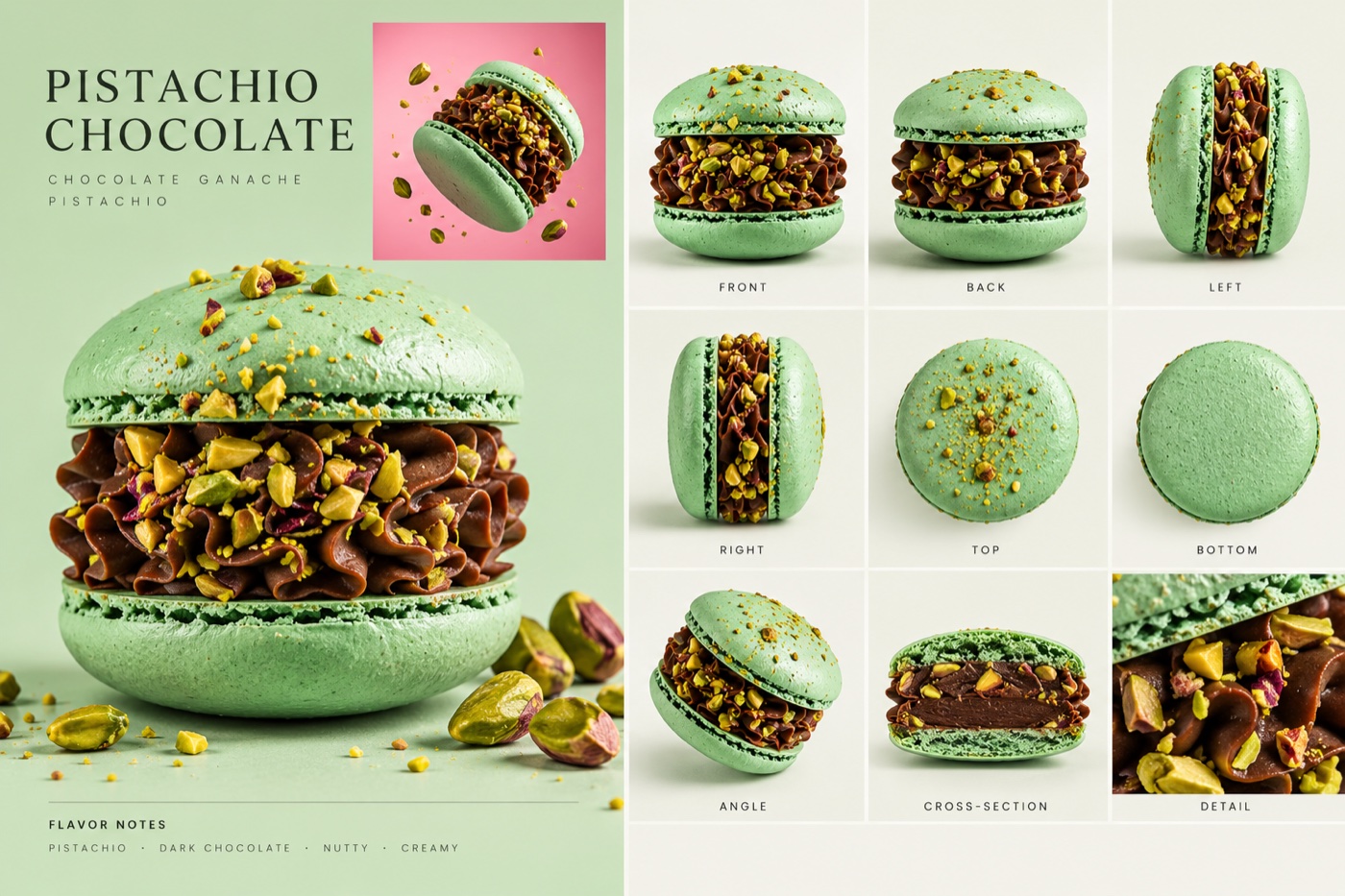
Create a premium ultra-photorealistic PRODUCT SHEET based strictly on the uploaded product photo.
Use the uploaded image as the only source of truth. Preserve the exact product:
- shape and proportions
- height and width
- colors
- textures
- filling, layers or interior
- toppings, garnish and decorations
Do not redesign the product or invent ingredients.
LAYOUT: Create one clean horizontal 16:9 editorial product sheet.
LEFT:
- large hero 3/4 product view
- product name
- short ingredient/flavor description
- small square inset showing the product floating in the air on a contrasting background color
RIGHT: Create a clean 3×3 grid:
FRONT BACK LEFT RIGHT TOP BOTTOM ANGLE CROSS-SECTION DETAIL
VIEW ACCURACY: Show the same exact physical product in every panel.
Preserve its real proportions in FRONT, BACK, LEFT, RIGHT, ANGLE and CROSS-SECTION. Never flatten, shorten, stretch or normalize the product.
TOP and BOTTOM must be true 90° views. Only show decorations that would actually be visible from that angle. Do not move toppings or garnish to another position.
CROSS-SECTION: Create a realistic vertical cut through the center. Preserve the original external height and width. Show only internal layers or textures supported by the reference image. Do not invent hidden ingredients.
DETAIL: Macro close-up of the most distinctive texture or ingredient.
STYLE: Luxury commercial food/product photography. Soft diffused studio lighting. Realistic shadows and textures. Clean premium editorial layout. Minimal typography and thin grid dividers. No people, hands, packaging, logos or watermark.
BACKGROUND: Choose a soft background color that contrasts beautifully with the dominant color of the uploaded product.
CRITICAL: The uploaded product must remain visually consistent across the entire sheet. Reference accuracy is more important than creative interpretation.
The other four sheets we used:
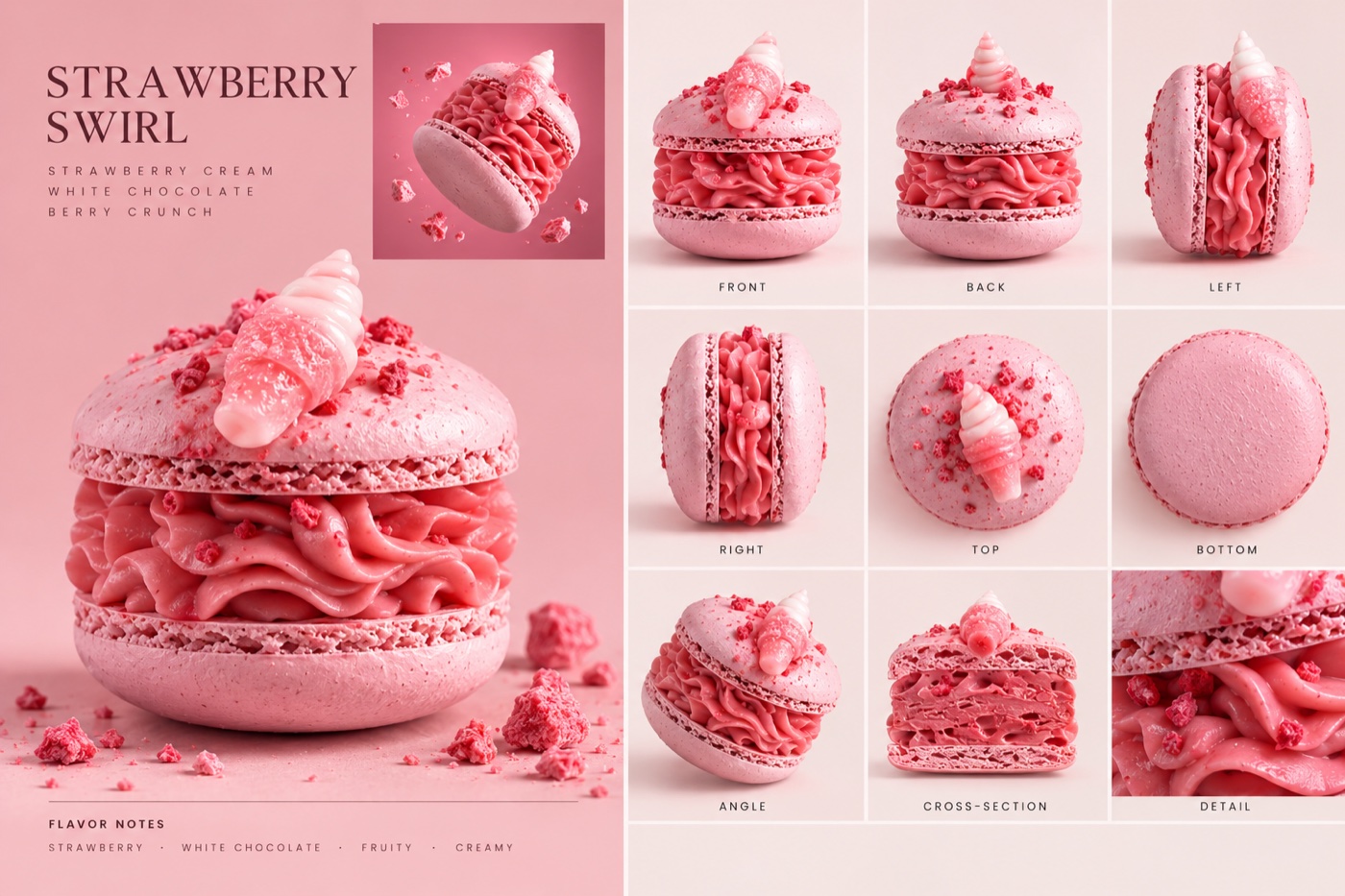
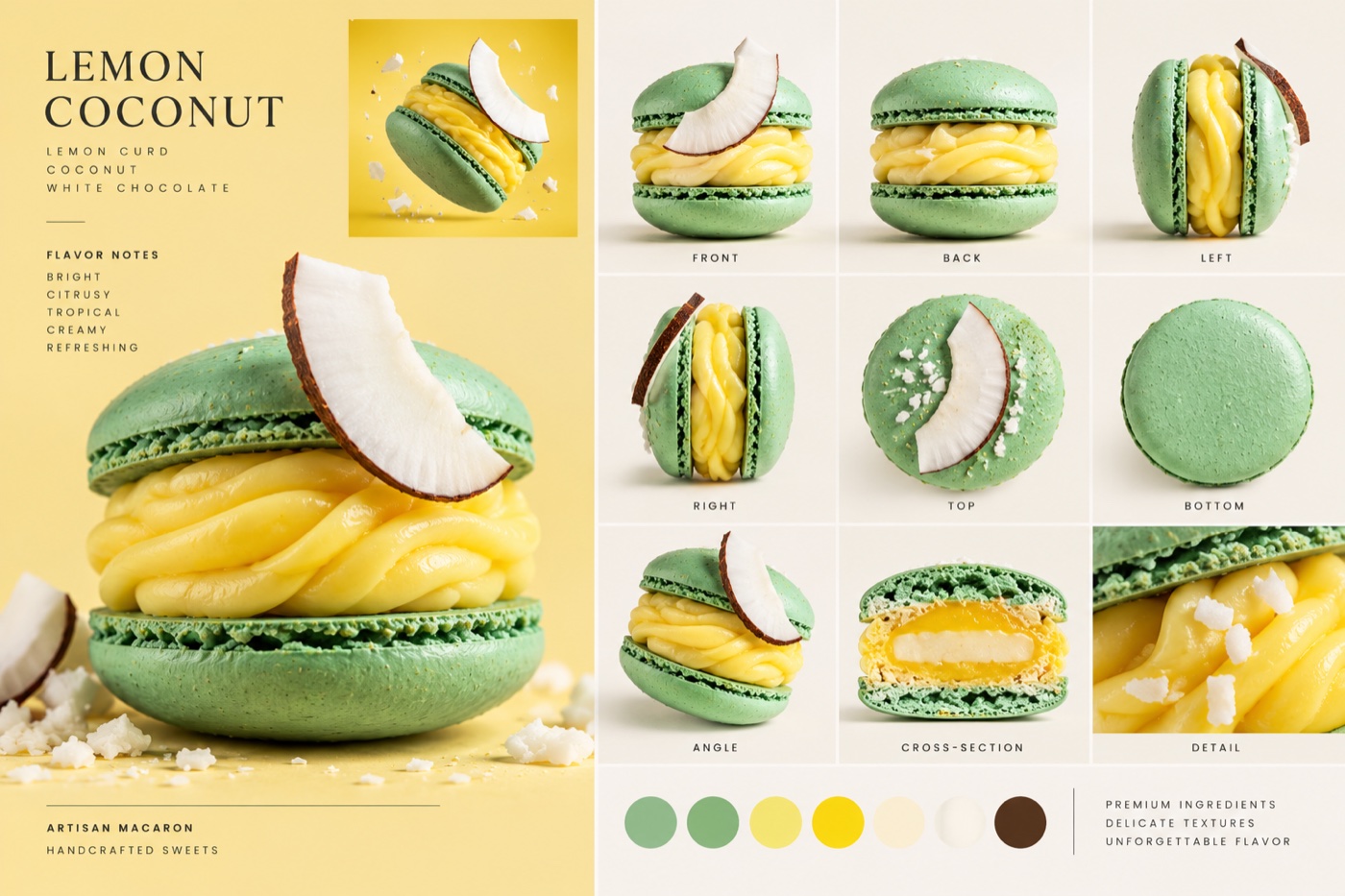
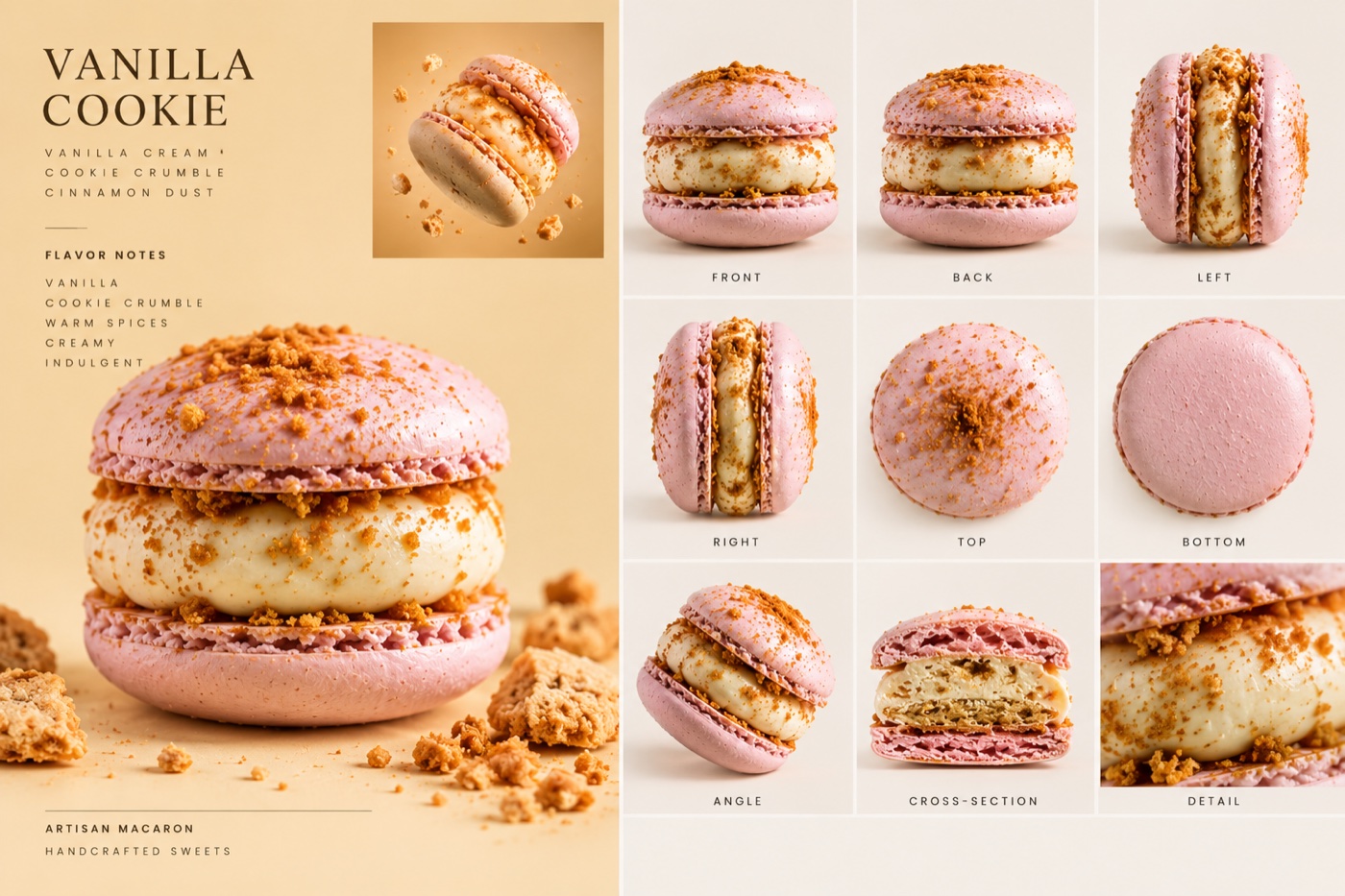
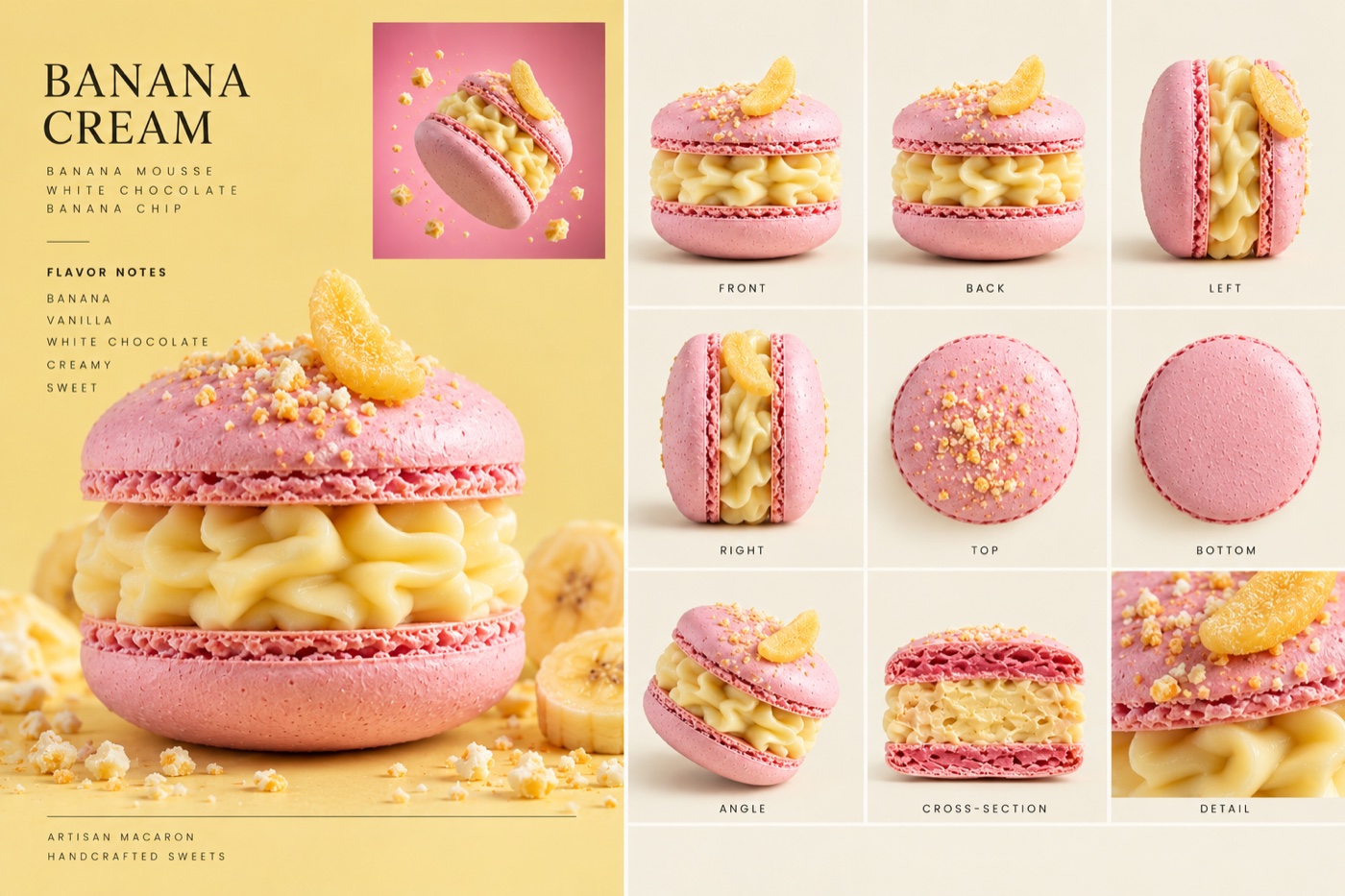
Check each sheet before you go on. The cross-section must match the real product, and the toppings must sit where they sit on the photo. A mistake on the sheet becomes a mistake in the video.
Adapt the video prompt and generate
This is the video prompt we used for the macarons. Each product has a name in
angle brackets, like <Pistachio macaron>, and it is linked to one sheet. The
agent replaces these names with your products. It also changes what drips or
pours onto each one: lemon glaze may become honey, caramel may become melted
cheese.
[LOOK — LOCKED, APPLIES TO EVERY SHOT] ARRI Alexa Mini LF, macro primes — shallow focus fall-off, creamy pastel bokeh, grain-free image. Food-commercial light: soft key, crisp rim light, specular highlights on creams and sauces. Pastel Gloss grade: powder-pink and pistachio-mint hero tones, golden-caramel secondary, dark-chocolate shadows. Motion-control rig, smooth constant-speed moves. Close-miked ASMR food sounds.
[Generation Goal] Luxury macaron commercial ending on a five-tier macaron tower. Seamless pastel studio backdrops.
[Products] <Pistachio macaron> corresponds to @Image 1. <Strawberry macaron> corresponds to @Image 2. <Lemon macaron> corresponds to @Image 3. <Vanilla macaron> corresponds to @Image 4. <Banana macaron> corresponds to @Image 5. Each image is one macaron from many angles. Use only its shells, filling and topper, the same as in the image. Do not use its background, grid layout, lettering or color swatches. Never swap parts between macarons. <Woman>: young woman, nude pearl manicure, natural glossy lips. Only in Stages 1-5.
[Stage 1 | 0-2 s] From the first frame, <Woman>‘s fingertips hold <Pistachio macaron> at an angle. Extreme close-up, 100mm macro, razor-thin focus, slow push in; focus racks from the top shell to the filling. End state: filling sharp, fingers on both shells. Audio: (warm bass synth fades in) <fingertip rustle on the shell>
[Stage 2 | 2-5 s] Same hand and macaron. Probe macro lens: wide bug’s-eye view millimetres from the filling, locked, slow motion. The fingers press the shells together: fine cracks spread along the edges, the dense filling bulges out in thick glossy folds, nut pieces shifting. End state: filling pushed past the edges, shells cracked but whole. Audio: <dry meringue crackle> <wet squish of dense ganache>
[Stage 3 | 5-7 s] Static close-up on <Woman>‘s lips, soft backlight, pastel bokeh. She slowly raises <Strawberry macaron> to her parted lips, inhales and stops a millimetre before biting. End state: macaron at her lips, not touching. Audio: (music drops out, low bass remains) <slow heartbeat> <soft inhale>
[Stage 4 | 7-9 s] Same woman and macaron. Extreme close-up at lip level, locked, extreme slow motion. Her teeth break the top shell; crumbs hang in the air; the filling squeezes out onto her lower lip. End state: a bite missing, glossy cream on her lower lip. Audio: <deep crisp crunch> <wet creamy squish>
[Stage 5 | 9-11 s] Same woman. Static medium close-up on her face. She chews slowly; her eyes close, her head tilts back slightly, a faint smile forms, her tongue tip picks a crumb off her upper lip. End state: eyes closed, soft smile. Audio: <soft blissful “mmm” sigh> (bass groove returns)
[Stage 6 | 11-13 s] <Lemon macaron> alone, cut in half, cross-section to camera. 45° macro, locked, slow motion. One heavy clear golden drop of lemon glaze falls from a glass pipette tip at the top edge of frame and bursts into fine droplets on the curd; coconut flakes drift down around it. End state: glaze glossy on the curd, flakes resting around the macaron. Audio: <springy drip-splash> <rustle of falling flakes>
[Stage 7 | 13-15 s] <Vanilla macaron> alone, floating and slowly turning. Backlit macro, locked, slow motion. Warm speculoos crumbs pour onto it from a small silver scoop at the top edge of frame; some stick in the filling, crumb dust hangs in the backlight. End state: macaron still floating, filling dotted with crumbs. Audio: <fine crackling crumb rain>
[Stage 8 | 15-17 s] <Banana macaron> alone. Extreme close-up on its top, slow push in, slow motion. A thick ribbon of warm amber salted caramel pours from a silver spoon tip at the top edge of frame onto the topper, then runs in unbroken threads into the folds of the filling. End state: caramel in the folds, a thread still hanging from the spoon. Audio: <thick viscous pour> <heavy drips>
[Stage 9 | 17-20 s] A tower on a mirror-glossy pastel-pink surface, top to bottom: <Strawberry macaron>, <Banana macaron>, <Lemon macaron>, <Vanilla macaron>, <Pistachio macaron>. Tiers sit flat and flush, lower toppers hidden between tiers; only the top tier shows its topper. Start close on the top tier. A heavy drop of glossy ruby strawberry sauce falls from a silver spoon tip onto it, spreads over the top shell and runs down tier by tier. Pedestal down: the camera lowers straight down along the tower, following the drip. End state: camera at the base tier, tower reflected in the surface. Audio: <heavy juicy drip> (final deep bass chord). Dialogue language: American English. An off-screen female voice-over whispers: {Unapologetically delicious.} (music fades out)
[Maintain Consistency] Each macaron appears once per shot. Not a hand holding the pipette, scoop or spoon: instead only their tips. Not on-screen text, captions or logos: instead clean text-free frames.
Before the agent generates, read its new version. Every product must still be linked to the right sheet, and the tower in stage 9 must list all five. The whispered line is in curly brackets in stage 9. Change it to your own slogan, and keep it to a few words.
Why it works
The look is locked at the top. The first block sets the camera, the light and the colours once, for every shot. So nine very different close-ups still look like one ad, not nine clips.
Every stage ends with a picture. Each stage says what the frame looks like when it is over. The next stage starts from there, so the cuts feel planned.
The sheet is used for the product only. The prompt tells the model to take the shells, the filling and the topper, and to ignore the background, the grid and the lettering. Without that line, the grid and the text leak into the video.
Only the tip of the spoon. A hand holding the spoon pulls attention off the food and often comes out wrong. The last block asks for the tips only.
Where it goes wrong
| What you got | The fix |
|---|---|
| The agent made the video straight away | Tell it again: product sheets first, then the video. Ask it to wait for your OK after the sheets |
| The filling is different inside the product | Regenerate that sheet. The cross-section panel must match the real product |
| Two products swapped toppings | Check that each name is linked to the right sheet. Keep “Never swap parts” |
| Grid lines or text from the sheet in the video | Keep “Do not use its background, grid layout, lettering or color swatches” |
| A full hand holds the spoon | Keep the last block: only the tips of the pipette, scoop and spoon |
| Captions or a logo on screen | Keep “clean text-free frames” |
| The tower has the wrong order | Check the list in stage 9 against your products |
Ready? Open Creatify, upload your products and start with the sheets.
Why this workflow runs here
Built around a product link
Avatars are ready made
Free plan to try it
Make yours in the next 30 min
You have the whole prompt and every setting. The only thing left is an account, and that takes a minute.
- Free to start
- Prompts ready to paste
- Upgrade only if you want more
Referral link — if you subscribe I earn a commission, at no extra cost to you. More on that.