How to Make a Weird AI Influencer That Dances
Build a strange AI character in ImagineArt's AI Influencer tab, make it dance to a trending preset, and start the Instagram account. Screenshots for every step.
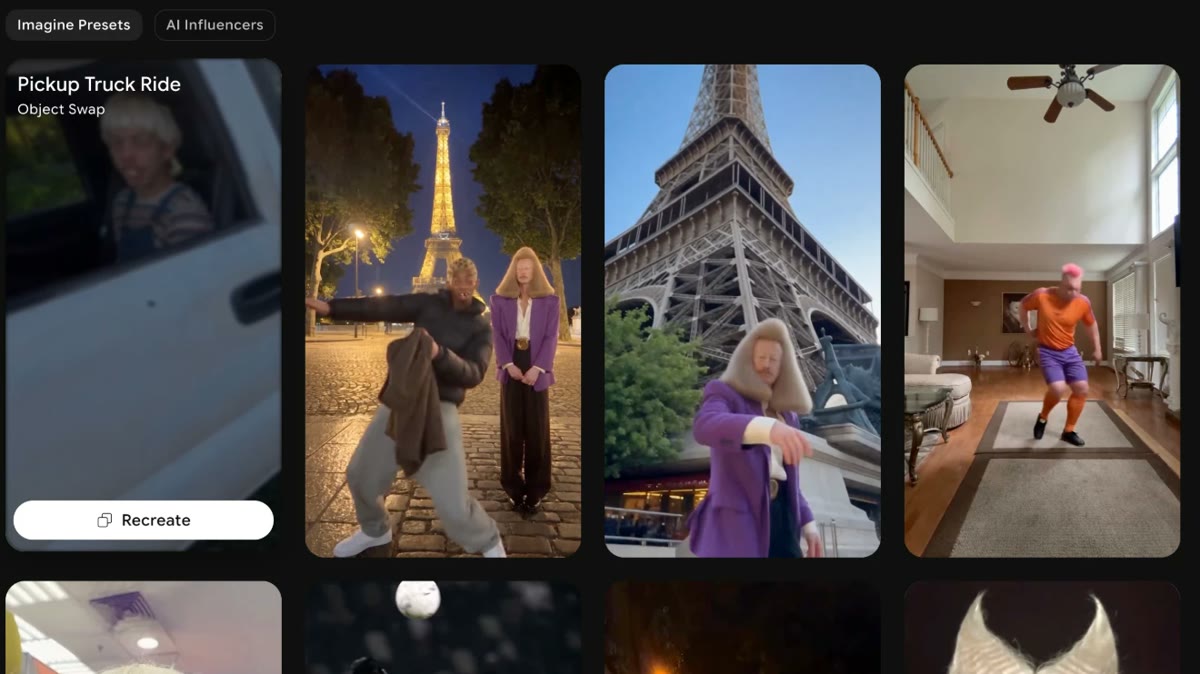
Have it running in three steps
- 1
- 2Open ImagineArt
- 3Paste it and generate
What you'll need
20 min- ImagineArt

You have seen them in your feed. A man with a tower of blond hair. A guy with a frog face. A bodybuilder in a baroque wig. They dance to a song that is trending this week, and that is the whole video.
These are AI influencers. Nobody filmed them. Some of these accounts get millions of views on a single dance.
The formula has two parts. A face you cannot stop looking at, and a song you already know. The face makes people stop scrolling. The song makes them stay, because they know the moves are coming. The stranger the character, the more people comment, and comments push the video to more people.
You can build the same kind of character in ImagineArt+200 free credits. It has a whole tab for it, called AI Influencer. You pick the face and the body from lists, then pick a dance from ready presets. You do not need to write a prompt.
The whole process
- Open AI Influencer in ImagineArt.
- Pick a Character type. Frog, cat, insect or a human face.
- Pick a Build. Slim, heavy, ultra muscular or centaur.
- Pick the hairstyle and the eyes, then generate.
- Open the Motion tab and pick a dance preset.
- Add your character and generate the video.
- Post it on Instagram with a trending song.
What you pick, and what it does
| Setting | Options | Why it matters |
|---|---|---|
| Character type | 9 | The face. This is what stops the scroll. |
| Build | 7 | The body. Centaur and ultra muscular make the dance look strange. |
| Hairstyle | 31 | The thing people remember. Big hair reads well on a small screen. |
| Eye shape | 11 | Small, but it makes the face feel off in a good way. |
| Dance preset | many | The moves and the setting. Pick one that fits a trending song. |
Open AI Influencer
Click the ImagineArt button on this page and sign up. In the menu on the left, under Tools, click AI Influencer.
You see two tabs at the top of the panel: Create Influencer and Motion. Start with Create Influencer. Below it is a long list of settings. Each one opens when you click it.
On the right are examples other people made. Scroll them for ideas first.
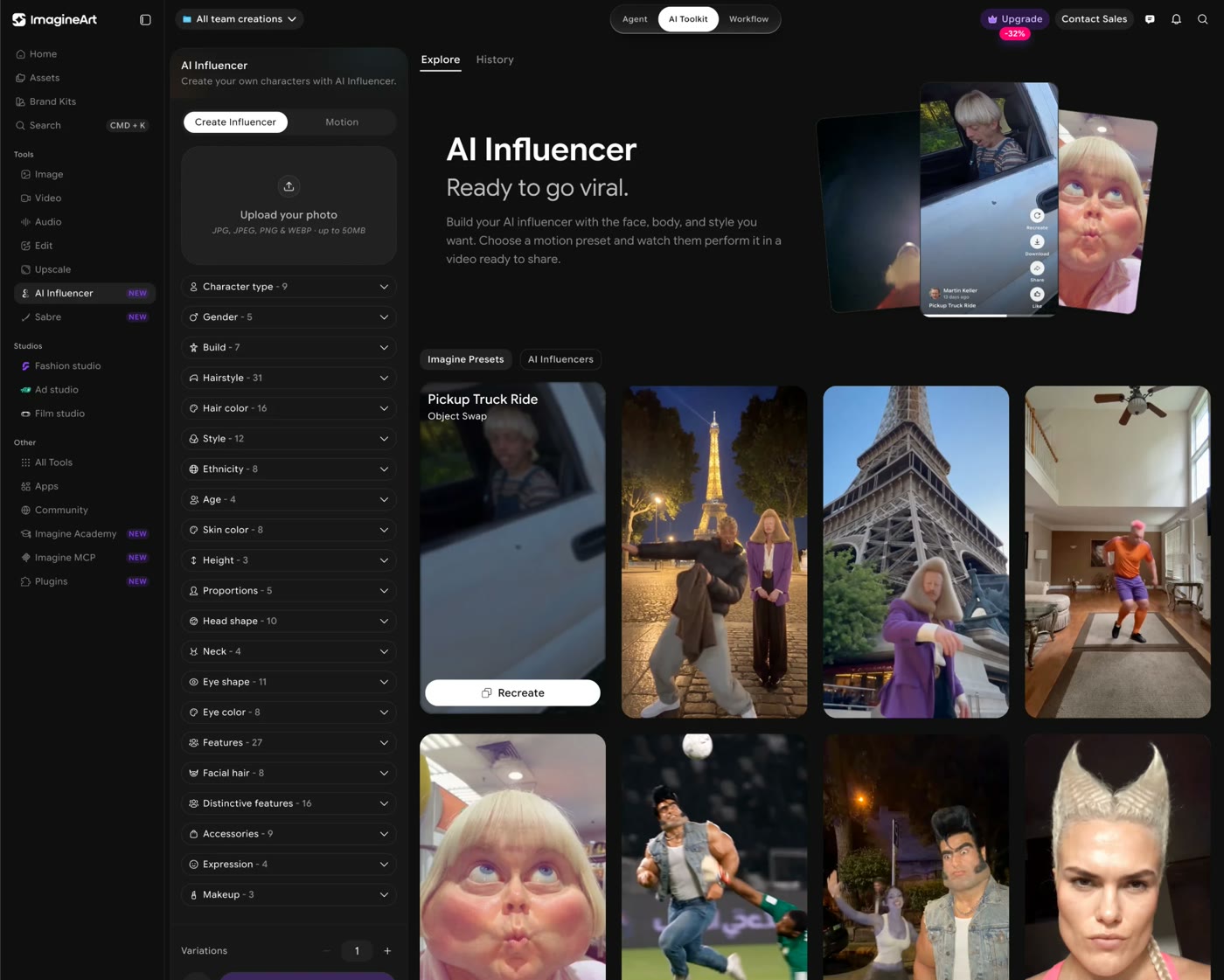
Pick a character type
Open Character type. There are nine. Average, Bold and Extreme are human faces. Insect, Frog, Cat, Dog, Rodent and Bird are animal heads on a human body.
For this trend, go weird. Extreme or an animal head works better than Average. Then open Gender and pick one.
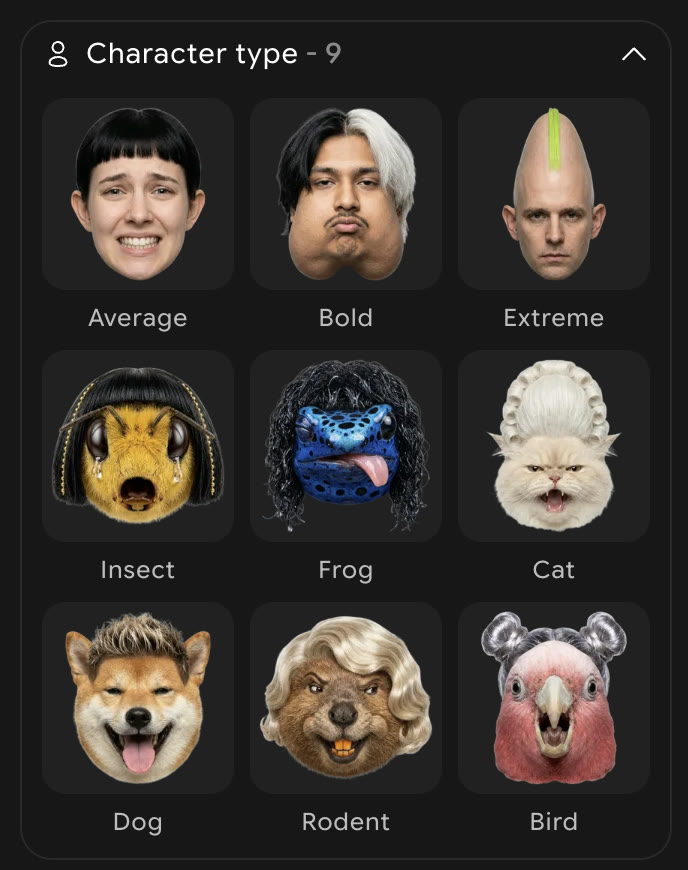
You can also upload a photo at the top of the panel instead. Use only a photo of yourself, or of someone who said yes.
Pick a build
Open Build. There are seven: Slim, Athletic, Muscular, Curvy, Heavy, Ultra muscular and Centaur.
The body is half the joke. A frog head on an ultra muscular body is funnier than a frog head on an average one. A centaur dancing in a kitchen is hard to scroll past.
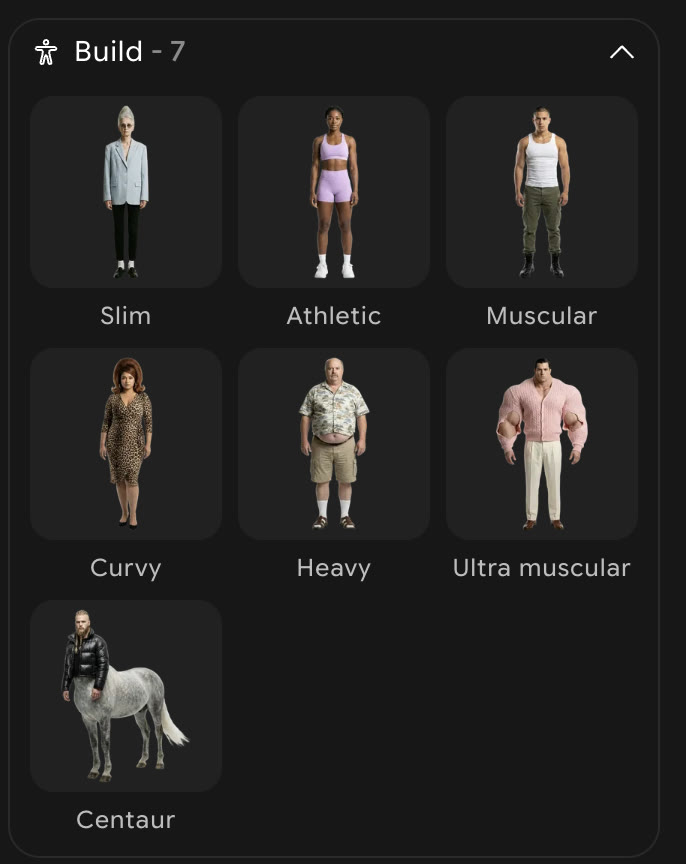
Pick the hair and the eyes, then generate
Open Hairstyle. There are 31. Pick something people will remember. A tall or very big hairstyle shows well on a phone screen. Set Hair color too.
Then open Eye shape. Uneven, Huge or Close-set make the face feel a little wrong, which is the point.
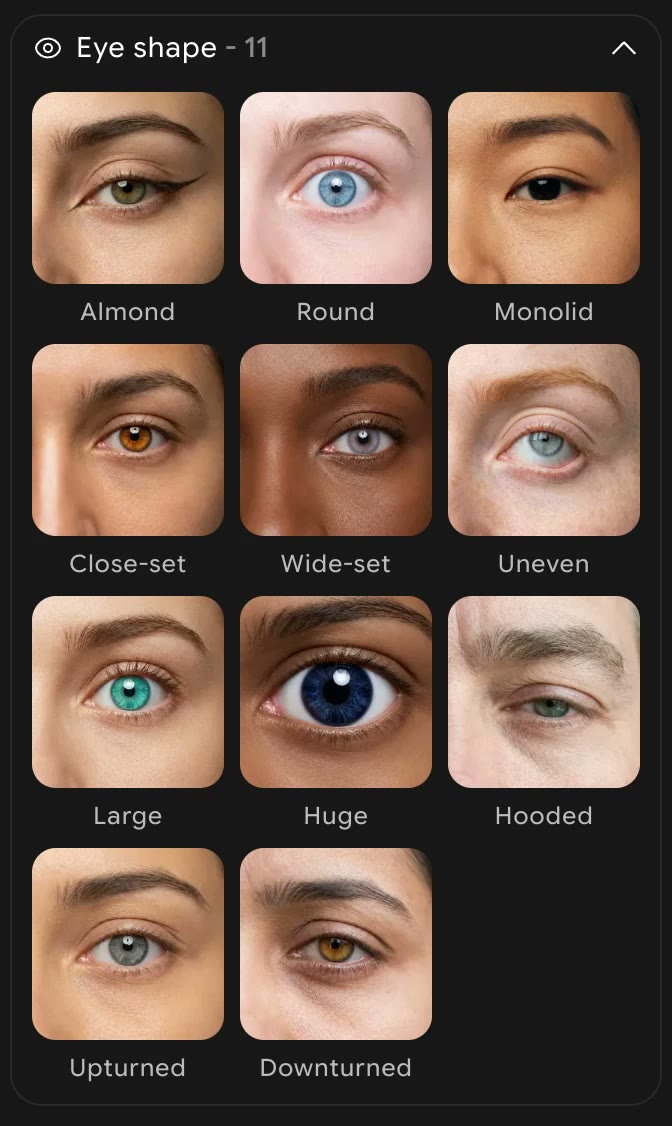
The other lists are optional. Features, Distinctive features and Accessories are good places to add one odd detail. Do not change everything. One or two strange things look funnier than ten.
At the bottom of the panel, set Variations to 2 or 3 and click the generate button. Pick the image you like most and download it. This is your character now. Keep this file, because you will use it in every video.
Pick a dance preset
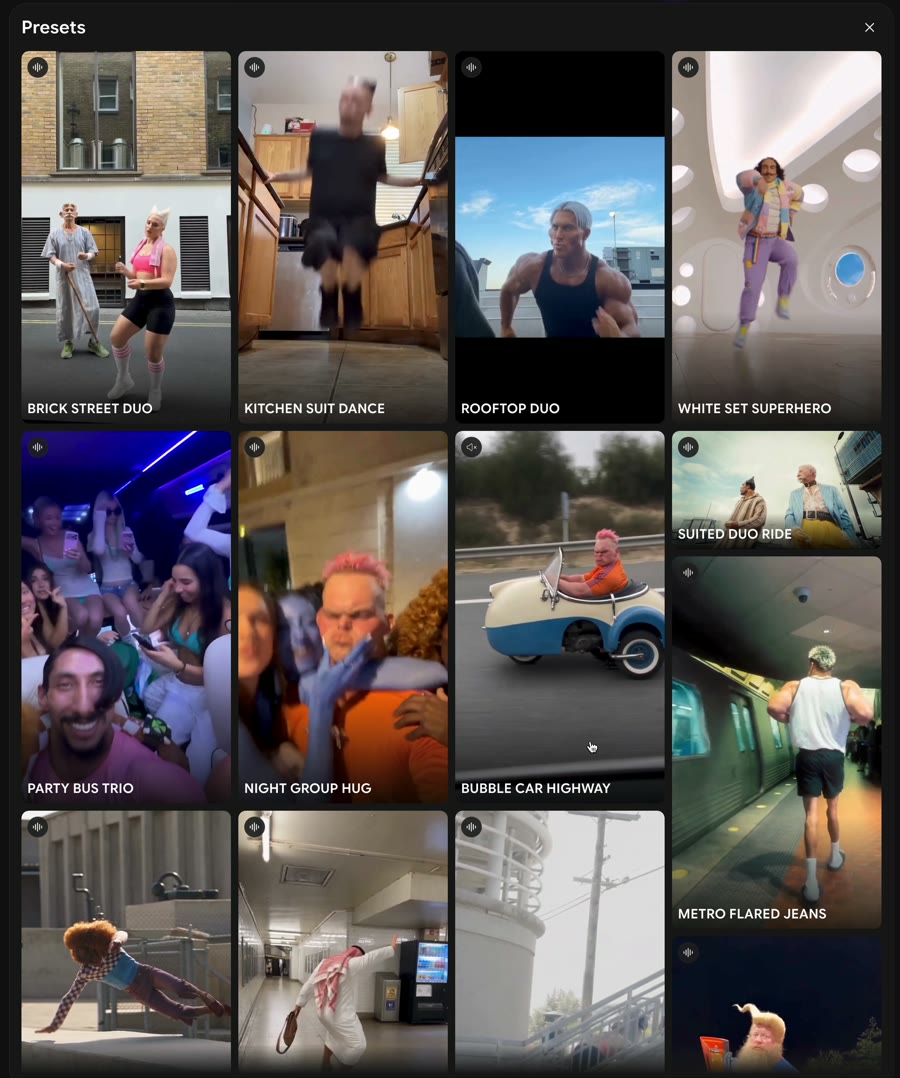
Switch to the Motion tab at the top of the panel. Click Change on the preset at the top. A wall of presets opens: street dances, kitchen dances, duos, car rides.
Hover over a preset to watch it. Pick one where the moves are clear and the whole body is in view. Dances you can recognise work best, because they match the songs people already know.
Add your character and generate
Under the preset, click the box that says Add your characters, products, or clothes and upload the character image from step 4.
The Prompt box is optional. Leave it empty for the first try. If you want a different place, write one short line, for example “same moves, new location: a supermarket at night”.
Keep Quality on 1080p and click generate. When the video is ready, download it.
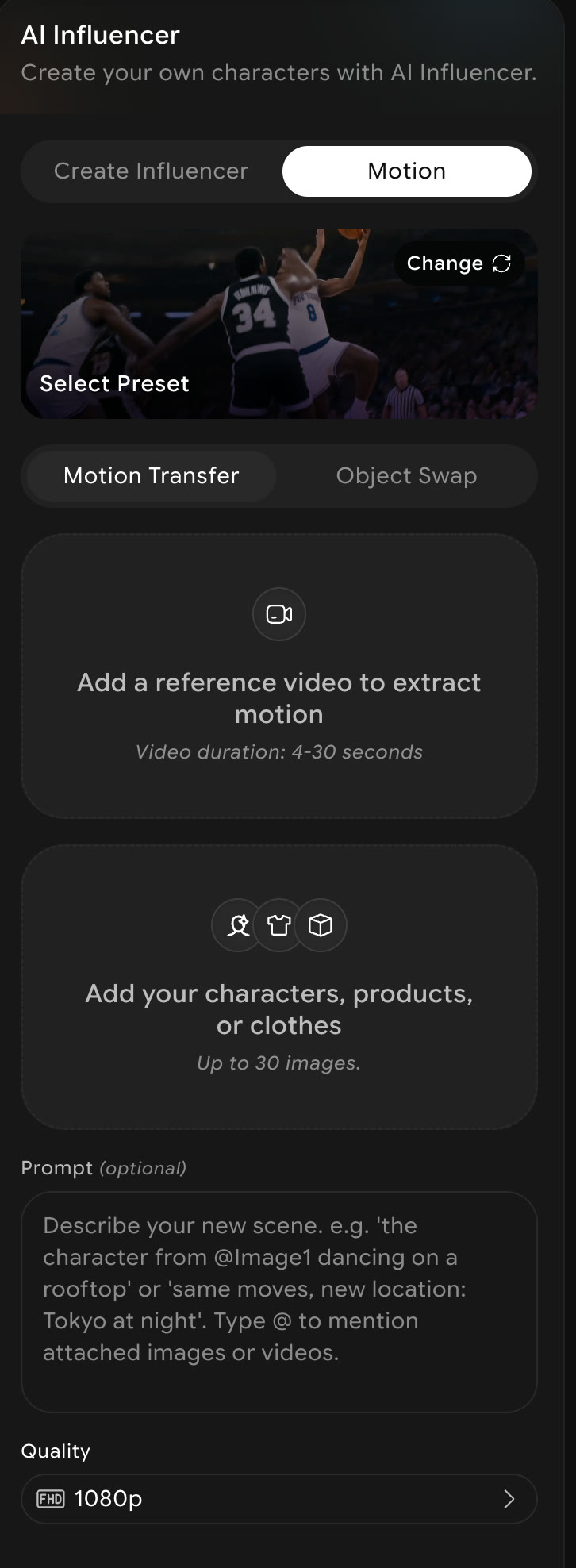
Want a dance that is not in the list? Under Motion Transfer you can add your own video, 4 to 30 seconds long. The character copies the moves from it. Only use a clip you filmed yourself or have the right to use.
Starting the Instagram account
The video is the easy part. The account is what takes time. Here is what helps.
Make a new account for the character
Do not post him on your personal page. Give him a name and a short bio. Use the character image as the profile photo.
Add the song inside Instagram
When you upload the reel, tap the music button and add a trending song from Instagram’s own library. A song with a small arrow next to it is trending. Sound added this way links your reel to that song’s page, where people browse more videos with it. Turn the original sound of the video down or off.
Post often, and keep the same rhythm
One reel a day is a good start. New accounts need a lot of posts before Instagram knows who to show them to. Make several videos in one sitting so you never miss a day.
Keep the character the same
Same image, every time. Change the dance, the place and the song. Never the face.
Make the first second count
The character should be on screen and moving from the first frame. No intro, no text card.
Read the comments
People will tell you what is funny about him. Reply in his voice. Use the best comments as ideas for the next video.
Use Instagram’s AI label
When you post, turn on the AI label. It is the honest thing to do. The whole joke is that he is not real.
How these accounts make money
Instagram does not pay you for views. There was a bonus for Reels, but it closed to new creators in March 2023. The bonuses Meta has run since then are invite-only. So a million views on Instagram earns nothing by itself.
The money comes from where the views send people. Here is what these accounts use.
The link in the bio
This is the main one. Many weird-influencer accounts sell a tutorial or a course on making the same videos. The bio says something like “learn how to make videos like these” and links to it. People who watch a strange dancing character often want to know how it was made.
Affiliate links
You can link to the tool you used and earn a commission when someone signs up. This page does exactly that: the ImagineArt links here are my referral links.
Digital products and brand deals
Some accounts sell templates, prompt packs or character packs. Brand deals come later, once an account is big enough for a brand to notice.
Pay-per-view apps
Some apps pay creators per view on videos they post for a campaign. Two you may hear about:
- Launchpoint. A phone app (the link opens the iPhone download). Brands post briefs in it. You apply, make the video, post it on TikTok, YouTube or Instagram and submit it through the app. Its App Store listing says you get a set rate for the video plus money per view, paid out to PayPal or Venmo. Read each brief, because the brand decides what it wants on camera. Also read the terms on who owns the video after you submit it. When you sign up, use my code ROBERTQBYDES for a sign-up bonus. Referral code. If you sign up with it, I may get a reward too, at no extra cost to you. More on that.
- Whop Content Rewards. A campaign owner sets a rate per 1,000 views and a budget. You post a video that follows the brief and submit it. You are paid only for views on approved videos, up to a cap, and only until the budget runs out. Whop gives about $1 per 1,000 views as an average. That is their own estimate, and rates change from campaign to campaign. Joining is free. If a “campaign” asks you to pay to join, it is a scam.
These apps pay for views on one campaign, not for your account. Treat them as a side option, not the plan.
When it goes wrong
| What you see | What to do |
|---|---|
| The character looks too normal | Go back to step 2. Pick Extreme or an animal head, and add one distinctive feature. |
| The face changes between videos | Always upload the same saved image from step 4. Do not make a new character each time. |
| The dance looks messy | Pick a preset where the whole body is in view and the background is simple. |
| The video is in the wrong place | Write one short line in the Prompt box, e.g. “same moves, new location: a beach”. |
| The reel gets no views | Add the song from Instagram’s library, not baked into the video, and keep posting every day. |
Good to know
- Do I need to write a prompt? No. The settings and the presets do the work. The prompt box is only for changing the place.
- Can I make myself the influencer? Yes. Upload your own photo at the top of the Create Influencer tab.
- Can I use a photo of a friend or a celebrity? Only a friend, and only with their permission. Never a celebrity.
- Is it free? You can sign up for free. Through my link you get 200 free credits, plus 55 a day on the free plan. Each generation shows its credit cost before you click.
- Which song should I use? Whatever is trending on Instagram this week. Check the music library when you upload.
ImagineArt is a partner of this site. The link tells them you came from here. You pay nothing extra.
Why this workflow runs here
Everything in one place
Free to start
Minutes, not days
Make yours in the next 20 min
You have the whole prompt and every setting. The only thing left is an account, and that takes a minute.
- 200 free credits on sign-up
- Prompts ready to paste
- Upgrade only if you want more
Referral link — if you subscribe I earn a commission, at no extra cost to you. More on that.